
MotionMuse AI pulled off something remarkable. It launched in April 2025 and was clocking over 16 million monthly visits by January 2026, purely on the strength of one simple promise: upload a photo, get a moving clip, no editing skills required.
I have used it, I understand the appeal, and I also understand exactly why so many people type its name into Google followed by the word alternatives. Because the moment your ambitions grow past a six-second animated photo, the walls of the app become very visible. So I spent a week running the same test images through every serious image-to-video generator on the market, and this is my honest map of where to go next.
Before recommending anything, it helps to be precise about the problem. MotionMuse is genuinely good at its narrow job. The onboarding takes under ten minutes, the preset library refreshes daily, and the custom prompt field responds well to specific instructions like a slow leftward pan with mild fog drift. None of that is the issue. The issue is everything around it.
Each of the seven tools below fixes at least two of those problems. Several fix all five. Keep those five complaints in mind as we go, because they are the thread connecting every recommendation that follows.
Loose comparisons are how bad recommendations happen, so I kept the method boring and strict. One portrait photo, one product shot, and one landscape went into every tool with the same motion brief and the same retry budget of three attempts per shot. I scored each output on motion quality, how faithfully it preserved the source image, artifacts, queue time, and the metric that actually decides whether a tool survives in your workflow, which is cost per usable clip after retries. A generator that nails one clip in three attempts is twice as expensive as its price sheet claims, and only testing exposes that.
If you want one answer and no reading, it is Kling. The current 3.0 model handles high-motion scenes better than anything else near its price, keeps faces and products consistent between frames, and supports multi-shot sequences that turn a single image into an actual scene rather than a wiggling photograph. It even does lip-sync in six languages, which is a different universe from anything MotionMuse attempts.
The economics seal it. Kling works out to roughly seven cents per second of generated video, which independent testing puts at 65 percent cheaper than Sora and 44 percent cheaper than Runway. The free tier gives you 10 credits every single day, enough for one to two watermarked test clips daily, which is the most generous ongoing free allowance in the category. MotionMuse's 20 starter credits are a one-time welcome gift by comparison. Paid plans start around ten dollars a month.
The honest caveat is that free-tier output is 480p and watermarked, and the interface has grown busier as features piled up. Neither changed my verdict. For social creators, marketers, and anyone animating photos at volume, Kling is where I would move first.

Runway is the tool I reach for when the shot in my head is specific. Gen-4.5 gives you genuine camera direction, so a slow dolly-in or an orbit around a product happens because you specified it, not because the model felt like it. The generative editing suite around the generator, covering inpainting, expansion, and restyling, makes it the closest thing this category has to a professional post-production environment. Multi-shot support stretches output up to 60 seconds, ten times MotionMuse's ceiling.
You pay for that control twice. Once in money, since generation runs around 15 to 20 cents per second and paid plans start at twelve dollars a month, and once in learning curve, because Runway rewards people who invest time in it and mildly punishes people who want one-click results. The free tier of 125 credits a month covers roughly five clips, enough to know whether the workflow suits you. If your work is client deliverables, ads, or anything where a shot has to match a brief, this is the pick, and everyone else will find Kling friendlier.
If what you actually love about MotionMuse is the simplicity, upload, click, download, then Luma Dream Machine is the alternative that will feel like home. It produces fast, cinematic five-second clips with unusually good depth handling, which makes it shine on exactly the material MotionMuse users feed it: landscapes, interiors, and product scenes where a sense of physical space sells the shot.
The free tier offers 30 generations a month, and the quality of those generations is high enough that reviewers argue they are worth more than bigger allowances elsewhere. Paid access starts around ten dollars monthly, and at Pro-tier volume the effective cost drops to roughly seven and a half cents per video, which is startling value. The clip length matches MotionMuse's weakness rather than fixing it, so treat Luma as a quality upgrade and a pricing upgrade, not a duration upgrade.
Hailuo has one differentiator nobody else on this list can claim, native 4K output. If your clips end up on large screens, in presentations, or anywhere resolution is scrutinised, that single spec decides the comparison, because everyone else tops out lower and upscales. Beyond the pixels, Hailuo's motion has a creative, expressive quality that handles unusual prompts well, and its ten-second clips carry a surprisingly strong narrative frame.
At $9.99 a month for entry, with per-clip costs around 28 cents flat, it sits comfortably in the value tier, and there is a workable free tier for testing. The trade-off is polish elsewhere: the interface is more utilitarian than Luma or Pika, and it lacks Runway's editing depth. I think of Hailuo as the specialist you hire when resolution or expressive motion is the whole job.

Pika 2.5 is what happens when a video model is designed around publishing daily rather than crafting occasionally. Generation is fast, the stylized effects library is the most fun in the category, and the outputs have a feed-native rhythm that performs on Reels, TikTok, and Shorts without fighting the format. Clips run to ten seconds, comfortably past MotionMuse's cap.
The free plan is quietly one of the best on the market, 150 credits a month, roughly fifteen short clips, and most outputs carry no watermark, which makes it the best zero-cost MotionMuse replacement for casual creators full stop. Paid plans start around ten dollars. Where Pika loses is realism, since it leans stylized by design, and precision, since you steer it loosely rather than direct it. For daily social content, neither matters much.

Veo 3.1 is currently the strongest all-around model in AI video, and it fixes MotionMuse's most fundamental gap by generating native audio, both ambient sound and dialogue, alongside the picture. Its realism on marketing-style concepts and its image-to-video fidelity are the benchmark the rest of the market chases, and its physics handling embarrasses smaller models on things like water, fabric, and hair.
Access runs through Google's AI subscriptions rather than a standalone app, which makes pricing feel less transparent than a simple credit sheet, and generation allowances on the base plans are tight for heavy users. My advice is unglamorous: if you already pay for Google's AI tier, Veo may be the best generator you technically own without realising it. Check before you subscribe to anything else on this list.
Sora 2 generates up to 20 seconds of video with fully native audio, meaning dialogue, sound effects, and music arrive in one pass, and its sense of visual mood is arguably the most polished in the industry. For narrative concepting, mood pieces, and cinematic experiments, it is a genuine leap over everything MotionMuse can express.
The catch is the front door. There is no true free tier, access requires a ChatGPT Plus subscription at twenty dollars a month, and that makes Sora the most expensive entry point in this article. If you live inside ChatGPT already, the marginal cost is zero and the recommendation is easy. If you would be subscribing purely for video, Kling and Veo deliver more generation for less money.
| Tool | Best for | Free tier | Entry price | Standout feature |
| Kling AI | Best overall replacement | 10 credits/day, 480p | ~$10/mo | Multi-shot, ~$0.07/sec cost |
| Runway | Directed, professional shots | 125 credits/mo (~5 clips) | $12/mo | Camera control, 60s multi-shot |
| Luma Dream Machine | Simple cinematic clips | 30 generations/mo | ~$10/mo | Depth handling, low per-clip cost |
| Hailuo (MiniMax) | High-resolution output | Limited free testing | $9.99/mo | Only native 4K in category |
| Pika | Daily social content | 150 credits/mo, mostly unwatermarked | ~$10/mo | Stylized effects, speed |
| Google Veo 3.1 | Maximum realism plus audio | Via Google AI plans | Bundled | Native ambient and dialogue audio |
| Sora 2 | Narrative and mood pieces | None | $20/mo (ChatGPT Plus) | 20s clips with full native audio |
Table 1. The seven alternatives at a glance, with free allowances and entry pricing verified against current listings in July 2026.
Three data points did most of the deciding in my testing, so they deserve to be seen rather than described. The first is clip length, because it defines what a tool can even attempt.
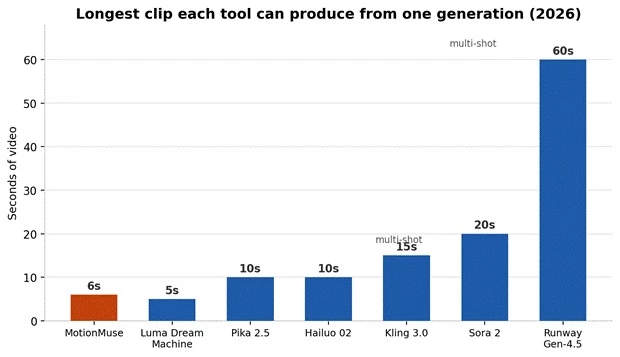
Figure 1. Maximum clip length per generation. MotionMuse's 6-second ceiling is the shortest in the field, and Runway's multi-shot mode extends a full ten times further.
The second is what you get without paying. Free allowances vary wildly, and the structure matters as much as the number, because MotionMuse's starter credits arrive once and never refresh, while Kling's allowance renews every morning.
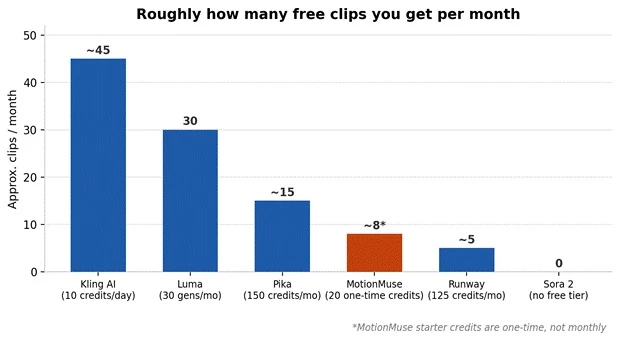
Figure 2. Approximate free clips per month across the field. Kling's daily refresh compounds into the most generous ongoing allowance, while Sora offers no free path at all.
The third is the cost of committing. Entry pricing clusters tightly around ten dollars, which tells you the real differences live in what each subscription buys rather than what it costs.
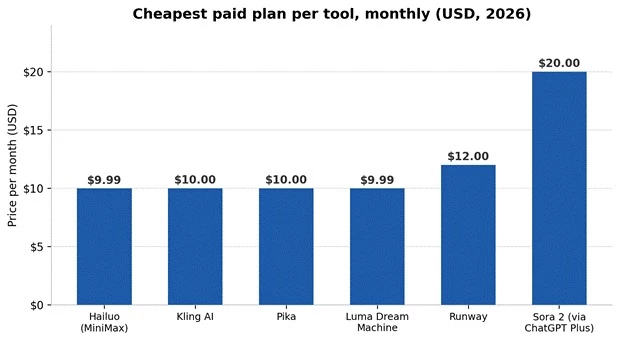
Figure 3. Cheapest paid plan per tool. With five of seven tools within two dollars of each other, capability per credit matters far more than sticker price.
Rankings are tidy, but nobody studies in a ranking. Here is how I would choose based on the situations I hear about most often.
The pattern across every test was consistent. MotionMuse is a good on-ramp and a limiting destination. Kling replaced it as my default within two days, because it beat MotionMuse on motion quality, clip length, free allowance, and cost per usable clip simultaneously, which is four of the five complaints solved by a single switch. Runway earned a permanent slot for directed work, and Pika earned one for anything going straight to a feed.
My honest recommendation is to spend one afternoon and zero rupees proving this to yourself. Take your three most typical images, run them through Kling, Luma, and Pika on their free tiers, and compare the outputs against what MotionMuse gives you for the same shots. The gap will make the decision for you, and you will have spent nothing to learn it.
Share your thoughts about this article.
Be the first to post a comment!

The same tool can be a 4.7 on one site and a 3.9 on another. Here is what is rea...
Nitin1 month ago

Here is the number worth pinning above your budget: in Gartner Digital Markets r...
Deepak Mehra1 month ago

What Artlist AI is in 2026Artlist began as a royalty-free music library. By 2026...
Deepak Mehra2 months ago

Most AI tool failures do not announce themselves. There is no crash, no angry em...
Nitin2 months ago

The best AI image generator in 2026 is Nano Banana 2 for speed, FLUX.2 for photo...
Parveen Verma2 months ago

“Useful” is a slippery word for a coding assistant. A tool can be brilliant at o...
Sakshi Dhingra2 months ago