
I did not set out to write a warning. I set out to find a cheap, fast tool that would unblur some old photographs and cartoonise a few headshots, and MyImg AI kept turning up. Then I started reading the reviews properly, and the search changed shape entirely.
So instead of comparing flashy marketing pages, I focused on the things that matter after you sign up: transparent pricing, responsive customer support, privacy, reliability, and whether the company stands behind its product when something goes wrong. After spending days researching the market, these are the five MyImg AI alternatives that I believe deliver a far better overall experience, and why I would choose them instead.
I had a rule while I tested these. Every tool on this list had to publish who it is, what it does with my uploads, and what I get for my money before I spent any. That single filter eliminated most of the “free AI image tool” category, which tells you something about the category.
I also want to name the trade-off honestly rather than pretend it does not exist. None of these will remove clothing from a photograph. If that is the feature you came for, none of this list replaces it, and I am not going to help you find one that does. What these five do is everything else MyImg AI advertises, done better, by companies you can send a letter to.
Here is the whole comparison at a glance, then I will take each one properly.
| Tool | Rating & reviews | Free tier | Entry paid | Where it wins | Where it loses |
| Canva | 4.7/5 (7,529 G2) | ~50 credits/mo | $14.99/mo Pro | Finished assets, not just images | Image quality is ~70–80% of a specialist |
| Adobe Firefly | 4.4/5 (335 G2) | 25 credits/mo | $9.99/mo Standard | Licensed training data, IP indemnity | Free tier watermarked, no commercial use |
| Leonardo.Ai | 4.5/5 G2 · 4.4–4.6 Trustpilot (1,300+) | 150 tokens/day | $12/mo Apprentice | Custom model training, best free tier | Free-tier images are public |
| Ideogram | No meaningful G2 volume | 10 slow credits/wk | $15/mo Plus (annual) | Text inside images that actually reads | Credits expire monthly, free output public |
| Recraft | 4.7/5 G2 | 50 credits/day | ~$12/mo Basic | True vector output, brand kits | Narrower than a general generator |
Table 1: All five at a glance. Ratings and pricing retrieved July 2026. Every figure here is verifiable on the vendor’s own pricing page, which is a sentence I could not write about MyImg AI.
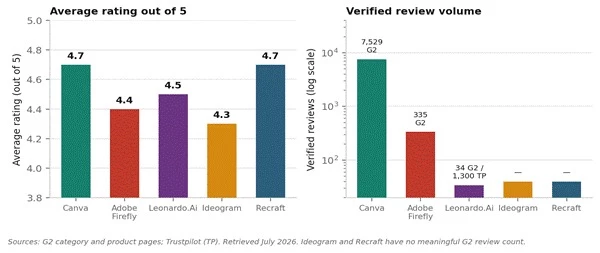
Ratings on the left, review volume on the right, on a log scale. This is why I put both charts side by side. Canva’s 4.7 is carried by 7,529 verified reviews. Leonardo’s 4.5 rests on 34 on G2, though its Trustpilot file runs past 1,300. A score without volume underneath it is an opinion, not evidence.
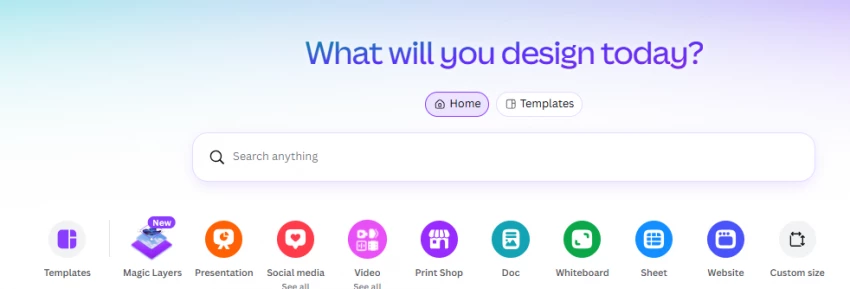
I will start with the boring answer because it turned out to be the right one for most of what I was doing. Canva is not the best image generator on this list. It is the tool where I finished the most work.
The scale is genuinely hard to argue with. Canva ended 2025 with more than 265 million monthly active users and over 31 million of them paying, on roughly $4 billion in annual recurring revenue, at a valuation near $42 billion from a 2025 secondary share sale. Around 95% of Fortune 500 companies use it. Its Magic Studio AI tools are used about 800 million times a month, up roughly 700% year over year.
Magic Media / Dream Lab generates images from a text prompt and drops them straight into the design you are already building, so there is no download-reformat-reupload loop between having an idea and having a finished post.
The honest assessment I found, and which matches my own experience, is that Canva AI is roughly 70 to 80 percent as good as each category leader at that leader’s speciality, but it bundles everything into one workspace at a fraction of the combined cost. If you are producing volume at decent quality, that trade works. If image quality is the single thing you are optimising, it does not.
Pro is $14.99 a month and includes full commercial licensing. There is a free tier, and I need to be straight about it: roughly 50 credits a month is a trial, not a plan. You can exhaust it in one session. Canva raised Pro from $10 to $15 in late 2024, a 50% jump, which is worth knowing if you are budgeting on old numbers. Since March 2026 there is at least a real-time credit tracker in the app, which is more than most of this category offers.
You produce social posts, decks, or marketing assets on a schedule, you are not a designer, and you would rather ship twenty good-enough things than one perfect thing. If that is you, stop reading here and go get it. The other four are for people with a specific problem Canva does not solve.
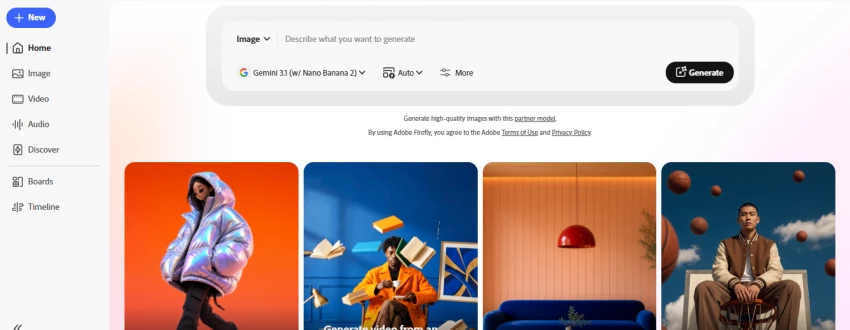
Firefly is the only major AI image generator trained exclusively on licensed content, specifically Adobe Stock, openly licensed material, and public domain work, rather than scraped web images. Because Adobe controls that training data, it can offer something nobody else on this list will: a commercial indemnity commitment, meaning Adobe will defend and indemnify qualifying enterprise customers against IP claims relating to Firefly-generated content.
Sit with the difference for a second. Leonardo grants you commercial usage rights on paid plans, but that is a licence grant from Leonardo, not a promise to defend you. If a generated image gets challenged on IP grounds, you carry the legal responsibility. Firefly is the one where somebody else picks up the phone. The practical risk of an IP claim is currently low, since no major suit over AI-generated images has succeeded as of early 2026, but low is not zero, and for client work the difference between low and zero is the whole point.
Adobe restructured this and the new shape is better than people give it credit for. Every paid plan includes unlimited standard generations. Text-to-image, Generative Fill, vector creation, text effects, generative recolor, all unlimited, no credits deducted. Credits are only consumed by premium features: video generation, audio translation, lip sync, high-resolution output, and partner models from Google, OpenAI, ElevenLabs, and Topaz.
| Plan | Price / month | Premium credits | What you also get |
| Free | $0 | 25 | Watermarked output. Not licensed for commercial use. |
| Standard | $9.99 | 2,000 | Unlimited standard generations. ~20 five-second video clips. |
| Pro | $19.99 | 4,000 | Adds Photoshop on web and mobile, Express Premium, ~40 clips. |
| Premium | $199.99 | 50,000 | Studio volume. Only worth it if you are replacing outsourced production. |
Table 2: Firefly plans as published July 2026. Credits do not roll over. Fast mode costs double. Verify current terms before you buy, because Adobe has changed this lineup more than once.
Two traps worth flagging. First, credits reset monthly and do not roll over, so buying a bigger plan just in case wastes money in slow months. Second, and this is the one that catches people: if you already pay for Creative Cloud Pro, it includes 4,000 monthly generative credits already, which is identical to standalone Firefly Pro. You would be buying the same thing twice. Check what your existing Adobe plan includes before you add anything, because new subscribers on most single-app and Photography plans get only 25 monthly credits, and that gap is enormous.
The free tier deserves its own warning. It is 25 credits, the output is watermarked, and it is not licensed for commercial use. It is a taste test, nothing more.
You are doing client work, or anything that gets published under a brand that could be sued. The $9.99 Standard tier is the cheapest legally-defensible AI image generation you can buy. If you are not already in the Adobe ecosystem and you are not worried about IP, honestly, Midjourney produces better-looking pictures for similar money.

Leonardo is where I would send anyone who liked MyImg AI’s “generous free plan” framing and wants that without the rest of it. 150 tokens a day, refreshing every 24 hours, with commercial usage rights on generated content. Compare that to Midjourney, which has no free tier at all.
The company is real and you can look it up, which is the entire point of this exercise. Founded in Sydney in December 2022 by JJ Fiasson and co-founders, it raised A$47 million in Series A in October 2023 from Blackbird Ventures, Samsung NEXT, and others, grew past 29 million users by the end of 2024, and was acquired by Canva in July 2024 in a deal reported above US$320 million. By early 2026 it reported serving more than 30 million registered users who had generated over 2 billion images. Its registered address is a suite on High Street in North Sydney. That is a company you can serve papers on.
An analysis of 100 Leonardo Trustpilot reviews found 90% positive, which is good but not remarkable. What is remarkable is the composition: 77 of those 100 reviews specifically name a customer support agent. One agent, Mark G., appears in 29 of them. Another, Fin, in 23.
I accidentally paid for a yearly sub instead of monthly and I reached out to customer support and they helped me get a full refund right away. — A Leonardo.Ai customer, Trustpilot
Two catches you must know before you sign up. Free-tier images are public, every one of them, visible in Leonardo’s feed. If you are making anything proprietary, you have to pay for privacy. And token costs vary by GPU load rather than a fixed rate, which makes monthly spend genuinely hard to predict. The workaround is to stay on first-party models on Artisan ($30/month) or higher, where relaxed generation is unlimited and the token maths stops mattering.
Game developers, concept artists, and anyone who needs the same character or style to survive across fifty images. Also the best place to start if you want to test seriously without paying, because 150 tokens a day is a real allowance, not a demo.
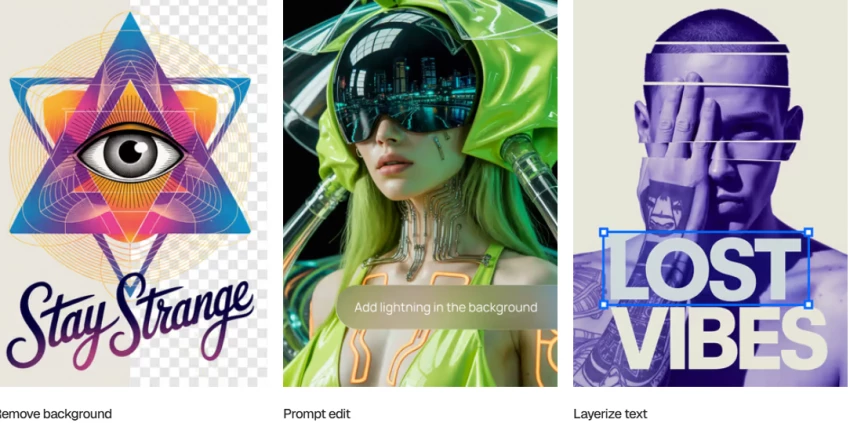
This one is on the list for a single reason and I am not going to pretend it is a general-purpose tool. Ideogram renders readable text inside images. Everything else generates something that looks like typography from across the room and dissolves into nonsense when you get close.
If you make posters, logos, thumbnails, or any graphic where a word has to actually be a word, that one capability is worth more than raw image quality. It was launched in August 2023 by ex-Google Brain researchers including Mohammad Norouzi, William Chan, Chitwan Saharia, and Jonathan Ho, which is a pedigree that explains the specialisation.
I have to be careful here because Ideogram’s published pricing varies between sources and appears to have shifted during 2026. The Plus tier sits at $15 a month billed annually, with a free tier of 10 slow credits per week, and Pro running to roughly $42 to $60 depending on which source and billing cadence you read. Annual billing saves 25% on Plus and 30% on Pro. I would check the live pricing page before buying rather than trust any number in any article, including this one.
What matters more than the headline price is the mechanic underneath it, because it is a trap. Credits are not images. Generating one image with Ideogram 4.0 at Quality costs 6 credits. The same credit buys 8 images at 2a Turbo. So on a Plus plan with 1,000 monthly priority credits, you get roughly 167 images if you run 4.0 Quality for everything, or around 8,000 if you run 2a Turbo. Most people land at 250 to 1,000.
Trustpilot reviewers note credits get used up fast when refining complex prompts. The practical advice I found and now follow: budget three to five times your final asset count. If you need 50 finished graphics, plan for 150 to 250 generations. Nobody gets it right first try.
Three more gotchas. Unused subscription credits expire at the end of each billing cycle with no rollover, so they are use-it-or-lose-it, though separately purchased top-up credits do carry over while your subscription stays active. Free tier images are all public and visible in the explore feed, and you cannot delete them, so confidential brand work is impossible on free. And batch generation via CSV is Pro-exclusive, regardless of how many credits you are holding.
One useful escape hatch: the API is billed separately from subscriptions at roughly $0.025 to $0.10 per image. For fewer than about 200 images a month, the API or the free tier is often better value than any subscription.
Anyone whose output contains words. Posters, logos, ad creative, thumbnails, packaging. Pair it with something else for everything that does not need type. It is a specialist and it does not pretend otherwise.
Every other tool on this list hands you a grid of pixels. Recraft hands you vectors, and if you have ever tried to scale a raster logo up for print you already know why that sentence matters.
It holds 4.7 out of 5 on G2, matching Canva at the top of this list, and G2 users consistently praise it for ease of use and high-quality results for generating professional graphics quickly. It sits in the category alongside Firefly and Ideogram as one of the three tools that form the strongest working toolkit: Recraft for vectors and icons, Firefly for Photoshop integration, Ideogram for typography.
The free tier runs about 50 credits a day, and the entry paid tier lands around $12 a month. Recraft is narrower than a general-purpose generator and I would not recommend it as your only tool. But if your work involves icons, logos, or anything that has to survive being resized, nothing else on this list competes.
Brand and identity work, icon sets, anything print-bound. If you have ever emailed a client a logo and got “can we get this as a vector” back, this is the tool that ends that conversation.
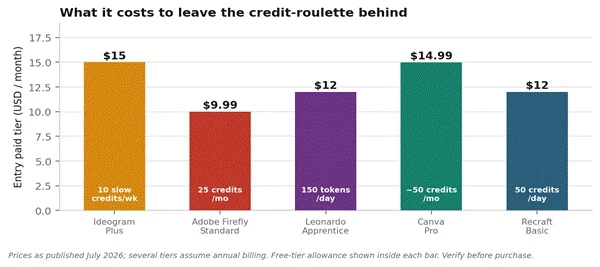
Figure 5: Entry paid tiers, with each tool’s free allowance shown inside the bar. The spread between the cheapest and most expensive is about five dollars a month. That is what leaving the credit-roulette costs.
Look at that chart for a second, because it makes an argument I did not expect when I started. The entire range here is $9.99 to $15. Five dollars a month separates the cheapest from the most expensive.
The premium for using a tool that publishes its terms and answers its email is roughly the price of one coffee a month, and it is not really a premium at all.
| If your actual problem is | Go here | Why, in one line |
| I need finished posts, not raw images | Canva Pro, $14.99 | The only one where generating and finishing happen in the same tab. |
| This goes out under a client’s name | Firefly Standard, $9.99 | The only one where somebody else carries the IP risk. |
| I need the same character across 50 images | Leonardo Apprentice, $12 | Custom LoRA training. Midjourney still cannot do this. |
| The image has words in it | Ideogram Plus, ~$15 | It is the only one where the text is readable. |
| It has to scale to a billboard | Recraft Basic, ~$12 | Vectors, not pixels. Nothing else here outputs them. |
| I want to test seriously for free | Leonardo free tier | 150 tokens a day with commercial rights, refreshing daily. |
| I want cartoon filters for fun | Canva free tier | Do the fun thing on a platform that publishes a privacy policy. |
Table 3: The decision table I wish someone had handed me three weeks ago.
After comparing these tools side by side, I realized that replacing MyImg AI was actually the easy part. Choosing a platform that is transparent about its pricing, explains how it handles your uploads, and has a real support team behind it gives far more confidence than chasing one extra AI feature.
Personally, I ended up valuing reliability more than novelty. Canva became my everyday workspace because it helped me finish projects faster, while Leonardo, Firefly, Ideogram, and Recraft each solved specific problems better than MyImg AI ever could. No AI image generator is perfect, but I would rather work with a company that is open about its limitations than one that leaves users guessing when issues arise.
If you are deciding where to spend your time or money, my advice is simple: choose the tool that fits the type of work you actually do, not the one making the biggest promises. In the long run, dependable support, clear policies, and consistent results matter far more than another AI feature you'll rarely use.
Share your thoughts about this article.
Be the first to post a comment!

The same tool can be a 4.7 on one site and a 3.9 on another. Here is what is rea...
Nitin1 month ago

Here is the number worth pinning above your budget: in Gartner Digital Markets r...
Deepak Mehra1 month ago

What Artlist AI is in 2026Artlist began as a royalty-free music library. By 2026...
Deepak Mehra1 month ago

Most AI tool failures do not announce themselves. There is no crash, no angry em...
Nitin2 months ago

The best AI image generator in 2026 is Nano Banana 2 for speed, FLUX.2 for photo...
Parveen Verma2 months ago

“Useful” is a slippery word for a coding assistant. A tool can be brilliant at o...
Sakshi Dhingra2 months ago