| Transparency note before you read further. I have not performed hands on testing of Magical for this article. Every claim here is drawn from documented sources: the official Magical website and help center, the Chrome Web Store listing, software directories including Capterra, GetApp and Software Advice, and independent third party reviews. Where a figure comes from the company itself, I say so directly. Where sources disagree or information could not be confirmed, I flag it. Treat this as a structured research summary, not a firsthand product review. |
Magical AI, developed by Magical (getmagical.com), is a productivity and automation tool that removes repetitive typing and data entry from browser based work. In its most widely known form, it is a free extension for Chrome and Edge that expands saved text shortcuts into full messages, drafts emails and replies with AI, autofills web forms, and moves data between open tabs without APIs or integrations.
Over time the company has also built a second, separate offering: an enterprise grade agentic AI platform that automates healthcare operations workflows such as prior authorizations, claims processing and revenue cycle management.

So when someone asks what Magical AI does, the honest answer depends on which Magical they mean. The free extension is a personal and team productivity assistant. The enterprise platform is a workflow automation engine for healthcare back offices. This guide covers both, explains how each works in practice, and lays out documented pricing, platform support, limitations and alternatives.
| Quick Fact | Detail |
| Product name | Magical (also listed as Magical AI and GetMagical; formerly Auto Text Expander for Google Chrome) |
| Developer | Magical, getmagical.com |
| Category | AI productivity, text expansion, autofill, workflow automation |
| Platforms | Chrome and Edge browser extension; enterprise agent platform for healthcare |
| Pricing model | Free plan plus paid tiers; custom pricing for enterprise |
| Best known for | Text shortcuts, one click message drafting, no code data transfer between tabs |
Table 1: Magical AI at a glance, compiled from official and directory listings
The most common point of confusion in search results is that Magical AI no longer describes one single tool. The original product, and still the one most people install, is the browser extension. Company materials have described it as a free AI writing assistant for Chrome and Edge that creates messages from scratch, updates forms instantly and drafts sales outreach or customer replies. The Chrome Web Store listing shows the extension began life under the name Auto Text Expander for Google Chrome and is also known as GetMagical, Magical AI, or simply Magical.
The second product is newer and aimed at a completely different buyer. The current getmagical.com homepage positions the company around specialized AI agents that execute operational work across healthcare systems, from patient access through revenue cycle.
The company states that production agents deploy in a matter of weeks, reaching over 90 percent workflow coverage in the first six weeks on average, with automations running at over 95 percent accuracy. Those are vendor published figures, and I have not seen independent verification of them, but they show where the company is investing.
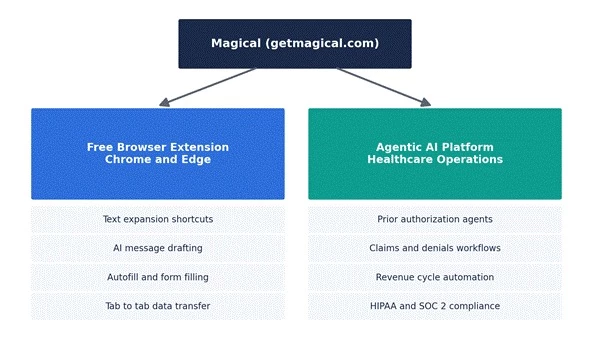
Figure 1: The two current Magical product lines and what each one covers
The extension bundles several distinct capabilities into one install. Based on the documentation and directory listings I reviewed, these are the core functions.
The foundational feature is text expansion. A user saves a frequently typed block of text, such as a candidate outreach message, a support reply or an address block, and assigns it a short trigger. Typing the trigger anywhere in the browser expands it into the full text. Software Finder describes this as creating shortcuts for frequently used phrases or messages that expand with a few keystrokes and personalize communications across platforms. Shortcuts can include placeholder variables, so a saved template can pull in details like a first name from the page being viewed, which turns a generic template into a personalized message without retyping.
On top of stored templates, Magical added generative drafting. GetApp's listing describes an AI powered writing assistant that provides contextual suggestions and personalized responses to emails, Slack messages and LinkedIn communications. Earlier third party documentation from LogicWeb reported that the drafting features were powered by OpenAI GPT models and that users do not need their own OpenAI API key, since the tool runs on its own key. In practical terms, this means a user can generate a reply to an email or an InMail in one click, with the draft referencing information from the original message. Reviewers consistently note the scope here: Originality.ai's assessment concluded that the AI generation is geared toward emails and short messages, not blog posts or long form content.
The extension can populate web forms, spreadsheets and database fields automatically. Software Finder's listing explains that autofill extracts relevant data from open tabs and fills forms, which reduces manual entry and errors. This is the feature that appeals most to operations heavy roles, since a large share of their day is copying the same fields into different systems.
Closely related to autofill is Magical's transfer capability. The tool can read data from one open tab, such as a CRM record, a search results page or a profile, and move it into another tab, such as a form, a sheet or a message. The Text Blaze comparison of the two products describes exactly this workflow: extracting data from a page like a CRM and transferring it to another page like a form or document. What makes this notable is the mechanism. There are no API keys, connectors or integration setup steps. The extension operates on top of whatever pages are already open in the browser, which is why company material frequently repeats the phrase no integrations needed.
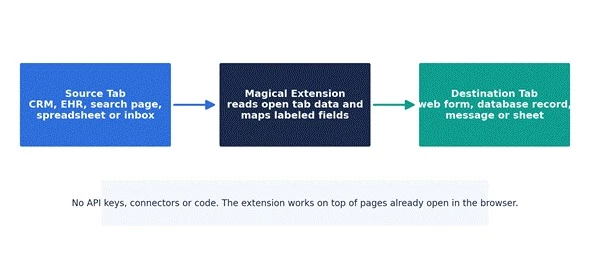
Figure 2: How the documented tab to tab transfer flow works, based on official descriptions
For repeatable multi step tasks, the Capterra listing documents a capture mode. A user hits record while performing a manual workflow once, and Magical AI learns how to automate it the next time. The company frames this as a lower cost alternative to traditional robotic process automation, claiming development cost reductions of 50 percent or more compared with RPA vendors. Again, that is a vendor claim rather than an audited figure, but the underlying capability, recording a browser workflow and replaying it, is well documented across listings.
Magical also functions as a shared library for teams. The company's own materials describe a Team Library that centralizes shortcuts so a sales or support team can use consistent, approved messaging. The Text Blaze comparison adds that folder sharing with permission controls sits on the Advanced plan, with custom usage reporting available on Enterprise.
| Capability | What It Does | Typical Use |
| Text expansion | Expands saved triggers into full text with variables | Outreach templates, support replies, signatures |
| AI drafting | Generates emails, replies and short messages in one click | Email replies, LinkedIn InMails, follow ups |
| Autofill | Fills forms and fields using data from open tabs | CRM updates, applicant tracking, order forms |
| Data transfer | Moves data between tabs without APIs or code | CRM to sheet transfers, record migration |
| Capture mode | Records a manual workflow and automates repeat runs | Multi step data entry routines |
| Team Library | Shares approved shortcuts and folders across a team | Consistent messaging for sales and support |
Table 2: Documented capabilities of the Magical browser extension
The enterprise side of Magical looks very different from the extension. According to the company's healthcare pages, the platform deploys AI agents that are pre trained on operational healthcare workflows and can run entire processes end to end. The listed automation areas include claim submissions, claim processing, payment posting, revenue cycle management, coding and billing, and collections. Prior authorization is a headline use case, where the company claims fully automated submissions can produce up to 50 percent fewer denials and faster payer decisions.
The compliance posture is documented in unusual detail for this category. Magical states that its platform meets full HIPAA requirements, holds SOC 2 compliance, never stores personal health information on its servers, runs daily automated testing, and produces logs for every automation that runs. For any healthcare organization evaluating the platform, those claims are the ones to verify directly during procurement, since compliance scope can differ by contract.
The company publishes several outcome figures on its marketing pages: a 95 percent clean claim rate, 12 times faster revenue recovery, denial reductions of up to 50 percent, and 2 to 4 times more denied revenue recovered. I want to be precise about the status of these numbers. They are company reported marketing figures, drawn from Magical's own pages, and I found no independent audit of them. I have charted them below strictly as published claims so readers can see what the vendor promises, not as verified benchmarks.
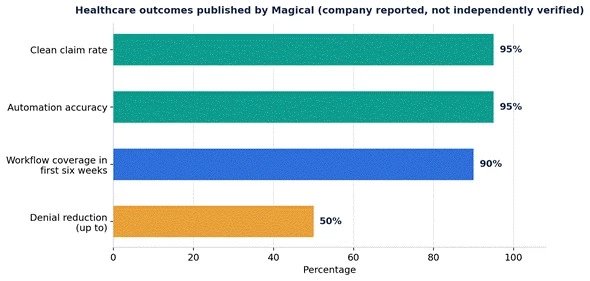
Figure 3: Outcome figures published on Magical's own healthcare pages, shown as vendor claims
| Workflow Area | What Magical Says Its Agents Handle |
| Prior authorization | Automated submissions, status checks and payer follow up |
| Claims management | Claim submission, processing, error fixes and resubmission |
| Payment posting | Posting payments and reconciling records across systems |
| Coding and billing | Moving coded data into billing systems with fewer manual touches |
| Patient access | Eligibility verification and patient data transfer between systems |
| Document handling | Extracting data from PDFs such as medical records into online forms |
Table 3: Healthcare workflow coverage as described on getmagical.com
Since I have not run the product myself, the steps below are assembled from Magical's own onboarding descriptions and third party walkthroughs, including the setup sequence documented in the aiquiks review. They describe the standard path for the browser extension.
1. Sign up: Go to getmagical.com and create a free account.
2. Install the extension: Add the Magical extension from the Chrome Web Store, or the Edge Add-ons store if you use Edge. The extension pins to the browser toolbar.
3. Create shortcuts: Open the Magical panel and save your most repeated messages as shortcuts, or import existing templates. Each shortcut gets a short trigger phrase.
4. Expand anywhere: In any text field on the web, type the trigger to expand the saved text. Templates with variables pull in details such as names from the active page.
5. Use autofill and transfers: With a source tab open, invoke Magical in the destination form or sheet and map the fields you want filled. The extension pulls matching data from the open tab.
6. Draft with AI: For emails and messages, use the AI assist option to generate a draft or a reply based on the message you are viewing, then edit before sending.
7. Automate a workflow: For repeatable routines, record the workflow once with capture mode so Magical can automate the same sequence on future runs.
8. Share with a team: On team plans, organize shortcuts into shared folders so colleagues use the same approved messaging.
For the healthcare agent platform, there is no self serve path. The documented route is booking a demo through the website, after which the company scopes the workflows and deploys agents, with production deployment described as taking weeks rather than months.
Because the extension operates at the browser level rather than through APIs, it works on top of most websites where text is typed. Directory listings and company pages repeatedly name a consistent set of tools where users apply it.
| Category | Documented Examples |
| Gmail | |
| CRM and sales | Salesforce, LinkedIn |
| Support and helpdesk | Zendesk |
| Messaging | Slack |
| Healthcare systems | Web based EHRs, scheduling and billing platforms |
| General web work | Web forms, spreadsheets, databases and search pages |
Table 4: Platform coverage named in Software Advice, GetApp and Magical's own materials
The important limitation flows from the same design. Magical is available as a Chrome extension and a Microsoft Edge extension, and it does not run in desktop applications outside the browser. Anyone who spends most of the day in native desktop software will get limited value from it, and the tool requires an internet connection to function.
Magical markets the extension as free, and a functional free plan genuinely exists. The company's help center confirms paid plans on monthly and annual billing, processed through Stripe. One detail from the official billing FAQ worth knowing for readers in India: Magical states that it accepts payments from all Stripe eligible countries except India, so Indian users may be able to use the free tier but face a documented barrier to purchasing paid plans directly.
Exact published prices have shifted over time and third party trackers do not fully agree, so the figures below should be treated as reported rather than guaranteed. The aiquiks review from January 2026 reports the Pro plan starting at around 6.50 dollars per user per month, with custom enterprise pricing above that. The Text Blaze comparison documents an Advanced plan that adds shared folders with permissions and an Enterprise tier with custom usage reporting. Anyone evaluating the tool should confirm current numbers on the official pricing page before deciding.
| Plan | Reported Price | What Listings Say It Includes | Status of Figure |
| Free | 0 dollars | Text expansion, basic automations, limited template actions per month | Confirmed free tier exists |
| Pro | About 6.50 dollars per user per month | Higher limits, AI personalization, collaboration features | Third party report, January 2026 |
| Advanced | Not consistently published | Shared team folders with permission controls | Documented in competitor comparison |
| Enterprise | Custom | Custom usage reporting, large scale automation, dedicated support | Company documented, quote based |
Table 5: Reported Magical pricing tiers; verify on getmagical.com before purchase
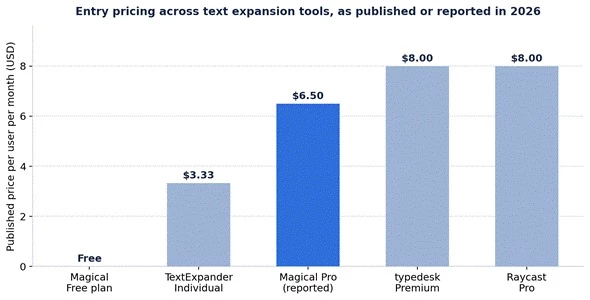
Figure 4: Entry prices of comparable tools as published on official or directory pages; Magical Pro figure is third party reported
The documentation and the company's own role pages point to a clear set of users for the extension.
• Sales and recruiting teams: Repetitive outreach at volume is the core use case. Saved templates with variables personalize each message, and AI drafting handles replies.
• Customer support teams: Support agents answering similar tickets can expand approved replies in helpdesk tools like Zendesk and keep messaging consistent through shared folders.
• Healthcare administration: Front office and billing staff move patient data between web based scheduling, EHR and billing screens without API projects. The enterprise agents extend this into fully automated claims and prior authorization work.
• Individual professionals: Anyone who types the same blocks of text daily, from email signatures to reporting boilerplate, gets value from the free tier alone.
Adoption claims support the breadth of that audience, though the numbers vary by source and date. Older company materials cited more than 500,000 users across 20,000 companies, a Magical blog post referenced 450,000 plus users at companies including Netflix, HubSpot, Amazon and Verizon, and the current Capterra listing states that teams at over 60,000 companies use Magical. LogicWeb's earlier report also cited a 4.6 star average across more than 2,620 Chrome Store reviews. I present these as a range rather than a single figure because the sources were published at different times.
A balanced answer to what Magical AI does has to include what it does not do. These limitations recur across independent reviews and user feedback.
• Browser only: The tool runs only in Chrome and Edge. There is no native desktop application, and text expansion does not work inside non browser software.
• No long form AI writing: Originality.ai's review concluded the AI generation is limited to emails and short messages, so it is not a substitute for a content writing tool.
• Free plan limits: The free tier caps template actions per month, and heavier automation features sit behind paid plans.
• Reported stability issues: User feedback compiled by Which 50 reports occasional performance glitches with large datasets, along with some reports of crashes and slow loading. I could not verify how widespread these issues are.
• Connectivity and privacy: The extension needs an internet connection, and a productivity tool that reads open tabs deserves a privacy review. The Chrome Web Store listing discloses data collection practices, and organizations handling regulated data should review the privacy policy and, for healthcare, the HIPAA documentation.
• Payment restriction for India: The official billing FAQ states payments are not accepted from India through its Stripe setup, which restricts paid upgrades for one of the largest potential user bases.
Magical sits between two categories, which shapes any comparison. Against pure text expanders it competes on price and AI drafting. Against automation platforms it competes on setup simplicity, since it needs no connectors. The table below summarizes documented positioning.
| Tool | Primary Focus | Platforms | Entry Paid Price | Key Difference vs Magical |
| Magical | Text expansion, AI drafting, tab transfers | Chrome, Edge | Reported around 6.50 dollars monthly | Free tier plus no code data transfer |
| TextExpander | Snippet expansion for individuals and teams | Mac, Windows, mobile, browser | 3.33 dollars monthly on annual billing | Works outside the browser, no tab transfer |
| Text Blaze | Dynamic snippets with logic and forms | Chrome, Edge, desktop apps | Published on its pricing page | Deeper dynamic snippet commands |
| Zapier | App to app workflow automation via connectors | Web platform, thousands of app integrations | Published tiered pricing | API based automation beyond the browser |
Table 6: Positioning against documented alternatives; prices from official or directory pages
The practical way to choose: if the repetitive work happens inside browser tabs and involves copying data between web systems, Magical's design fits directly. If the work spans native desktop apps, TextExpander style tools cover more surface. If the automation needs to run in the background across cloud apps without a browser open, connector platforms like Zapier remain the standard approach.
Based purely on the documented record, Magical AI does two jobs. For individuals and teams, it removes repetitive typing and copy paste work inside the browser through shortcuts, AI drafted messages, autofill and tab to tab data transfer, with a genuinely usable free tier.
For healthcare organizations, it now sells autonomous agents that run claims, prior authorization and revenue cycle workflows end to end, backed by published compliance commitments and vendor reported performance figures.
The consistent theme across both products is the same design decision: automation that works on top of what is already on screen, with no APIs, connectors or code. The consistent caution is also the same: the most impressive numbers attached to Magical are the company's own, so anyone evaluating it seriously should start with the free extension for personal workflows, and for enterprise healthcare deployment, insist on a scoped pilot before trusting the published outcome claims. Since I have not tested the product hands on, I would treat this article as the map, and a free plan trial as the territory.
Share your thoughts about this article.
Be the first to post a comment!

The same tool can be a 4.7 on one site and a 3.9 on another. Here is what is rea...
Nitin4 weeks ago

Here is the number worth pinning above your budget: in Gartner Digital Markets r...
Deepak Mehra4 weeks ago

What Artlist AI is in 2026Artlist began as a royalty-free music library. By 2026...
Deepak Mehra1 month ago

Most AI tool failures do not announce themselves. There is no crash, no angry em...
Nitin1 month ago

The best AI image generator in 2026 is Nano Banana 2 for speed, FLUX.2 for photo...
Parveen Verma1 month ago

“Useful” is a slippery word for a coding assistant. A tool can be brilliant at o...
Sakshi Dhingra1 month ago