Akool has built a strong reputation as an all-in-one AI video platform, best known for its face swap, talking avatars, real-time streaming avatars, and multilingual video translation across 155+ languages. Founded in 2022 and headquartered in Palo Alto, the company reached the top of the 2025 Inc. 5000 list of fastest-growing private companies, with reported ARR of around $40 million.
Even so, no single tool fits every workflow. Some teams want more predictable pricing, some want a bigger avatar library, some want a dedicated ad-creation engine, and some want deeper training and L&D features. This guide breaks down the seven strongest Akool alternatives available, how each one compares, and which type of user each one suits best.
Transparency note: This comparison is based on desk research, not first-hand hands-on testing. Every figure below is drawn from vendor pricing pages, product documentation, and published third-party reviews as of 2025. AI pricing and features change frequently, so treat these numbers as a starting point and confirm current details on each vendor's site before purchasing.
Because no live testing was performed, this article does not claim to rank raw output quality from personal experience. Instead, it synthesizes what is publicly documented and what a large body of user reviews consistently reports. The goal is to help you shortlist the right tool for your use case, not to declare a single universal winner.
Each alternative was assessed against the same seven-part framework. The weighting below reflects how much each factor influenced the overall picture for a typical creator or marketing team.
| Criterion | What it measures | Weight |
| Avatar & lip-sync quality | Realism of talking avatars and accuracy of lip synchronization (per documentation and reviews) | 25% |
| Ease of use & workflow | How quickly a user gets from script or input to a finished video | 20% |
| Pricing & value | Entry cost, free tier, credit transparency, and scalability | 20% |
| Language & localization | Number of supported languages, dubbing, and translation quality | 15% |
| Feature breadth | Range of tools: avatars, face swap, editing, ads, translation, API | 12% |
| Customization & brand | Control over backgrounds, styles, avatars, and brand elements | 8% |
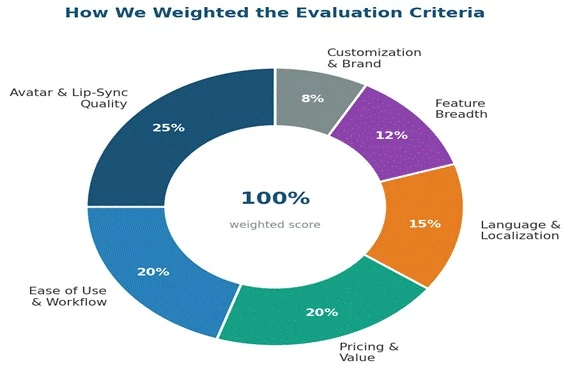
Figure 1. The relative weighting applied to each evaluation criterion. Avatar quality and workflow speed carried the most influence, since those are the two factors users cite most often when switching tools.
A few ground rules kept the comparison fair:
| # | Alternative | Best known for | Entry price (approx) |
| 1 | HeyGen | Multilingual avatar videos and translation | $24/mo (annual) |
| 2 | Synthesia | Enterprise training and L&D at scale | $18/mo (annual) |
| 3 | Creatify | AI video ads and UGC-style product content | $33/mo (annual) |
| 4 | D-ID | Photo-to-talking-avatar and developer API | $4.70/mo (annual) |
| 5 | Vidnoz | Large avatar library on a generous free tier | $13.50/mo (annual) |
| 6 | VEED | Browser video editor plus AI avatars | $12/mo (annual) |
| 7 | Colossyan | Interactive, scenario-based training video | $19/mo |
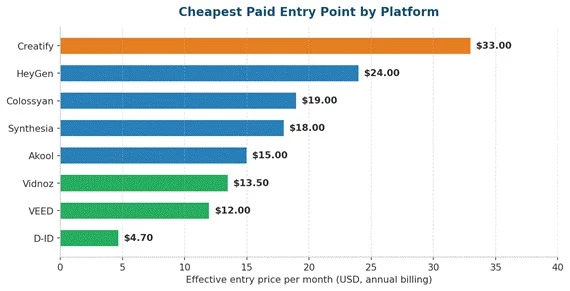
Figure 2. Cheapest paid entry point per platform, using annual-billing rates. D-ID, VEED, and Vidnoz sit at the affordable end, while Creatify is priced highest because it targets performance-marketing teams rather than casual creators.
The closest direct competitor to Akool for avatar-led, multilingual video.
HeyGen is one of the most mature AI video platforms on the market and the alternative most often recommended for teams that want polished talking-head videos. You write a script, pick an avatar (stock, photo-based, or a custom digital twin), choose a voice, and HeyGen renders a video where the avatar speaks with synced lip movement, gestures, and natural intonation.
Its standout strength is video translation and localization. HeyGen supports 175+ languages with lip-synced dubbing, which is a step beyond most competitors. G2 named it the number one fastest-growing product of 2025, and the company reportedly reached $100M ARR in 29 months.
| Plan | Price | What you get |
| Free | $0 | 3 videos/month, 1-minute cap, 720p, watermark, 500+ stock avatars, 1 custom twin, 30+ languages |
| Creator | $29/mo ($24 annual) | Unlimited Avatar III videos, 1080p, no watermark, voice cloning, 175+ languages, ~30 min of premium Avatar IV |
| Pro | from $49-$99/mo | More premium credits, 4K export, higher volume for advanced individuals |
| Business | $149/mo + $20/seat | Team collaboration, SSO, interactive video, SCORM, LMS integrations, longer videos |
| Pros | Cons |
| Best-in-class translation and lip-sync across 175+ languages | Credit system makes premium (Avatar IV/V) costs hard to predict |
| Unlimited standard (Avatar III) video on paid plans | Free tier is limited to short, watermarked clips |
| Large, high-quality avatar library | Costs can climb quickly for heavy multilingual production |
| Fast product improvement and strong support reputation | Business tier adds per-seat charges on top of the base price |
Best fit: Global brands, marketing teams, and creators who need avatar videos localized into many languages and are comfortable managing a credit budget.
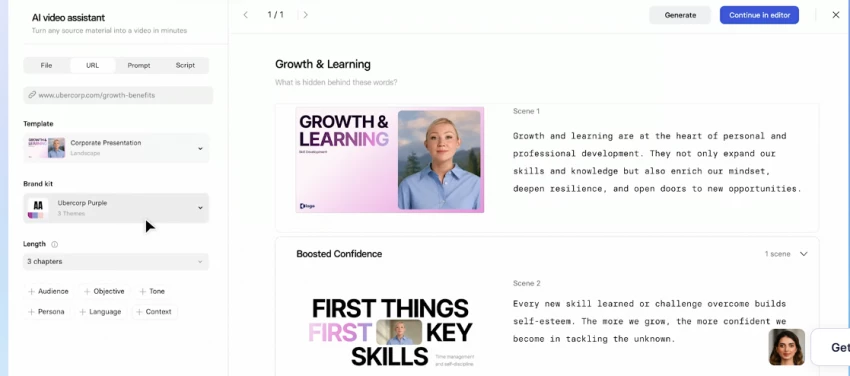
The category leader for enterprise training and corporate communication video.
Synthesia is the enterprise standard for turning scripts into professional avatar videos, particularly for training, onboarding, and internal communications. It is trusted by large organizations including Reuters and Zoom, and is widely cited as the leader for multilingual corporate video at scale.
Where Synthesia shines is polish and governance. It offers 140-160+ languages, a large library of professional studio avatars, brand kits, and enterprise features like SCORM export and one-click video translation. The trade-off is a noticeable pricing cliff between its self-serve plans and its custom Enterprise tier.
| Plan | Price | What you get |
| Free | $0 | ~10 min/month, ~9 avatars, watermark, no MP4 download, 140+ languages (evaluation only) |
| Starter | $29/mo ($18 annual) | ~10 min/month, 125+ avatars, 1 personal avatar, watermark removed |
| Creator | $89/mo ($64 annual) | ~30 min/month, 180+ avatars, multiple avatars per scene, interactive video, API access |
| Enterprise | Custom (often $20k+/yr) | Unlimited minutes, SSO, SCORM, unlimited personal avatars, brand governance, dedicated support |
| Pros | Cons |
| Unmatched language coverage for enterprise rollouts | Steep jump from self-serve to Enterprise pricing |
| Highly polished, professional studio avatars | Video minutes are capped per plan and do not roll over |
| Strong template library and brand controls | Studio Express avatars cost an extra $1,000/year add-on |
| Reliable for structured training and L&D content | Not built for social ads or cinematic creative content |
Best fit: Enterprises and L&D teams producing multilingual training, onboarding, and internal communication videos where polish and governance matter more than price.
A purpose-built engine for AI video ads and UGC-style product content.
Creatify is not a general avatar tool. It is built specifically for performance marketers who need to produce high volumes of video ads fast. Its signature feature is URL-to-video: paste a product link from Amazon, Etsy, Shopify, or similar, and Creatify pulls the product details to auto-generate UGC-style ad variations complete with scripts, avatars, and voiceovers.
For advertisers running Meta, TikTok, or AppLovin campaigns, this is a genuine time-saver. Creatify also layers in ad analytics, batch generation, ad cloning, and a competitor ad tracker, positioning itself as an ad-production system rather than a single generator.
| Plan | Price | What you get |
| Free | $0 | 10 credits/month (~2 videos), watermark, limited AI tools |
| Starter | $39/mo ($33 annual) | 100 credits, no watermark, 300 AI actors, 200+ templates, up to 2-min videos |
| Pro | $49-$99/mo | 300-5,000 credits, 1,500 AI actors, custom avatars, up to 10-min videos, competitor tracker |
| Enterprise | Custom | All actors and models, custom credits, media-buying services, API volume discounts |
| Pros | Cons |
| Fastest path to UGC-style video ads from a product link | Credit system is opaque and unused credits do not roll over |
| Built-in ad analytics and competitor tracking | Some reviewers report lip-sync issues and billing complaints |
| Excellent for batch testing many ad variations | Limited fine-grained editing after generation |
| 1,000+ avatars and product-shot generation | Narrow focus: not ideal for training or explainer video |
Best fit: Ecommerce brands, agencies, and performance marketers who need to spin up and test many short-form video ads quickly.
The specialist for turning a single photo into a talking avatar, with a strong API.
D-ID pioneered the photo-to-video approach: upload a still portrait, type a script, and its Creative Reality Studio animates the face into a lip-synced talking avatar. No one does this particular trick better, which makes D-ID the go-to for memorial videos, historical figures, and personalized outreach where you want a specific face to speak.
It is also one of the most affordable entry points in the category and a favorite among developers, thanks to a robust API and support for real-time interactive agents. The main friction points are a credit-based model that some users find confusing and a smaller avatar library than Synthesia or HeyGen.
| Plan | Price | What you get |
| Trial | $0 (14 days) | ~3 minutes of video, 100+ avatars, API access, watermark, no credit card |
| Lite | $5.90/mo ($4.70 annual) | ~40 credits (roughly 10 min), core studio features |
| Pro | $29/mo ($16 annual) | ~60 credits, commercial license, premium voices, 1 voice clone, subtitles |
| Advanced | $108-$196/mo | ~400 credits (roughly 100 min), higher volume for agencies |
| Pros | Cons |
| Unmatched photo-to-talking-avatar quality | Credit system is confusing and credits are consumed even on failed generations |
| Lowest floor price in the category | Lower plans watermark videos |
| Strong 119+ language text-to-speech support | Smaller avatar library than the market leaders |
| Developer-friendly API and real-time agents | Some reviewers report reliability and cancellation frustrations |
Best fit: Creators and developers who specifically need to animate a photo into a talking avatar, or who want to embed avatar video into an app via API on a small budget.
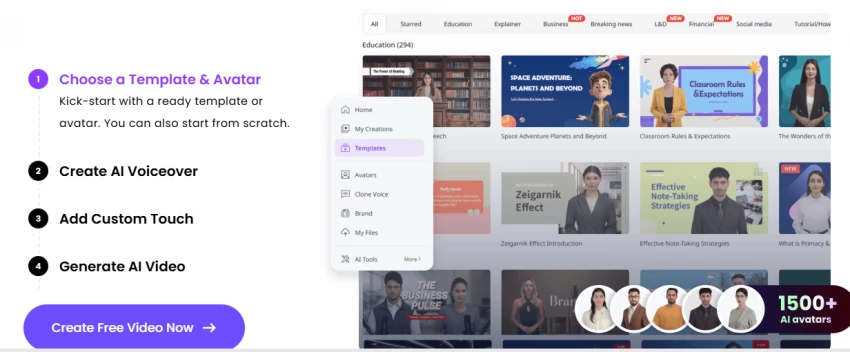
The value pick, pairing a huge avatar library with an unusually generous free tier.
Vidnoz competes on breadth and price. It offers one of the largest avatar libraries in the category (well over 1,500, with some counts citing 1,900+), more than 2,600 voices across 140+ languages, and thousands of templates, all wrapped in a beginner-friendly, browser-based editor.
Its free plan is notably generous compared with HeyGen or Synthesia, which makes Vidnoz a practical starting point for creators and small teams testing AI video without committing budget. It also bundles a range of extra AI tools such as a face swapper, voice cloning, and a video translator.
| Plan | Price | What you get |
| Free | $0 | Daily limits, watermark, access to avatars and templates for testing |
| Starter | from ~$13.50/mo (annual) | More minutes, higher resolution, watermark removed |
| Business | ~$26.99/mo+ | Higher volume, more credits, added features for teams |
| Enterprise | Custom | Scaled usage and support for larger organizations |
| Pros | Cons |
| One of the largest avatar and template libraries available | Avatar expression and scene flexibility can feel limited |
| Genuinely useful free tier for testing | A mild learning curve despite the friendly interface |
| Very affordable paid entry point | Credit and minute limits apply even on paid tiers |
| Bundled extra AI tools add flexibility | Output polish is a step below premium leaders for high-end work |
Best fit: Budget-conscious creators, educators, and small teams who want a large avatar selection and a real free tier before paying anything.
A browser-based video editor with AI avatars baked in, ideal for all-round production.
VEED approaches the problem from the opposite direction to most tools here. It is first and foremost a full browser-based video editor used by more than 10 million people monthly, with AI avatars as one feature inside a much larger toolkit. That makes it a strong choice if you want to generate avatar clips and then actually edit, subtitle, and polish real footage in the same place.
Alongside AI avatars, VEED offers auto-subtitles in 125+ languages, voice cloning, background removal, eye-contact correction, filler-word removal, and a natural-language editing agent. Backed by Sequoia Capital, it reportedly reached around $45M ARR in late 2025.
| Plan | Price | What you get |
| Free | $0 | Watermark, 720p, ~10-min limit, basic editing, limited subtitle minutes |
| Lite/Basic | $24/mo ($12 annual) | 1080p, no watermark, more subtitle minutes, stock library |
| Pro | $55/mo ($29 annual) | AI avatars, unlimited Gen-AI Studio videos, translation, 15+ AI tools, full brand kit |
| Enterprise | Custom | Custom avatars, SSO, advanced security, analytics, priority support |
| Pros | Cons |
| True editor plus AI avatars in one browser tool | AI avatars are locked behind the higher Pro tier |
| Excellent auto-subtitling and AI cleanup features | Per-seat pricing makes teams more expensive |
| Affordable annual pricing for the editor tier | Performance can lag on long or high-resolution projects |
| No software install and works on any device | AI credits for avatars and dubbing can run out |
Best fit: Creators and marketing teams who need a genuine video editor with subtitles and cleanup tools, and want AI avatars as one capability rather than the whole product.
A training-first platform built for interactive, scenario-based learning video.
Colossyan focuses squarely on workplace learning. It converts documents, slides, or a topic description into structured training videos with avatars, and pairs that with features L&D teams specifically need: branching scenarios, quizzes with pass/fail scoring, and SCORM export for learning management systems. It serves 35,000+ business accounts and names customers like Novartis, Vodafone, BMW, and the American Red Cross.
Compared with Synthesia, Colossyan is cheaper at the entry level and stronger on interactive, roleplay-style content, which makes it a natural fit for sales training and compliance courses. Its free plan is also unusually generous, giving access to its full 300+ avatar library.
| Plan | Price | What you get |
| Free/Starter | $0 | Full 300+ avatar library, core creation features, ~$27/month of value |
| Professional | $59/mo (annual) | 30 min NEO + 10 min NEO2/month, SCORM export, AI images, up to 3 editors |
| Business | ~$70-$88/mo | Branching scenarios, quizzes, more minutes and collaboration |
| Enterprise | Custom | Unlimited minutes, SSO, data residency, custom avatars, dedicated CSM |
| Pros | Cons |
| Best-in-class for interactive, scenario-based training | Interactive features (branching, quizzes) sit on higher tiers |
| Generous free tier with the full avatar library | Minute limits can bottleneck growing content libraries |
| SCORM and quizzes make it LMS-ready | Avatar polish trails Synthesia and HeyGen slightly |
| Lower entry price than Synthesia for L&D teams | Some users report issues saving or handling larger videos |
Best fit: Corporate L&D and training teams that need interactive, quiz-driven, SCORM-ready video courses rather than one-off marketing clips.
The tables and charts below pull the seven alternatives together so you can weigh them against Akool and against each other on the factors that matter most.
| Tool | Entry price | Avatars | Languages | Standout strength |
| Akool (baseline) | $15/seat (annual) | 500+ | 155+ | Face swap + live streaming avatars |
| HeyGen | $24/mo (annual) | 700+ | 175+ | Translation and lip-sync depth |
| Synthesia | $18/mo (annual) | 230+ | 140+ | Enterprise training polish |
| Creatify | $33/mo (annual) | 1,000+ | 75+ | URL-to-video ad creation |
| D-ID | $4.70/mo (annual) | 100+ | 119+ | Photo-to-avatar + API |
| Vidnoz | $13.50/mo (annual) | 1,900+ | 140+ | Library size + free tier |
| VEED | $12/mo (annual) | Editor + avatars | 125+ | Editor plus AI avatars |
| Colossyan | $19/mo | 300+ | 100+ | Interactive L&D training |
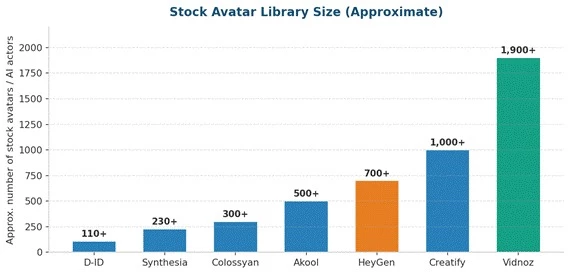
Figure 3. Approximate stock avatar library size. Vidnoz and Creatify lead on sheer volume, while Synthesia and D-ID keep smaller, more curated libraries aimed at professional and enterprise polish.
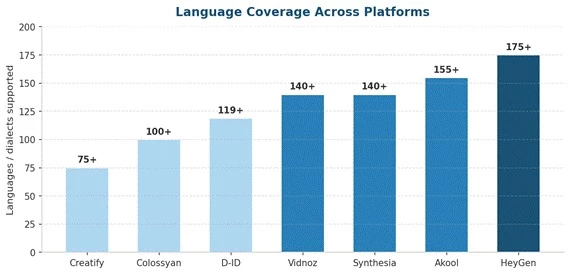
Figure 4. Language coverage across the seven alternatives. HeyGen leads at 175+, with Akool, Synthesia, and Vidnoz close behind. Creatify sits lowest because it optimizes for ad markets rather than broad localization.
Since these platforms are built for different jobs, raw specs only tell part of the story. The chart below scores each alternative on three common use cases using editorial judgment drawn from documentation and reviews, not benchmark testing.
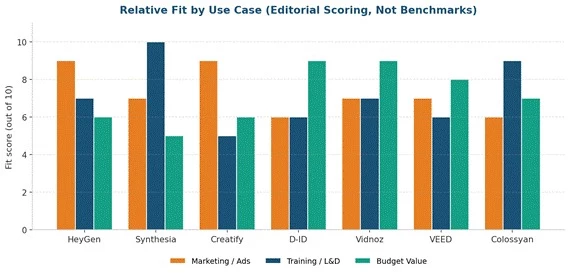
Figure 5. Relative fit by use case. Synthesia and Colossyan lead for training, HeyGen and Creatify lead for marketing and ads, and D-ID and Vidnoz lead on budget value. These are qualitative scores, not measured results.
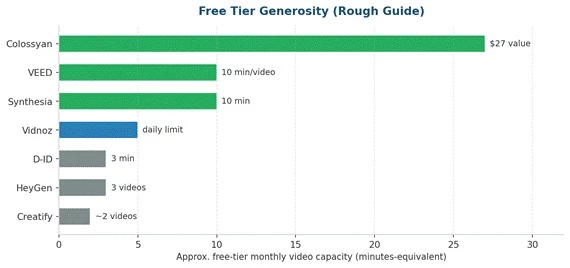
Figure 6. A rough guide to free-tier generosity. Colossyan, Synthesia, and VEED give the most room to test before paying, while HeyGen, Creatify, and D-ID offer only small trial allowances.
| If you want | Choose | Why |
| The closest overall Akool replacement | HeyGen | Matches avatar quality and beats it on language coverage |
| Enterprise training at scale | Synthesia | Category leader for polished multilingual L&D video |
| High-volume video ads fast | Creatify | URL-to-video and batch testing built for advertisers |
| Photo-to-avatar or an API | D-ID | Best photo animation and developer-friendly |
| Maximum value and a free tier | Vidnoz | Huge library, low price, generous free plan |
| An editor plus AI avatars | VEED | Real editing suite with avatars included |
| Interactive, quiz-based training | Colossyan | Branching scenarios and SCORM export for LMS |
With seven strong options, the decision comes down to matching a tool to your actual workflow. These questions help narrow the field quickly.
Practical tip: Because pricing and features in AI video shift almost monthly, always run a short pilot on the free or trial tier with your own real use case before committing to an annual plan. A tool that looks perfect on paper can feel very different once your specific script, language, and brand requirements are in play.
Akool remains a powerful, feature-rich platform, especially for face swap, live streaming avatars, and multilingual translation. But the seven alternatives here each solve a specific problem better for a specific kind of user.
If you want the closest all-round match, HeyGen is the natural choice. For enterprise training, Synthesia and Colossyan lead. For advertising, Creatify is built for exactly that. For photo animation or an API, D-ID stands alone. And for value, Vidnoz and VEED deliver the most capability per dollar. The right pick is the one that fits your output, your languages, your budget, and your workflow, so start with a free trial and let your own use case decide.
Share your thoughts about this article.
Be the first to post a comment!

The same tool can be a 4.7 on one site and a 3.9 on another. Here is what is rea...
Nitin2 months ago

Here is the number worth pinning above your budget: in Gartner Digital Markets r...
Deepak Mehra2 months ago

What Artlist AI is in 2026Artlist began as a royalty-free music library. By 2026...
Deepak Mehra2 months ago

Most AI tool failures do not announce themselves. There is no crash, no angry em...
Nitin2 months ago

The best AI image generator in 2026 is Nano Banana 2 for speed, FLUX.2 for photo...
Parveen Verma2 months ago

“Useful” is a slippery word for a coding assistant. A tool can be brilliant at o...
Sakshi Dhingra2 months ago