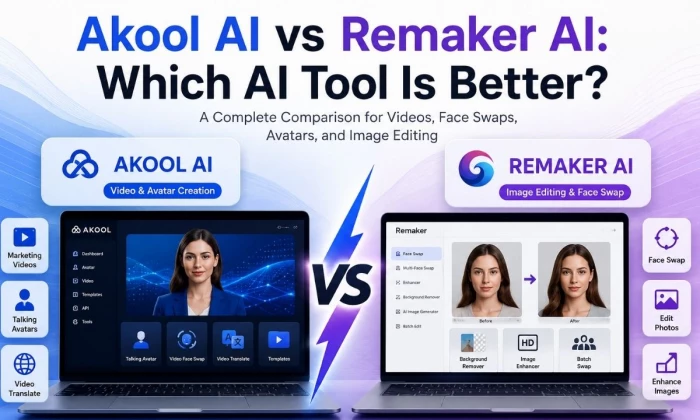
Comparing Akool AI and Remaker AI for real content work is different from skimming two feature pages. Both attract people interested in AI face swaps and creative editing, and on the surface they overlap. In practice they are built for different jobs, and that difference is what should drive the choice.
Akool AI leans toward AI video, avatars, business marketing, and campaign-style creative work, including video face swap, talking avatars, and video translation.
Remaker AI is more often used like a quick AI photo-editing and face-swap toolkit, strong on image face swaps, background removal, enhancement, and casual creative tasks. Neither framing makes one tool bad. They simply point at different outputs.

This Akool AI vs Remaker AI comparison is organized around that reality. Every section answers a practical question: for this specific job, which tool fits better, and what should be verified before trusting it. The goal is to help a reader choose based on the content they actually need to make, whether that is video-first or image-first, with honest notes on cost, privacy, and commercial use for both.
This table is a fast shortlisting aid. Match the need, then read the relevant section and verify the caution before committing.
| User Need | Better Choice | Reason | Main Caution |
| AI marketing videos | Akool AI | Built for avatar and campaign video output | Verify video length and commercial rights |
| Face swap images | Remaker AI | Fast, image-first face swap toolkit | Quality depends on source image |
| Video face swap | Akool AI | Higher-resolution video face swap focus | Confirm export quality and limits |
| AI avatars | Akool AI | Avatar video and talking avatars | Avatar realism varies; test first |
| Background removal | Remaker AI | Quick background tools for images | Edge quality on complex images |
| Product or social visuals | Depends | Remaker for images, Akool for video promos | Match to your output type |
| Business campaigns | Akool AI | Team and campaign-oriented workflows | Check business and API terms |
| Quick casual edits | Remaker AI | Simple one-off photo edits | Free credits may be limited |
| Team or agency workflow | Akool AI | Business features and API access | Confirm seats and pricing |
| Beginner-friendly editing | Remaker AI | Lower setup for simple tasks | Still needs ethical, reviewed use |
The cleanest way to frame the two: Akool AI is video-first and business-oriented, while Remaker AI is image-first and casual-friendly.
• Akool AI: better suited for AI video, avatar-led content, marketing campaigns, video face swap, and business creative workflows
• Remaker AI: better suited for quick image edits, face swaps, background removal, enhancement, and casual creative photo tasks
• For teams: Akool may feel more useful when video-first output and collaboration matter
• For solo speed: Remaker may feel simpler when only fast photo edits are needed
• The deciding factors: output type, editing depth, budget, and commercial-use needs
| Category | Akool AI | Remaker AI | Practical Takeaway |
| Main workflow | Video and avatar creation | Image editing and face swap | Pick by primary output |
| Best output type | Marketing and avatar video | Edited photos and swaps | Video vs image is the core split |
| Face swap use | Image and high-res video | Image, multi, and batch swaps | Akool for video, Remaker for photos |
| Video support | Strong, video-first | Lighter, image-to-video clips | Akool leads for real video work |
| Photo editing | Supports image tasks | Core strength | Remaker is the photo specialist |
| Avatar features | Avatar and talking avatars | Limited avatar focus | Akool for avatar-led content |
| Marketing use | Campaign and business video | Social images and quick assets | Akool for campaigns, Remaker for fast visuals |
| Ease of use | More setup, broader suite | Quick for one-off edits | Remaker is faster to start |
| Business fit | Team and API oriented | More individual oriented | Akool for teams and agencies |
| Creative control | Deeper video workflow | Simple, guided editing | Match control to your needs |
This is the detailed side-by-side. The better-choice column reflects general fit for that feature, and the final column flags what to confirm on official pages, since feature availability shifts.
| Feature Area | Akool AI | Remaker AI | Better Choice |
| Image face swap | Supported | Core strength | Remaker |
| Video face swap | Strong, higher-res | Supported | Akool |
| AI avatars | Avatar video focus | Limited | Akool |
| Talking photo | Yes | Yes | Tie, test |
| Video generation | Video-first suite | Short image-to-video | Akool |
| AI image generation | Supported | Multi-model image gen | Remaker |
| Background remover | Supported | Quick remover | Remaker |
| Image enhancer | Supported | Upscaler strength | Remaker |
| Batch processing | Varies | Batch swaps and edits | Remaker |
| Templates | Campaign templates | Simple presets | Akool |
| API and business tools | API and enterprise | More limited | Akool |
| Team workflow | Team oriented | Individual oriented | Akool |
| Export options | Higher-res claimed | Standard exports | Akool |
| Watermark rules | Free tier watermark | Free tier limits | Verify both |
| Commercial usage rights | Business plans | Per-plan terms | Verify both |
Face swap is where the two tools overlap most, so it deserves a direct read. The short version: Akool aims at high-resolution video face swap for campaigns, while Remaker focuses on fast image face swaps, including multi-face and batch jobs.
| Face Swap Factor | Akool AI | Remaker AI | Winner for This Factor | |
| Image face swap | Solid | Core strength | Remaker | |
| Video face swap | Higher-resolution focus | Supported | Akool | |
| Face consistency | Strong in video | Good in images | Akool for video | |
| Lighting match | Designed for video lighting | Varies by source | Akool | |
| Skin tone blending | Generally strong | Source dependent | Akool | |
| Realism | High for campaigns | Good for casual use | Akool | |
| Speed | Heavier processing | Fast for images | Remaker | |
| Source image quality | Both depend on it | Both depend on it | Tie | |
| Consent and safe use | Required for both | Required for both | Tie, ethics first | |
| Business suitability | Campaign-ready focus | Casual-leaning | Akool | |
For video-first creators, this section usually settles the decision. Akool AI is the stronger fit for avatar videos, video translation, talking avatars, marketing videos, and video-first campaigns, assuming current features check out. Remaker AI is less video-workflow-focused and tends to shine on image-based creative tasks instead.
Anyone building business video should confirm export quality, voice and lip-sync features, video length, branding controls, and commercial rights before committing, since these decide whether output is publish-ready.
| Video Workflow Need | Akool AI Fit | Remaker AI Fit | Best Choice |
| Avatar explainer | Strong | Limited | Akool AI |
| Marketing video | Strong | Light | Akool AI |
| Video face swap | Strong, higher-res | Supported | Akool AI |
| Talking photo | Supported | Supported | Test both |
| Short social video | Supported | Image-to-video clips | Depends on style |
| Product promo | Strong for video | Image-led only | Akool AI |
| Business presentation | Avatar presenter fit | Not the focus | Akool AI |
| Casual video edit | More than needed | Simpler for clips | Remaker AI |
Flip the output to images and the advantage flips too. Remaker AI tends to be better for quick photo edits, background removal, AI image generation, enhancement, and casual portrait edits. Akool still supports creative image workflows, but its stronger value usually comes from video and business content.
For blog visuals, thumbnails, product images, or quick face swaps, compare actual output quality on your own images, since results vary by source.
| Image Editing Need | Akool AI | Remaker AI | Better Fit |
| Background removal | Supported | Quick remover | Remaker AI |
| Object or photo cleanup | Supported | Cleanup tools | Remaker AI |
| AI image generation | Supported | Multi-model gen | Remaker AI |
| Image enhancement | Supported | Strong upscaler | Remaker AI |
| Portrait edits | Supported | Headshot and portrait tools | Remaker AI |
| Product visuals | Strong for video promos | Quick product images | Depends on output |
| Blog or social images | Workable | Fast and simple | Remaker AI |
| Quick downloads | Heavier flow | Fast preview and export | Remaker AI |
Setup effort tracks the tools' ambitions. The comparison points worth weighing:
• Dashboard simplicity: Remaker tends to feel lighter; Akool packs a broader suite into its dashboard
• First project setup: Remaker is usually faster for a single edit; Akool needs more orientation
• Upload workflow: both accept source uploads; confirm format and size limits
• Prompt or template guidance: Akool leans on campaign templates; Remaker uses simple presets
• Editing controls: Akool offers deeper video controls; Remaker keeps controls minimal
• Preview process: both let you preview before spending credits on output
• Export process: Remaker is quick for images; Akool focuses on video export quality
• Beginner friendliness: Remaker is friendlier for first-time casual edits
• Team workflow: Akool is built more for teams and repeatable production
Balanced verdict: Remaker AI may feel easier for quick one-off photo edits, while Akool AI may need more setup but pays off for business video workflows. Confirm the current interface through hands-on testing, since both update often.
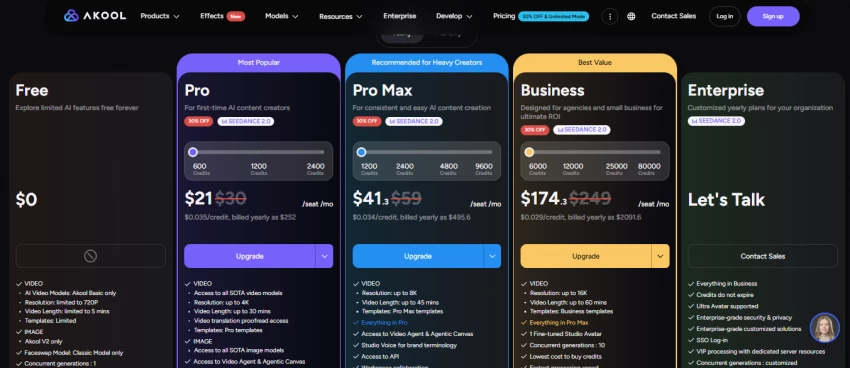
Exact prices change and differ by region and platform, so this compares value factors rather than numbers. Both commonly use credit-based models with free entry points, but they earn their cost differently. Akool's value depends on video, avatars, face swap, campaign tools, and business features.
Remaker's value depends on image editing volume, face swap credits, background tools, and export quality.

A common caution for both: video tasks can burn credits quickly, so estimate real usage, not headline limits.
| Pricing Area | Akool AI | Remaker AI | User Should Verify |
| Free plan | Free tier with caps | Free credits with limits | Current free allowances |
| Credit system | Credit-based | Pay-as-you-go credits | Credit cost per task |
| Monthly plans | Tiered plans | Credit packs and plans | Plan inclusions |
| Export quality | Higher-res claimed | Standard exports | Resolution per plan |
| Watermark rules | Free tier watermark | Free tier limits | Watermark on free output |
| Video limits | Length by plan | Short clips | Video length caps |
| Face swap limits | Per-plan limits | Per-credit limits | Swap counts and quality |
| Commercial use | Business plans | Per-plan terms | Commercial license scope |
| Team or business plans | Team and API | More individual | Seats and API access |
| Cancellation terms | Confirm terms | Confirm renewal terms | Auto-renewal and refunds |
Both tools handle faces and personal images, so the privacy and consent questions are not optional, especially for client work. The checklist pairs the question to ask each vendor with the risk of skipping it.
| Check Area | Akool AI Question | Remaker AI Question | Risk if Ignored |
| Uploading faces | How are face uploads stored? | How are face uploads stored? | Sensitive data exposed |
| Data retention | How long is data kept? | How long is data kept? | Long-term exposure |
| Training use | Are uploads used to train models? | Are uploads used to train models? | Loss of control over images |
| Account deletion | Can the account and data be deleted? | Can the account and data be deleted? | No way to fully leave |
| Consent for swaps | Is consent required and logged? | Is consent required and logged? | Non-consensual edits |
| Misleading edits | What edits are disallowed? | What edits are disallowed? | Deceptive or harmful content |
| Commercial rights | What does the license permit? | What does the license permit? | Monetizing without rights |
| Likeness limits | Are celebrity or brand likenesses blocked? | Are celebrity or brand likenesses blocked? | Rights and IP issues |
| Client work | Is output safe for client use? | Is output safe for client use? | Client and legal exposure |
| Agency approval | Is there an internal review path? | Is there an internal review path? | Unreviewed content shipped |
Mapping the choice to who you are makes it concrete. Reasons below are general guidance, so confirm with a quick test in your own workflow.
| User Type | Better Choice | Reason | Caution |
| Solo creator | Depends | Remaker for images, Akool for video | Match to your main output |
| Social media manager | Depends | Akool for video posts, Remaker for image posts | Check volume and credits |
| Marketing agency | Akool AI | Campaign video and team tools | Confirm seats and rights |
| eCommerce seller | Depends | Akool for promo video, Remaker for product images | Test output quality |
| YouTuber | Akool AI | Avatar and video face swap content | Verify export and length |
| AI photo editor | Remaker AI | Fast image edits and swaps | Source quality matters |
| Business training team | Akool AI | Avatar explainers and translation | Check commercial terms |
| Meme or casual creator | Remaker AI | Quick, fun image swaps | Use ethically with consent |
| Brand campaign team | Akool AI | Campaign-ready video assets | Approval and rights checks |
| Beginner user | Remaker AI | Lower setup for simple edits | Still review every output |
| Tool | Pros | Cons |
| Akool AI | Stronger video-first creative workflows; useful for avatars and marketing content where verified; better fit for teams and campaign-style content; more business-oriented use cases | May be more than casual users need; pricing and credits must be checked; video workflow may require more review; not every AI output will be publish-ready |
| Remaker AI | Quick AI photo edits; useful for face swaps and image cleanup; beginner-friendly for simple tasks; good fit for casual creative edits | May be less suitable for business video campaigns; output quality varies by source image; commercial rights and privacy terms must be checked; still needs ethical use and final review |
• You need AI video output rather than single edited images
• You want avatar-led content such as explainers or presenters
• You work on marketing campaigns that need repeatable video assets
• You need video face swap at higher resolution
• You create business presentations or explainer videos
• You work with a team or agency and need shared, API-friendly workflows
• You care about campaign-ready creative assets, not quick one-offs
• You need quick image face swaps, including multi-face or batch jobs
• You want fast background removal on photos
• You need casual photo edits without a heavy workflow
• You want simple AI image generation
• You edit portraits or social images
• You do not need a full video production workflow
• You prefer simpler, one-off editing with fast downloads
Neither tool exists in a vacuum. A short shortlist of others is worth a look depending on the output you care about most.
| Alternative | Better For | Reason to Compare |
| HeyGen | Avatar videos | Polished presenter avatars for marketing |
| Synthesia | Professional training avatars | Mature corporate and training video |
| Canva AI | Design workflows | Turns assets into finished, on-brand content |
| Fotor | Photo editing | Quick image edits and background tools |
| Runway | Creative video generation | Cinematic short-form generation and effects |
When the comparison blurs, this rule-based table cuts through it. Find the need, pick the tool.
| If You Need | Choose | Reason |
| Business avatar videos | Akool AI | Avatar video is a core Akool strength |
| Quick face swap images | Remaker AI | Image face swap is Remaker's specialty |
| Marketing campaigns | Akool AI | Campaign and team video workflows |
| Background removal | Remaker AI | Fast image background tools |
| Casual AI photo edits | Remaker AI | Simple, quick image editing |
| Team video workflows | Akool AI | Business and API-oriented features |
| Simple beginner edits | Remaker AI | Lower setup and learning curve |
| Video-first content | Akool AI | Built around video output |
After weighing the workflows, the split is clean. Akool AI is likely the better fit for users who want AI video, avatars, and business-oriented creative work, including video face swap and campaign assets. Remaker AI is likely the better fit for users who want quick image editing, face swaps, background removal, and casual creative visuals.
The honest answer to which is better is that it depends on whether your main output is video or image. Neither tool wins outright, and both need ethical use, source-quality awareness, and a final review before anything ships, especially for face swaps and client work.
The Practical Rule – Choose Akool AI if your content strategy is video-first. – Choose Remaker AI if your workflow is image-first. – Test both with the same source image or campaign idea before paying for a plan. |
Share your thoughts about this article.
Be the first to post a comment!

The same tool can be a 4.7 on one site and a 3.9 on another. Here is what is rea...
Nitin4 weeks ago

Here is the number worth pinning above your budget: in Gartner Digital Markets r...
Deepak Mehra4 weeks ago

What Artlist AI is in 2026Artlist began as a royalty-free music library. By 2026...
Deepak Mehra1 month ago

Most AI tool failures do not announce themselves. There is no crash, no angry em...
Nitin1 month ago

The best AI image generator in 2026 is Nano Banana 2 for speed, FLUX.2 for photo...
Parveen Verma1 month ago

“Useful” is a slippery word for a coding assistant. A tool can be brilliant at o...
Sakshi Dhingra1 month ago