The photo editing software market has been shaken harder in the past eighteen months than in the previous decade. Affinity, long the best-known one-time-purchase alternative to Adobe went completely free after Canva acquired it in late 2025.
Adobe restructured its Photography Plan and retired the beloved $9.99 tier for new subscribers. Apple bought Pixelmator. Adobe is in the process of acquiring AI specialist Topaz Labs. And virtually every editor on the market has bolted on AI masking, denoising, and generative tools of wildly varying quality.
Rather than skim across a dozen names, this guide goes deep on the five editors that genuinely matter for most people in 2026, one best-overall workflow tool, one professional retoucher, one free powerhouse, one subscription-free quality champion, and one AI-first option for fast results.
Each review covers the editor's core toolset, its AI capabilities, its real pricing and multi-year cost, and exactly who should (and shouldn't) choose it. The market data and cost-of-ownership analysis frame the whole decision.
Desktop photo editing software is a growing but maturing market. The most conservative 2026 estimates put the global market at roughly $1.2–2.5 billion depending on scope, growing at around 5–8.6% annually through the early 2030s. (Market-size figures vary widely between research firms depending on whether mobile apps and broader creative suites are included, treat absolute numbers as directional.)
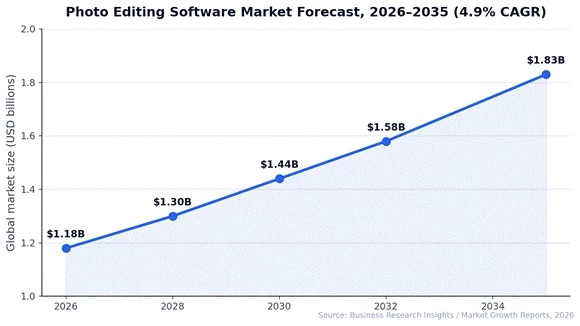
Figure 1: The core desktop photo editing market is forecast to grow ~4.9% annually through 2035.
A few numbers frame the competitive landscape:
• Adobe holds roughly 41% of the overall photo editing software market, and a dramatically higher share of professional and enterprise spending, Creative Cloud passed roughly 30 million subscribers in 2024.
• RAW editing tools account for about 61% of market revenue, reflecting how central serious photography workflows are to the category's economics.
• The prosumer segment, enthusiasts and creators between beginner and pro is the largest user tier at around 45.6% of the 2026 market.
• Around 48% of modern editing solutions now integrate AI-powered tools, and 58% of enterprise teams prefer cloud-based editors for collaboration.
• Humanity now shoots roughly 1.8 trillion photos a year, the raw fuel for all of this demand.
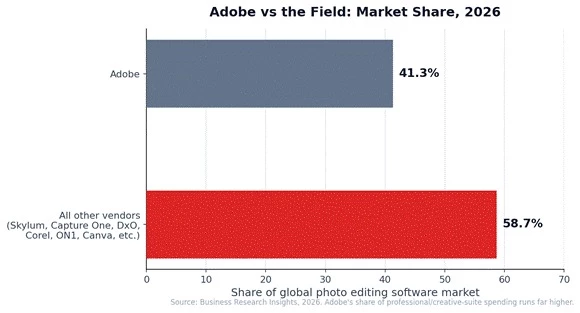
Figure 2: Adobe versus everyone, dominant, but far from unchallenged outside pro workflows.
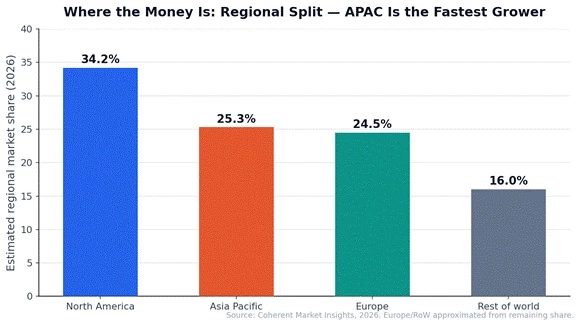
Figure 3: North America leads on revenue; Asia Pacific is the fastest-growing region and drives about 71% of global editing-app downloads.
Every pick was judged on five criteria: editing power (RAW processing quality, layers, masking, retouching depth), AI capability (denoising, subject selection, generative tools), workflow and library management, value (true multi-year cost, not sticker price), and learning curve. We deliberately narrowed the field to five because the market now clusters around five distinct buyer situations, the daily-workflow photographer, the professional retoucher, the zero-budget editor, the subscription-refuser who still demands top image quality, and the beginner who wants AI to do the heavy lifting. One deep review per situation beats ten shallow blurbs.
| Software | Pricing (2026) | Model | Category won |
| Adobe Lightroom Classic | $19.99/mo Photography Plan (with Photoshop + 1TB) | Subscription | Best overall workflow |
| Adobe Photoshop | In Photography Plan; $22.99/mo standalone | Subscription | Best for retouching & compositing |
| Affinity (by Canva) | Free | Free | Best free editor |
| DxO PhotoLab 9 | $239.99 one-time (Elite) | Perpetual | Best RAW quality, no subscription |
| Luminar Neo | Subscription-first (promos vary) | Subscription | Best AI-first editor for beginners |
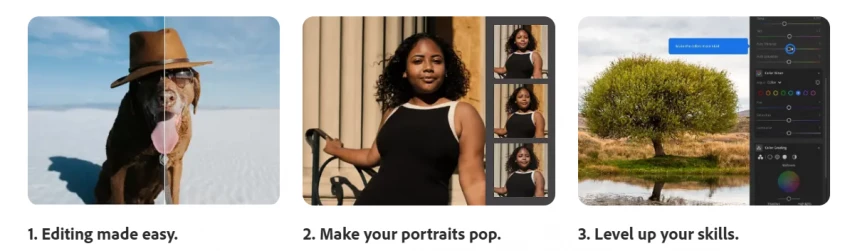
Lightroom Classic remains the default answer in 2026, and multiple professional reviewers, including photographers who have tested every major application on the market, still name it the best pick for most people. The reason isn't any single feature. It's that Lightroom is the only tool that handles the entire photographic workflow at the highest level: import, culling, organisation, RAW development, local adjustment, output, and sync across desktop, web, and mobile. Competitors beat it on individual battles; nothing beats it on the whole war.
The catalog is the foundation. Lightroom Classic manages libraries of hundreds of thousands of images with keywording, star ratings, colour labels, smart collections, and face recognition, and its culling tools make short work of a 3,000-frame wedding shoot. On the development side, the RAW engine delivers excellent colour and highlight recovery, with the full standard toolkit, tone curves, HSL, colour grading wheels, lens corrections, and profile-based looks.
Local adjustments have been transformed by AI masking: one click selects a subject, sky, or background; the People masks isolate skin, hair, teeth, and eyes individually for portrait work that used to demand Photoshop. Crucially, Adobe ships day-one RAW support for new cameras, if you buy a body released last month, your files just open. Perpetual-licence competitors can take months to catch up, which is a genuine operational issue for working photographers.
Three AI features carry their weight daily. AI Denoise produces remarkably clean high-ISO files (with a modern GPU strongly recommended, processing is dramatically faster). AI-powered masking, described above, has cut complex selection work from minutes to seconds.
And Generative Remove handles distraction cleanup, power lines, tourists, sensor dust, without a round-trip to Photoshop. Adobe's generative features draw on the same Firefly engine as Photoshop and consume generative credits, which matters for heavy users (more in the Photoshop review).
The Photography Plan at $19.99/month bundles Lightroom Classic, cloud-based Lightroom, Photoshop, and 1TB of cloud storage. That's roughly $240 a year and about $720 over three years. Important 2026 context: the legacy $9.99/20GB plan is closed to new subscribers, and plans are annual commitments billed monthly, early cancellation typically costs 50% of the remaining months.
The standalone Lightroom plan at $11.99/month excludes Lightroom Classic and Photoshop, which makes it poor value for desktop editors; almost everyone should take the full Photography Plan. Whether $720 over three years is fair depends entirely on frequency: daily editors amortise it easily, and the bundle (two industry-standard apps plus storage) is genuinely unmatched. Burst editors should read the DxO review.
| Strengths | Limitations |
| Best-in-class catalog and workflow at any scale | Subscription only, ~$720 over three years, rising |
| Day-one RAW support for new cameras | Annual commitment with early-cancellation penalty |
| Excellent AI masking, denoise, and remove tools | Performance can lag on very large catalogs without tuning |
| Photoshop and 1TB storage included in the plan | Generative features metered by credits |
| Seamless desktop–mobile–web sync | Old $9.99 tier gone; entry price effectively doubled |
Who it's for: photographers who shoot and edit regularly, manage growing libraries, and want one system that does everything, the professional default, and the right choice for most enthusiasts who edit weekly or more.
Photoshop is the program by which all photo editing software is judged, the industry standard for forty years and still the ceiling for pixel-level work in 2026. It is also frequently misunderstood as a Lightroom competitor. It isn't.
Photoshop has no photo catalog and its layer-based architecture is deliberately built for deep manipulation of individual images, not high-volume photo development. Veteran reviewers note that most of a modern photographic workflow happens in Lightroom, with Photoshop reserved for the images that need surgical work. Used that way, it has no equal.
The toolset's depth is the point. Layers, layer masks, blend modes, and adjustment layers enable fully non-destructive, infinitely revisable edits. Retouchers rely on frequency separation, dodge-and-burn workflows, and the healing/clone stack for skin and product work that must survive client scrutiny at 200% zoom.
Compositing tools: Select Subject, refined edge detection, perspective warp, smart objects, support everything from e-commerce cutouts to cinematic composites. Camera RAW, embedded within Photoshop, provides the same develop engine as Lightroom for single-image RAW work. For graphic design, typography, mockups, and brand assets, it remains the tool client work is expected to arrive in.
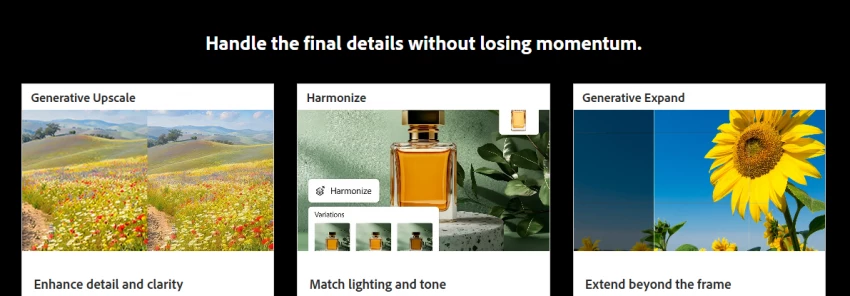
Firefly-powered Generative Fill and Generative Expand are the most polished mainstream generative tools in any editor: select an area, describe what you want (or nothing at all), and Photoshop synthesises content that matches lighting and grain surprisingly well.
Distraction Removal and improved Select Subject round out the AI stack. The caveat is metering: standalone Photoshop includes only about 25 generative credits per month, while the Photography Plan carries a larger allowance, but AI-heavy users can exhaust allowances and face top-up purchases. Budget for this if generative editing is central to your work.
Here's the pricing trap to avoid: standalone Photoshop costs $22.99/month, yet the $19.99/month Photography Plan includes Photoshop and Lightroom and 1TB of storage. Buying Photoshop alone is effectively paying more for less, and exists mainly for corporate procurement.
Via the bundle, Photoshop's marginal cost to a photographer is zero, which is precisely why competitors have such a hard time displacing it. Note also that in early 2026 Adobe has been running aggressive promotions on its broader Creative Cloud Pro tier, worth checking if you need video or design apps too.
| Strengths | Limitations |
| Unmatched retouching and compositing depth | No photo catalog, not a workflow tool |
| Best-in-class generative AI (Fill / Expand) | Generative credits meter heavy AI use |
| Industry-standard file format for client work | Steepest learning curve in this guide |
| Included at no extra cost in the Photography Plan | Standalone plan is poor value at $22.99/mo |
| Massive ecosystem of plugins, actions, tutorials | Overkill for straightforward photo development |
Who it's for: professional retouchers, designers, and any photographer whose work regularly demands compositing, deep cleanup, or client-ready design output, obtained through the Photography Plan, essentially free alongside Lightroom.
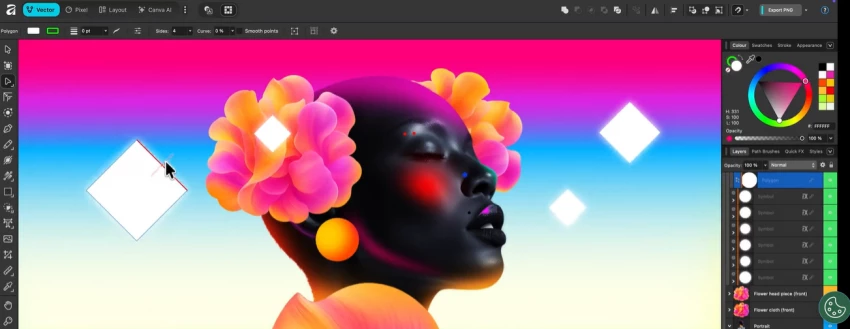
The single biggest story in this market since the subscription era began: after Canva acquired Serif, the Affinity creative suite became completely free in late 2025. This is not a stripped-down teaser. Affinity's photo editor was a respected paid product for a decade, the tool sceptics of Adobe's subscription model bought first, and what is now free is a professional-grade application: full layer-based editing, RAW development, and print-ready output, now unified with Affinity's design and layout tools and available on desktop and iPad. Reviewers across the photography press have updated their guides to say the previously unthinkable: the best free photo editor is no longer a compromise.
Affinity's editing model will feel familiar to anyone who has touched Photoshop: layers, masks, blend modes, adjustment layers, and live filters that stay editable indefinitely. Its selection and refinement tools handle hair and complex edges credibly; frequency separation and dedicated retouching tools cover portrait work; and its RAW develop persona processes camera files with solid colour and recovery.
It handles PSD files well, opening and exporting them with layers largely intact, a practical necessity when collaborating with Adobe-based clients. Performance has long been a quiet strength: it's fast, GPU-accelerated, and light on system resources compared to its Adobe counterparts.
This is where the free model shows its shape. Core editing is free forever, but several AI-powered features connect to Canva's ecosystem, where a Canva Premium subscription unlocks generative capabilities.
The strategy is transparent enough: Affinity is the professional on-ramp, Canva AI is the monetisation. As of mid-2026 the free core is genuinely complete for traditional editing; just don't expect Firefly-grade generative fill without entering Canva's paid tier.
Free. Not freemium-with-watermarks, not a trial, the full editor costs nothing, which makes its value analysis the shortest in this guide and its three-year cost of ownership exactly $0 against Adobe's ~$720.
The honest limitations are structural rather than financial: there is no Lightroom-class catalog (Affinity is an editor, not a library manager, pair it with free Darktable or XnView for organisation), no cloud sync ecosystem, and new-camera RAW support arrives on Serif's schedule, not day one. The strategic question, how Canva's ownership shapes the product long-term, is worth watching, but is a reason for attention, not avoidance.
| Strengths | Limitations |
| Professional layered editing, completely free | No built-in catalog / library management |
| Strong PSD compatibility for Adobe collaboration | AI/generative features tie into paid Canva ecosystem |
| Fast, efficient, GPU-accelerated performance | New-camera RAW support lags Adobe's day-one pace |
| Desktop and iPad versions | No cloud sync workflow between devices |
| No account lock-in, subscription, or watermarks | Long-term roadmap under Canva still unproven |
Who it's for: students, hobbyists, budget-conscious creators, and even working editors who need serious layered editing without Lightroom-style cataloguing, and the automatic first stop for anyone whose software budget is zero.
DxO Labs built its reputation measuring lenses and sensors scientifically, and PhotoLab is that laboratory DNA turned into an editor. Its pitch is simple and, for a specific kind of photographer, irresistible: the best RAW output money can buy, purchased once. Reviewers consistently name PhotoLab 9 the pick for photographers who refuse subscriptions but won't compromise on image quality, the strongest perpetual-licence editor of 2026.
Two technologies define it. First, DeepPRIME noise reduction, widely considered the best in the business, which turns ISO 3200-and-above files from concerts, wildlife hides, and dim reception halls into images that look shot at base ISO, with a quality margin over rivals that high-ISO shooters describe as decisive. Second, DxO's optics modules: laboratory-measured correction profiles for thousands of camera-lens combinations that fix distortion, vignetting, chromatic aberration, and lens softness with an accuracy generic profiles can't match.
Around these sit a capable full editor, U Point-based local adjustments (click a point, adjust everything it intelligently selects), ClearView haze cutting, solid colour tools, and batch processing. PhotoLab can also run as a plugin inside Lightroom or Photoshop, so Adobe users routinely buy it purely as a denoising engine, the clearest possible endorsement of its output quality.
DxO's AI philosophy is quality-first rather than generative: DeepPRIME's neural denoising and demosaicing is genuinely deep learning applied where it measurably improves files, and newer releases have added AI-driven masking to speed local adjustments.
What you will not find is sky replacement or generative fill, DxO builds instruments, not effects. Pair it with Affinity (free) if you occasionally need pixel-level manipulation.
PhotoLab 9 Elite costs $239.99 as a one-time purchase; you pay again only if you choose to upgrade to a future major version. Three-year cost: $240 versus Adobe's ~$720, and industry surveys suggest around 62% of hobbyists prefer exactly this perpetual model.
The trade-offs are the classic perpetual ones: its photo library is serviceable but well behind Lightroom's catalog for large-scale organisation, there's no mobile/cloud ecosystem, and support for newly released cameras arrives with a lag rather than day one. For the burst editor intense sessions after trips and events rather than daily throughput, those trade-offs are usually invisible, and the savings buy a lens.
| Strengths | Limitations |
| DeepPRIME: best-in-class high-ISO noise reduction | Library management well behind Lightroom Classic |
| Lab-measured lens/camera corrections | No mobile app or cloud sync ecosystem |
| One-time $239.99 no subscription, ever | New-camera support lags Adobe's day-one pace |
| Runs standalone or as a Lightroom/Photoshop plugin | No generative AI tools |
| U Point local adjustments are fast and intuitive | Upgrade pricing adds cost if you chase every version |
Who it's for: quality-obsessed photographers, especially high-ISO shooters, who edit in bursts, own their tools on principle, and will happily trade cloud ecosystems for the cleanest RAW files on the market.
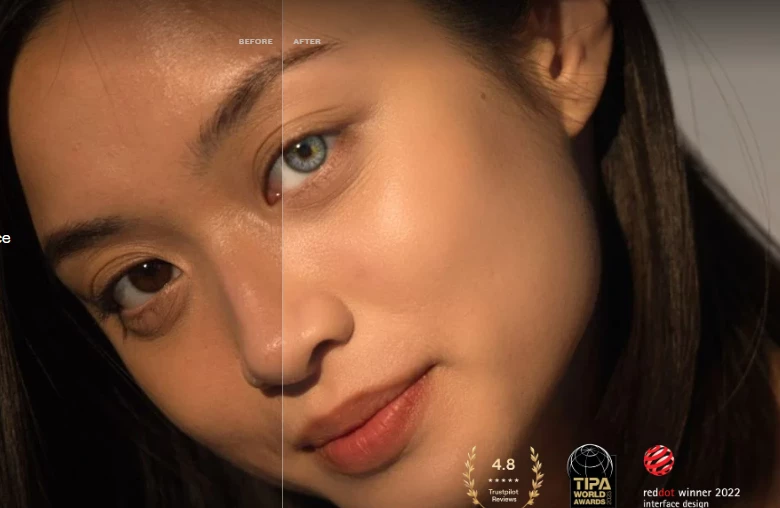
Skylum's Luminar Neo approaches editing from the opposite direction to DxO: instead of maximising measured fidelity, it asks how much of the editing craft AI can simply do for you. The answer, in 2026, is a lot.
One prominent hands-on reviewer this year named it their overall winner precisely because it balances one-click AI speed with proper manual control underneath, you can let the AI drive, then take the wheel. That combination makes it the strongest recommendation for beginners and enthusiasts who want striking results without a season of tutorials.
The AI toolset is the headline. Sky replacement swaps overcast skies for dramatic ones with automatic relighting of the scene so the composite reads as real. Relight lets you adjust foreground and background illumination independently after the fact, using AI depth mapping. Portrait tool, face light, skin refinement, AI bokeh deliver flattering retouching without masking skills, and generative erase removes distractions cleanly.
Crucially, beneath the one-click layer sits a real editor: RAW development, layers, masking (including AI subject masks), selective colour and clarity, and a deep filter/preset system. It is slower in operation than Lightroom, as reviewers note, but comfortably fast enough in real-world use, and the structure-versus-magic balance is the product's genuine achievement.
Where Luminar concedes ground is volume workflow. Its catalog is basic next to Lightroom Classic, fine for hundreds of images, strained by a professional's hundreds of thousands, and batch-processing depth, tethering, and colour-managed print workflows aren't its game. It also can't match DxO's noise reduction at extreme ISOs.
Luminar works as a plugin for Lightroom and Photoshop, which is how many advanced users deploy it: Adobe for workflow, Luminar for its sky, relight, and portrait tools.
Pricing is the moving target. Skylum has shifted Luminar Neo toward subscription-first pricing during 2025–26 (a change flagged by photography publications tracking the product), while promotional lifetime deals still surface periodically.
That drift matters for the value calculation: Luminar's historical appeal was AI power at a one-time price, and a subscription puts it in direct comparison with Adobe's far deeper bundle. Practical advice, check the current offer, and if a lifetime licence promotion is running, it remains excellent value; the 30-day money-back guarantee makes trying it risk-free either way.
| Strengths | Limitations |
| Best one-click AI editing (sky, relight, portrait) | Basic catalog, not built for huge libraries |
| Works as a plugin inside Lightroom/Photoshop | Noise reduction trails DxO at extreme ISOs |
| 30-day money-back guarantee | Pro workflow tools (tethering, soft-proofing) limited |
Who it's for: beginners and enthusiasts who want dramatic, share-ready images fast, and advanced users who want its AI tools as a plugin beside an Adobe workflow.
Sticker prices mislead. A subscription looks cheap monthly and expensive over years; a perpetual licence looks expensive up front and cheap over years, until paid upgrades enter the picture. Here's the three-year math at 2026 prices, including the studio-grade Capture One and budget ON1 for context:
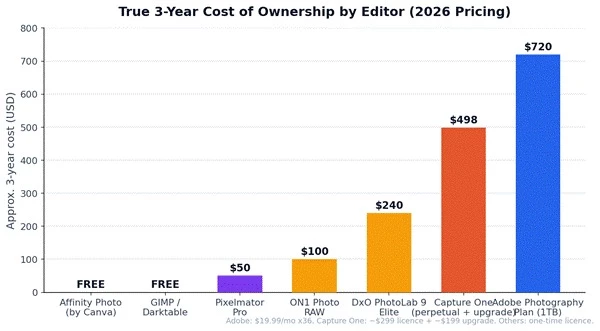
Figure 4: Three-year cost of ownership. Adobe runs ~$720 over three years; perpetual options $0–$500.
The honest read: Adobe's $720-over-three-years buys continuous updates, day-one camera support, 1TB of cloud storage, and two industry-standard apps, defensible if you edit constantly.
But with 62% of hobbyists preferring perpetual licences and the free tier stronger than it has ever been, the right frame is editing frequency: daily editors amortise a subscription easily; burst editors get better value from DxO or the free tier.
| Your profile | Best pick | Why |
| Professional / daily editor | Adobe Photography Plan | Complete workflow, day-one camera support, Photoshop included |
| Retoucher / designer | Photoshop (via Photography Plan) | Unmatched depth; effectively free beside Lightroom |
| Anyone spending $0 | Affinity by Canva (+ Darktable) | Pro-grade layered editing free; Darktable adds cataloguing |
| Quality-obsessed, anti-subscription | DxO PhotoLab 9 | Best RAW output and noise reduction; pay once |
| Beginner who wants fast AI results | Luminar Neo | One-click AI with real manual controls underneath |
• Consolidation is accelerating. Canva bought Affinity and made it free. Apple bought Pixelmator. Adobe is acquiring Topaz Labs. The independent mid-tier is being absorbed by platforms, great for prices today, worth watching for lock-in tomorrow.
• AI has moved from gimmick to table stakes. Roughly 48% of editing solutions now ship AI tools. The differentiators are quality (DxO's denoising, Adobe's generative fill) and cost model, Adobe's generative-credit system means heavy AI use now carries metered costs on top of subscriptions.
• The free tier is genuinely good now. Affinity free, GIMP 3, Darktable, and DaVinci Resolve's new Photo page mean 'I can't afford editing software' is no longer a real constraint, pressure that will keep discounting the paid mid-market.
If you want one answer: Adobe Lightroom Classic is still the best photo editing software for most photographers in 2026, the workflow, ecosystem, and camera support justify the subscription for anyone editing regularly, and Photoshop rides along at no extra cost. But the more interesting truth is that the alternatives have never been stronger.
DxO PhotoLab 9 delivers arguably better RAW output for a single payment. Affinity delivers professional layered editing for nothing. Luminar Neo makes advanced-looking edits accessible to complete beginners.
The market's centre of gravity is shifting from 'which tool is most powerful' to 'which pricing model respects how often you actually edit', and on that question, for the first time in a decade, Adobe has real competition at every price point, including zero.
Share your thoughts about this article.
Be the first to post a comment!

Choosing growth software in 2026 means finding five winners inside a catalog of...
Sakshi Dhingra1 month ago

The short version, for anyone who does not want to read 5,000 wordsCopper is a C...
Sakshi Dhingra2 months ago

If you've spent any time around tax professionals in the United States, you've h...
Harpreet Singh2 months ago

The short versionQuicken sells two entirely separate things. Quicken Classic is...
Harpreet Singh2 months ago

Here is a small confession most security writers avoid making: you probably do n...
Deepak Mehra2 months ago
A code kata is a small exercise you repeat until the technique becomes instinct....
Harpreet Singh3 months ago