The short version Quicken sells two entirely separate things. Quicken Classic is desktop software for Windows and Mac that keeps data on the machine. The Web and Mobile family, made up of Quicken Simplifi, Quicken Business & Personal and Quicken LifeHub, is cloud based and runs in a browser or on a phone. They do not share data. Advertised prices are first year promotional rates. Standard renewal rates run 67 percent higher on Classic and 100 percent higher on the cloud products, which changes the buying decision considerably. Classic remains the deepest consumer finance tool available, particularly for investors, landlords and the self employed who need Schedules C, E and F. Nothing else in the consumer market covers that ground. The weaknesses are consistent and well documented: bank connection errors, a mobile app that trails purpose built rivals, an interface that shows its age, and a meaningful set of Classic features that Windows gets and Mac does not. Every plan carries a 30 day money back guarantee, and Quicken products are designed for the United States and Canada only. |
| What it is | Personal finance software covering budgeting, bill tracking, investments, net worth, retirement planning and, on some plans, small business and rental accounting. |
| Company | Quicken Inc., headquartered at 3760 Haven Avenue, Menlo Park, California. Chief executive Eric Dunn. |
| Ownership | Majority owned by Aquiline Capital Partners since 2021, having been bought from Intuit by H.I.G. Capital in 2016. No longer connected to Intuit in any way. |
| Age and scale | Launched in 1983. Quicken describes Classic as trusted for over 40 years and the wider business as serving more than 20 million people. |
| Product families | Classic Desktop (Starter, Deluxe, Premier, Business & Personal, Family Enterprise) and Web and Mobile (Simplifi, Business & Personal, LifeHub). |
| Price range | From $2.99 per month promotional to $9.99 per month standard, all billed annually. There is no free plan. |
| Bank connections | Quicken cites connections to over 14,000 financial institutions. |
| Trial terms | 30 day money back guarantee rather than a free trial. Payment is taken upfront. |
| Geography | Designed for the United States and Canada. Not built to function elsewhere. |
| Best for | Investors, landlords, the self employed, and households with genuinely complicated finances. |
| Weakest at | Mobile experience, interface modernity, and consistency of bank connections. |
Most confusion about Quicken, and most of the buyer regret, traces back to a single fact that the marketing does not make especially loud. Quicken is currently two separate software families that happen to share a brand.
One is Quicken Classic, the desktop application that has existed in some form since 1983. It installs on Windows or Mac and stores the data file on the computer. The other is the Web and Mobile family, which is cloud based, runs in a browser or a phone app, and stores data on Quicken servers.
These are not two views of the same account. They are different products with different codebases, different feature sets, different prices and separate subscriptions. Data does not flow between them.
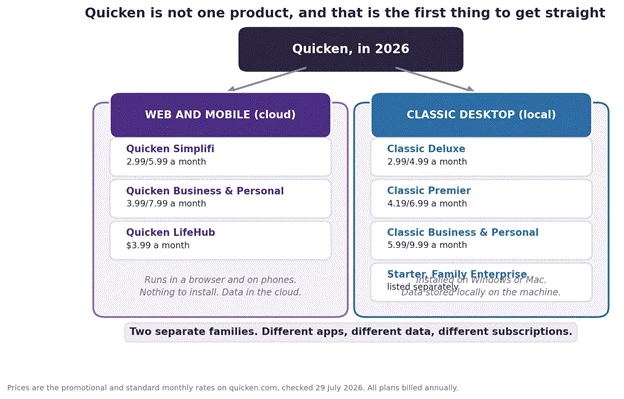
The figure above lays out the whole catalogue in one view. The left column is cloud, the right is desktop. Anyone searching for Quicken software and landing on a pricing page without noticing which family they are looking at can easily buy something that does not do what they expected. The prices shown are the promotional rate followed by the standard rate.
The clearest example of how confusing this gets is that a product called Business & Personal exists in both families, at different prices, with different capabilities.
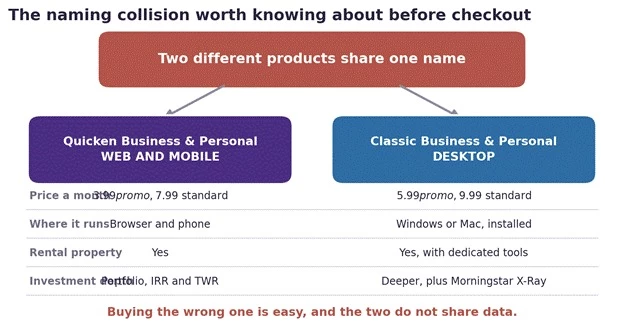
The figure above puts the two identically named products side by side. One is a cloud app at $3.99 a month promotional. The other is desktop software at $5.99 a month promotional. Both handle rental property and both handle business income, but they are separate purchases running on separate platforms, and switching later means moving data by hand rather than flipping a setting.
Quicken bills annually across every product, quotes prices as a monthly figure, and runs near permanent promotional pricing on the first year. Understanding the gap between those two numbers is the single most valuable thing a prospective buyer can do.
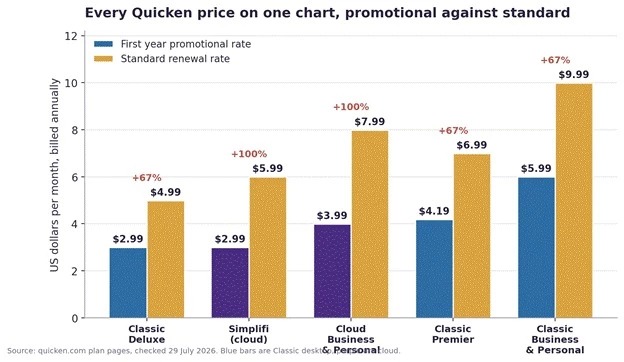
The figure above shows every current Quicken price, promotional against standard. The blue bars are Classic desktop products and the purple bars are cloud. The percentage above each pair is the size of the step up once the introductory year ends. Note that Classic Deluxe and Simplifi both start at $2.99 a month, then diverge sharply.
| Plan | First year | Standard | What it adds |
| Classic Deluxe | $2.99 a month | $4.99 a month | Budgets with unlimited categories and tags, debt tools, investment tracking, capital gains estimator, Schedules A, B and D, Lifetime Planner on Windows. Bill pay is a paid add on. |
| Classic Premier | $4.19 a month | $6.99 a month | Everything in Deluxe plus venture capital and employee stock option accounts, Zillow home values, real time quotes, Morningstar Portfolio X-Ray on Windows, FBAR reporting, direct bill pay and premium support. |
| Classic Business & Personal | $5.99 a month | $9.99 a month | Everything in Premier plus accounts payable and receivable, Schedules C, E and F, business profit and loss reporting, invoicing, online payments and rental property tools. |
| Classic Starter | Listed separately | Listed separately | An entry product that sits outside the main comparison table. Quicken explicitly excludes it from promotional offers. |
| Plan | First year | Standard | What it covers |
| Quicken Simplifi | $2.99 a month | $5.99 a month | Personal finances only. Spending plan, savings goals, projected cash flow, portfolio view with real time quotes, IRR and TWR performance, retirement planner, credit score tracking and Schedules A and B. |
| Quicken Business & Personal | $3.99 a month | $7.99 a month | Everything in Simplifi plus business accounts, Schedules C, E and F, business reporting, invoicing with Stripe payments, client and project tracking, and rental property. |
| Quicken LifeHub | $3.99 a month | Not published | A document vault rather than a finance tool. Stores identity documents, insurance details, accounts and contacts, and is sold as a bundle addition. |
Promotional pricing applies to the first year only, for new memberships ordered directly from Quicken, and the subscription then renews automatically at the rate current at that time. This is stated plainly in Quicken’s own footnotes, but it sits well below the prices themselves.
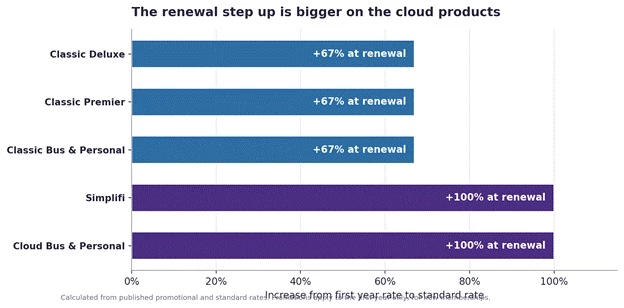
The figure above isolates the size of that increase. Classic products rise by 67 percent. The cloud products double. Anyone comparing Quicken against a rival on first year pricing alone is comparing a discounted number against a standing one, which is not a fair test and usually flatters Quicken.
Personal finance software is not a product people churn through quickly. The data becomes more valuable the longer it accumulates, which is precisely why the renewal rate matters more than the introductory one.
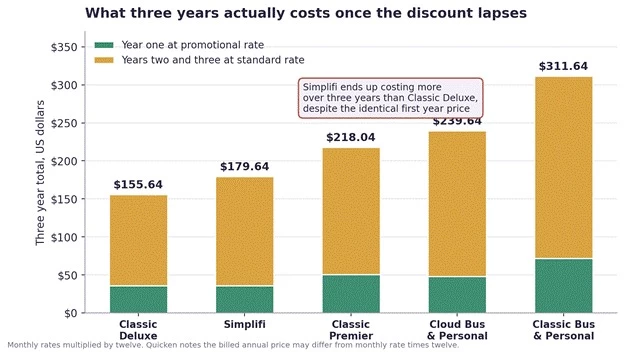
The figure above models three years of ownership at published rates. The result contains a genuine surprise. Simplifi and Classic Deluxe both start at $2.99 a month, but over three years Simplifi costs roughly 24 dollars more, because it renews at $5.99 rather than $4.99. Anyone choosing between them on the headline price is choosing on a number that stops being true after twelve months.
| Product | Year one | Years two and three | Three year total |
| Classic Deluxe | $35.88 | $119.76 | $155.64 |
| Quicken Simplifi | $35.88 | $143.76 | $179.64 |
| Classic Premier | $50.28 | $167.76 | $218.04 |
| Cloud Business & Personal | $47.88 | $191.76 | $239.64 |
| Classic Business & Personal | $71.88 | $239.76 | $311.64 |
A footnote worth reading before budgeting Quicken states in its own small print that discounts are calculated on the annual price, and that the final price may differ from the monthly discounted price multiplied by twelve. The annualised figures above are therefore close estimates rather than exact invoice amounts. Two further conditions apply. Promotional pricing is for new memberships only and requires ordering directly from Quicken before the stated deadline, which at the time of checking was late August 2026. And the offer explicitly does not apply to Classic Starter. |
The advertised monthly rate is not always the whole bill. Several items are sold separately, and one of them changes the maths on the entry tier entirely.
• Bill Manager. Paying bills directly from within Quicken is included on Classic Premier and Classic Business & Personal. On Classic Deluxe it is an add on, which Quicken lists as starting at $9.95 a month.
• Online Backup. Cloud backup of a locally stored Classic data file is sold as a separate product rather than bundled into the subscription.
• Printed cheques. Cheque stock compatible with Quicken is ordered separately through the company’s own store.
The Bill Manager point deserves emphasis because it inverts an apparently obvious decision. Classic Deluxe costs $2.99 a month promotionally and $4.99 standard. Adding bill payment at $9.95 a month costs more than the subscription itself, and takes the combined figure well past Classic Premier at $4.19 promotional or $6.99 standard, which includes direct bill payment outright. Anyone who intends to pay bills from inside Quicken should price Premier before assuming Deluxe is the economical choice.
Quicken gates features by tier in a cumulative way, so each plan contains everything below it. The gaps are not always where a buyer would guess.
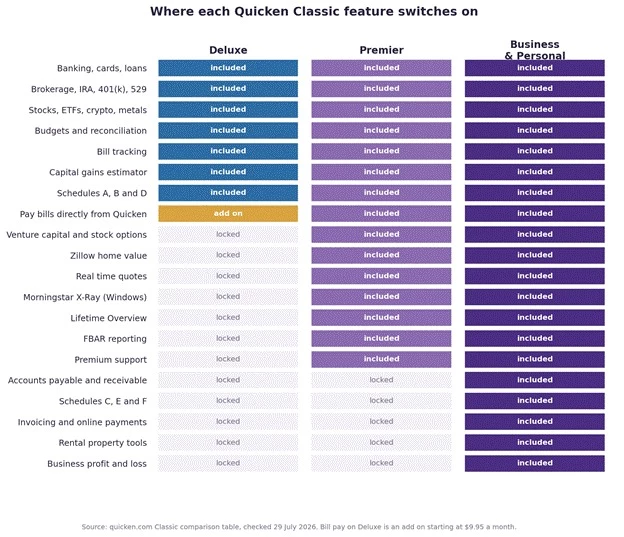
The figure above maps twenty capabilities across the three main Classic tiers. Two things stand out. Deluxe covers far more than its position suggests, including full investment tracking and capital gains estimation, but it cannot pay bills without a paid add on that starts at $9.95 a month. And the entire business and rental layer, including Schedules C, E and F, sits only on Business & Personal, with no middle option.
The figure above shows the far simpler cloud split. Simplifi is a complete personal finance tool including retirement planning, real time quotes and performance measurement. The only thing separating it from Business & Personal is business and rental capability. For anyone with no business income, the upgrade buys nothing.
This deserves its own section because it is the single most under reported thing about Quicken Classic, and because it is genuinely consequential for anybody buying on a Mac.
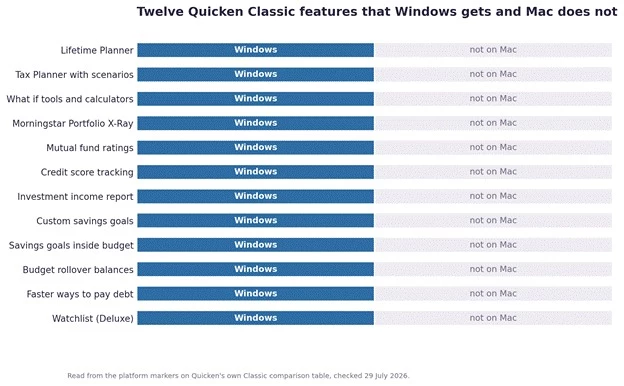
Quicken Classic runs on both Windows and Mac, and Quicken says so clearly. What is less prominent is that a meaningful set of Classic features carry a Windows only marker on Quicken’s own comparison table.
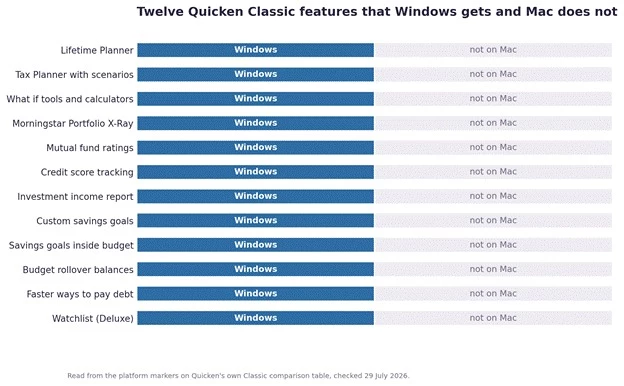
The figure above lists twelve Classic features marked Windows only. The Lifetime Planner and the Tax Planner are on that list, and both are among the most cited reasons for choosing Classic over a cheaper rival. So is Morningstar Portfolio X-Ray, credit score tracking within Classic, and budget rollover balances. A Mac buyer paying Premier prices for retirement modelling should confirm what actually ships on their platform before purchase.
This is the core of the argument for Quicken and it is a strong one. Classic tracks account types most rivals do not acknowledge exist: brokerage, individual retirement accounts, 401(k) and 403(b), 529 plans, bonds, options, cryptocurrency, precious metals, multicurrency holdings, venture capital, private equity limited partnerships and employee stock options. It handles loans with amortisation schedules and assets with Zillow linked home values.
For a household with a genuinely complicated balance sheet, the alternatives are not other budgeting apps. The alternatives are a spreadsheet or an accountant.
Built in tax schedules are Quicken’s quiet moat. Schedules A, B and D come with the personal plans, and Business & Personal adds C, E and F, which cover self employment, rental property and farm income. Data exports to tax programs directly.
Budgeting focused rivals generally do not attempt this. For a freelancer with a rental property, that difference is worth considerably more than a nicer interface.
Classic keeps the data file on the user’s own machine, with cloud backup as an option rather than a requirement. In a category where several well known services have closed and taken user access with them, an offline file that continues to open regardless of what happens to the vendor is a real form of insurance. Quicken also operates a data access guarantee that preserves the ability to view and export data after a membership lapses.
Quicken cites connections to more than 14,000 financial institutions, a number built over four decades of relationships. It also supports multiple separate data files, which suits people who track a personal budget alongside something else entirely, such as a parent’s accounts or a small community organisation.
The complaints about Quicken are unusually consistent across review platforms, which makes them easy to summarise honestly.
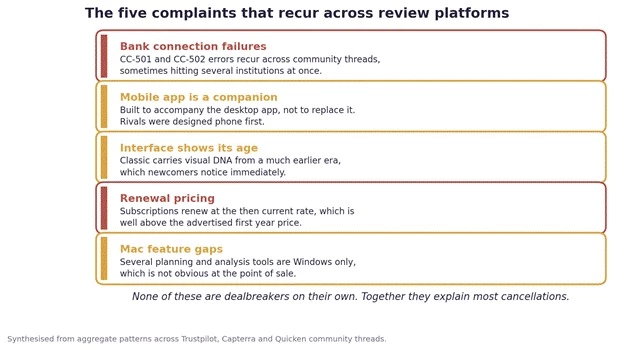
The figure above groups the five recurring themes. The connection errors are the most damaging, because a finance tool that fails to pull transactions is not doing the one job that justifies the subscription. Community threads document these failures across multiple institutions, sometimes simultaneously. It is worth saying that bank aggregation is genuinely hard and every competitor has some version of this problem, but Quicken attracts more of the complaints because it has more users and more account types.
Quicken Classic’s mobile app exists to accompany the desktop application, with two way sync between them. It was never intended to be the primary interface, and it shows. Rivals built in the last decade were designed phone first, and for anyone who wants to manage money mainly from a phone, that gap is the most visible weakness in the Classic lineup. The cloud family closes it, but at the cost of the depth that made Classic worth buying.
Classic looks like software with a long lineage, because that is exactly what it is. Experienced users tend to regard the density as a feature rather than a fault, since the information is genuinely there. Newcomers coming from a modern app usually find it dated on first contact. Both reactions are reasonable.
There is no free plan and no conventional free trial. The 30 day money back guarantee means paying first and requesting a refund if it does not suit, which is a meaningfully higher barrier than simply signing up and looking around. Several competitors offer either a free tier or a no payment trial.
Quicken states plainly that its products are not designed to function outside the United States and Canada. A separate Canadian edition exists. For anyone elsewhere, this is not a limitation to work around, it is a reason to look at something else entirely.
Quicken has changed hands twice in the last decade, and the ownership question turns out to matter for anyone deciding whether to commit years of financial history to the product.
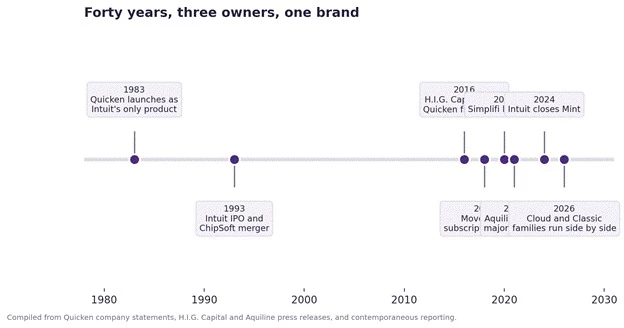
The figure above traces the arc from 1983 to today. Quicken began as Intuit’s only software product, which is why its chief executive describes it as the first fintech. Intuit sold it to H.I.G. Capital in April 2016, and Eric Dunn, who had joined Intuit as its fourth employee in 1986, became chief executive at the same time. Aquiline Capital Partners acquired a majority stake in a deal announced in September 2021 and completed that October, with Dunn and other employees retaining equity.
Under Dunn the company moved to a subscription model in 2018, launched Simplifi in 2020 and rebranded in 2023. The pattern is a mature product being steadily modernised rather than a business winding down, which is the relevant question when choosing where to store a decade of records.
This confuses people constantly and the confusion is entirely understandable. Dan Gilbert founded Rock Financial in the 1980s and licensed the Quicken brand from Intuit to trade as Quicken Loans. That business is now Rocket Mortgage. The licensing arrangement survived Intuit’s sale of the software, which is why Quicken’s own website carries a footnote stating that Quicken is a registered trademark of Rocket Mortgage, LLC, used under license.
The practical position is that the software company licenses its own name from a mortgage lender it has no ownership connection to. The two share no management and no financial relationship. Anyone budgeting in Quicken and anyone applying for a mortgage through Rocket are dealing with entirely separate businesses.
The competitive landscape shifted sharply when Intuit closed Mint in 2024, pushing millions of users into the market at once. Many landed on Quicken as the established option, and a portion of them then discovered that newer tools had caught up on the things they actually cared about.
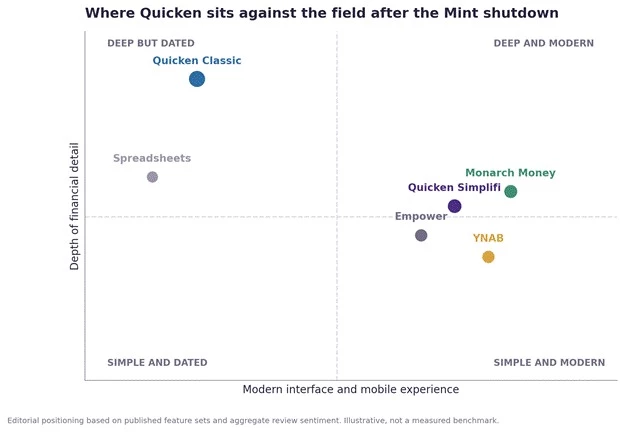
The figure above places the main options on two axes that matter to buyers. Quicken Classic sits alone in the top left: more depth than anything else, wrapped in the least modern interface. Monarch and Simplifi occupy the comfortable middle. The chart is an editorial judgement based on published feature sets and aggregate review sentiment, not a measured benchmark, and it is offered as a way to frame the trade off rather than as a score.
| Alternative | Where it beats Quicken | Where Quicken still wins |
| Monarch Money | Modern interface, strong household and couple collaboration, much better mobile experience, imports Quicken data | Investment depth, tax schedules, rental and business accounting, local data storage |
| YNAB | A genuine budgeting methodology rather than passive tracking, strong behavioural results for people who commit to it | Breadth. YNAB does budgeting and little else, with limited investment capability |
| Empower | Free, with excellent investment and net worth analysis | Budgeting depth, tax preparation, business features. Empower monetises through advisory outreach |
| Copilot Money | Polished mobile first design and strong automation | Almost everything structural: tax schedules, business accounting, account type coverage |
| Spreadsheets | Free, completely private, infinitely customisable | Automation. Every transaction is manual, which is why most spreadsheet systems quietly die |
Competitor pricing changes frequently and was not verified first hand for this article. The comparison above is positional rather than numerical, and rival pricing should be checked directly before any purchase decision.
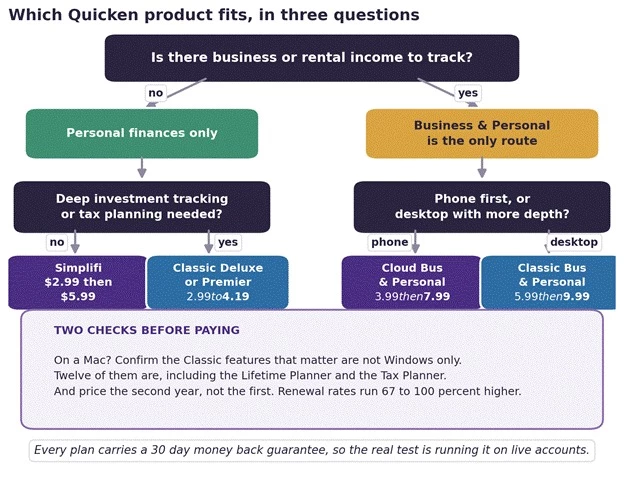
The figure above reduces the catalogue to three questions. Business or rental income is the first fork because it eliminates most of the range immediately. After that the choice is really about platform preference and how much investment and tax machinery is needed. The two warnings at the bottom are the ones that generate the most regret when ignored.
| Situation | Recommendation | Reasoning |
| Straightforward budgeting, phone first | Quicken Simplifi | Modern, cloud based, covers spending, goals, cash flow and even retirement planning. No desktop install. |
| Serious investor on Windows | Classic Premier | Real time quotes, Morningstar X-Ray, Lifetime Planner and Tax Planner all present on Windows. |
| Serious investor on Mac | Check carefully first | Several headline planning tools are Windows only. The 30 day guarantee is the safety net here. |
| Self employed or a landlord | Business & Personal | Schedules C, E and F plus invoicing and rental tools. Choose cloud or desktop on platform preference. |
| Casual budgeter who wants free | Look elsewhere | Quicken has no free tier and takes payment upfront. Free alternatives cover basic tracking adequately. |
| Based outside the US or Canada | Look elsewhere | Quicken states its products are not designed to function outside those two markets. |
Migration is where personal finance software either earns loyalty or loses it, and Quicken’s position here is mixed.
Quicken for Windows imports from Quicken for Windows 2010 or newer, and from Microsoft Money 2008 and 2009 on Deluxe and above. Quicken for Mac imports from Quicken for Windows 2010 or newer, Quicken for Mac 2015 or newer, Quicken for Mac 2007, Quicken Essentials for Mac and Banktivity. That is an unusually generous list, and reflects how long the product has been absorbing refugees from other tools.
Exports run to spreadsheet formats and to tax software, and the data access guarantee preserves the ability to view and export records after a membership ends. The practical caveat reported by users moving to other platforms is that investment lot level history does not transfer cleanly to most rivals, and often has to be rebuilt by hand. Anyone with years of cost basis records should treat that as a genuine switching cost rather than an afterthought.
A sensible habit regardless of platform: export a full copy of the data before any cancellation or migration, while the subscription is still active.
Quicken in 2026 is a specialist tool wearing the clothes of a mass market one. That mismatch explains most of the disappointment it generates and most of the loyalty it retains.
For the household that needs it, there is no real substitute. A freelancer with a rental property, a brokerage account and a mortgage can produce something close to a full financial picture and a tax ready set of schedules from one application. No budgeting app built in the last decade attempts that, and the ones that come closest do so by being accounting software instead.
For everyone else, Quicken asks for patience it has not entirely earned. The interface is dense, the mobile experience trails, connections need occasional attention, and the price rises substantially once the first year ends. A person who wants to know where their money went last month is buying a great deal of machinery they will never switch on.
The practical route through this is to use the 30 day guarantee properly. Connect the real accounts rather than a sample, run a full month, and attempt the one report or schedule that actually motivated the purchase. Whether that feels like relief or like homework is the answer.
Editorial score: 7.9 out of 10 Depth of features: 9.5. Tax and business capability: 9.2. Data ownership and portability: 8.4. Value for money: 7.0. Interface and ease of use: 6.4. Mobile experience: 5.8. Pricing transparency: 6.0. Scored against the Editorial Consumer Software Evaluation Methodology described below. The composite reflects a product that is close to unmatched at what it was built for and distinctly average at what most buyers think they are buying. |
Share your thoughts about this article.
Be the first to post a comment!

Choosing growth software in 2026 means finding five winners inside a catalog of...
Sakshi Dhingra1 month ago

The short version, for anyone who does not want to read 5,000 wordsCopper is a C...
Sakshi Dhingra2 months ago
If you've spent any time around tax professionals in the United States, you've h...
Harpreet Singh2 months ago

Here is a small confession most security writers avoid making: you probably do n...
Deepak Mehra2 months ago

The photo editing software market has been shaken harder in the past eighteen mo...
Sakshi Dhingra2 months ago

A code kata is a small exercise you repeat until the technique becomes instinct....
Harpreet Singh3 months ago