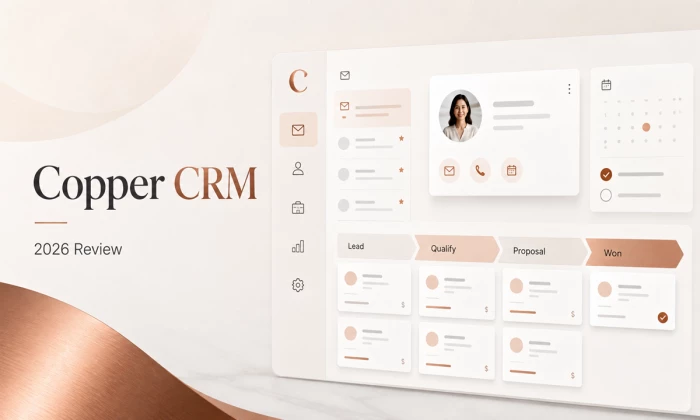
The short version, for anyone who does not want to read 5,000 words Copper is a CRM built specifically for teams that live inside Gmail and Google Calendar. It sits in the inbox as a sidebar, pulls contact details out of email signatures on its own, and logs conversations without anyone remembering to log anything. That single design decision explains almost everything Copper gets right and most of what it gets wrong. It is a strong fit for small agencies, consultancies, production companies and professional services firms of roughly three to forty people who already run on Google Workspace and who care about long relationships more than high volume outbound. It is a poor fit for Microsoft 365 shops, high volume outbound sales floors, and any team whose main requirement is deep custom reporting. Reporting is the single most common complaint in user reviews. Pricing in July 2026 runs from 23 US dollars per seat per month on Basic to 99 dollars on Business with annual billing. There is a free trial but no permanently free plan. |
| What it is | A customer relationship management platform built natively for Google Workspace, covering contacts, pipelines, projects, tasks and email. |
| Company | Copper CRM, Inc., headquartered in San Francisco. Launched as ProsperWorks and rebranded to Copper on 23 July 2018. |
| Funding | Roughly 87 million US dollars raised across rounds including a 24 million dollar Series B in 2016 and a 53 million dollar Series C in 2017, backed by GV, Norwest Venture Partners, True Ventures and Next World Capital. |
| Customer base | Over 30,000 companies according to Copper’s own pricing page. |
| Plans, July 2026 | Basic, Professional and Business. Annual billing at 23, 59 and 99 dollars per seat per month. Monthly billing at 29, 69 and 134 dollars. |
| Free trial | 14 day trial, no credit card required, with instant activation. |
| Best for | Relationship led small and mid sized teams on Google Workspace. |
| Weakest at | Native reporting depth, non Google environments, and high volume outbound motions. |
| Independent ratings | Rated 4.5 out of 5 from more than 1,150 reviews on G2, and 4.4 on Capterra, at the time of checking. |
Most CRM reviews open by explaining what a CRM is. That is a waste of everybody’s time. The more useful framing is this: every CRM on the market is fighting the same enemy, which is that sales people and account managers do not want to update the CRM. They will do it for a week after the training session and then they will stop, and six months later the pipeline report is fiction.
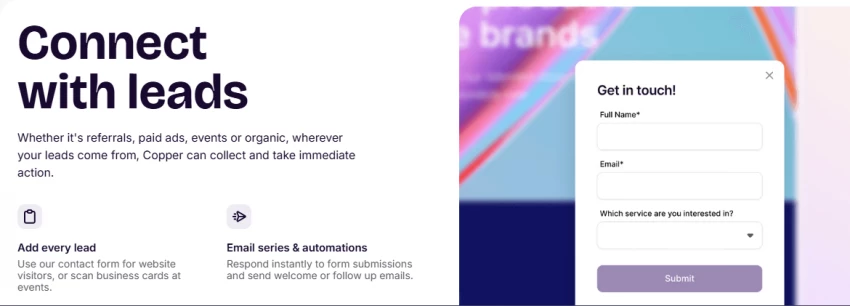
Different vendors attack that problem in different ways. Salesforce attacks it with process and administration. HubSpot attacks it with a generous free tier and a lot of marketing automation wrapped around it. Copper attacks it by refusing to be a separate destination at all.
Copper is designed so that nobody has to open Copper. It installs as a Chrome extension and appears as a panel inside Gmail. When an email arrives from a client, the contact record, the open deal, the last three interactions and any outstanding tasks appear next to the message. When somebody new emails in, Copper reads the signature block and builds a contact record without anybody typing anything. Calendar meetings land on the contact timeline automatically. Files attached to threads get linked to the right record.
That is the whole pitch. It is a narrow pitch, and Copper has been unusually disciplined about not straying from it. In a market where nearly every competitor spent 2025 and 2026 rebranding as an AI first platform, Copper has kept shipping small practical improvements to the same core idea.
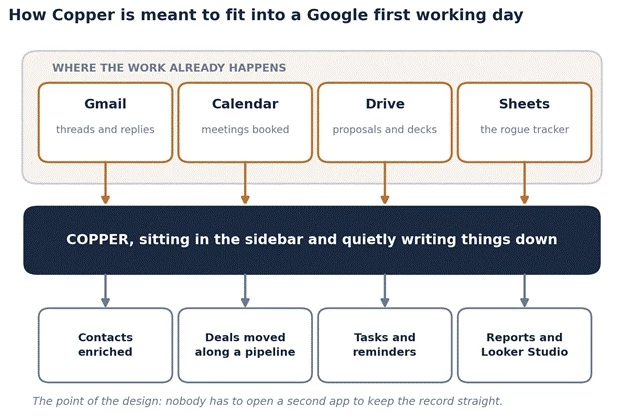
The figure above shows the basic idea in one picture. The tools along the top are where the work already happens on a Google first team. Copper sits underneath them, catching what passes through and turning it into contacts, deals, tasks and reports. Nobody has to open a second app to keep the record straight, which is the entire reason the data stays clean.
There is one more piece of context worth knowing. Copper grew up as ProsperWorks, was funded early by GV, which was then called Google Ventures, and has been recommended by Google to Workspace customers for years. That relationship gave Copper deep access to Google APIs at a time when competitors were bolting Gmail plugins on from the outside. It is a genuine structural advantage rather than a marketing claim, and it shows in how little friction there is between the two products.
This is the feature that justifies the price for the teams it suits. Copper populates contact records from email signatures, syncs Google Contacts both ways, pulls calendar events onto timelines, and suggests contacts that somebody has been emailing repeatedly but never added. Reviewers on G2 consistently describe the reduction in manual entry as the single biggest benefit, and it is the point almost every positive review returns to.
The practical effect is that the CRM stays roughly accurate even when the team is sloppy, which is the normal condition of every team. That matters more than it sounds. Industry compilations put the share of CRM implementations considered failures at around 30 percent, with poor user adoption named as the leading cause in roughly 43 percent of cases. A CRM that fills itself in is attacking the actual failure mode rather than the imagined one.
Copper runs two kinds of pipeline. Opportunity pipelines handle sales, and project pipelines handle delivery after the deal closes. Both are drag and drop, both support custom fields that vary by pipeline, and both are simple enough that a new account manager can be productive on day one without a training deck.
The project pipeline is underrated and is a real differentiator against pure sales CRMs like Pipedrive. Agencies and consultancies do not stop caring about a client when the contract is signed. Copper lets the same tool follow the relationship through delivery, which is why the agency and consulting segments show up so heavily in its customer base.
Copper publishes monthly release notes, and reading two years of them is more revealing than reading any marketing page. The pattern is consistent: forms that feed the pipeline, LinkedIn capture from the Chrome extension, subtasks, dark mode, richer notes, branded navigation, mobile improvements, record visibility controls. These are not headline grabbing features. They are the things that irritate people daily.
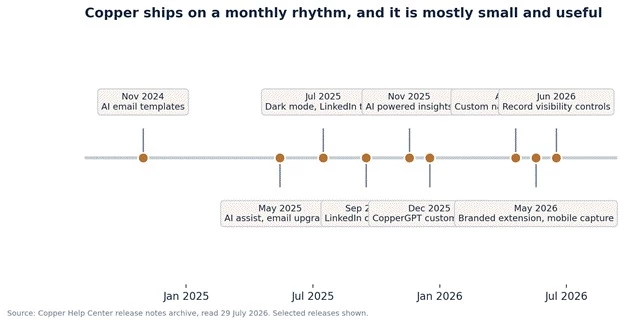
The figure above traces selected releases from Copper’s own changelog. The rhythm is roughly monthly and the changes are deliberately small. Note where the AI work sits: email templates in late 2024, an AI assist in mid 2025, AI powered insights and CopperGPT customisation across late 2025. Copper added AI to an existing product rather than rebuilding around it, which is either reassuring or unambitious depending on temperament.
As of mid 2026 the AI features include an email rewriter that adjusts tone and clarity, an AI email template generator marketed as Copper Magic that produces templates with merge fields, contact enrichment that fills in phone numbers and company details automatically, a LinkedIn email finder, and CopperGPT for querying CRM data in plain language. The email tools sit on the Professional and Business plans.
None of this is going to win an AI benchmark. It is also not pretending to. For a fifteen person consultancy that mainly wants follow up emails written faster and contact records filled in without effort, modest and working beats ambitious and unpredictable.
Pricing is where most published articles about Copper are currently wrong, so this section is worth reading carefully even for anyone who has already researched the product elsewhere.
Copper charges per seat, per month, with a discount for paying annually. As of 29 July 2026, the public pricing page lists three plans.
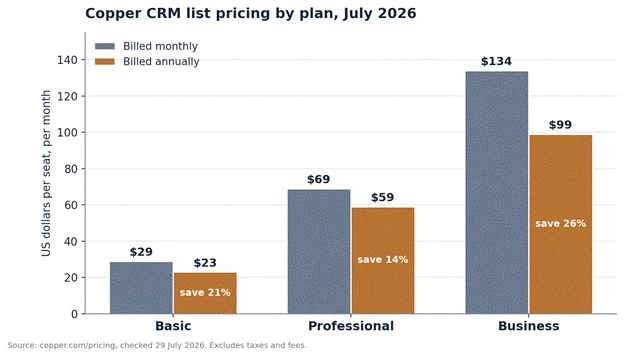
The figure above compares monthly and annual list pricing across the three plans. The gap between the two bars is the annual commitment discount. It is not applied evenly, which matters more than it first appears and is unpacked a few paragraphs below.
| Plan | Annual | Monthly | What it unlocks |
| Basic | $23 per seat | $29 per seat | A 2,500 contact limit, opportunity and project pipelines, task automation, contact enrichment, custom fields and single sign on through Okta. |
| Professional | $59 per seat | $69 per seat | A 15,000 contact limit, workflow automation, bulk email and email tracking, the leads object, pipeline and activity reports, team permissions, the developer API, and native integrations including Slack, Mailchimp, QuickBooks, DocuSign, PandaDoc, JustCall, RingCentral and Zendesk. |
| Business | $99 per seat | $134 per seat | Unlimited contacts, the custom report builder, automated email series for nurture, embedded integrations, multi currency support and premium support. |
Prices are in US dollars and exclude taxes and fees. Copper notes that seat minimums apply on its plan comparison table, so the smallest possible bill is not always one seat.
A large number of currently ranking articles list a Starter plan at 9 dollars per seat annually or 12 dollars monthly, with a 1,000 contact cap. That plan is not on Copper’s public pricing page as of 29 July 2026. The pricing page shows three plans, beginning at Basic.
Interestingly, Copper’s own help centre plan comparison article, last updated in August 2025, still documents a Starter tier with 1,000 contacts and 10 custom fields. The most reasonable reading is that Starter has been withdrawn from public sale while existing accounts continue on it, and the support documentation has not caught up. Anyone who saw a 9 dollar figure in a comparison article and built a budget around it should treat 23 dollars per seat as the realistic entry point and confirm directly with Copper before planning further.
Most CRM vendors separate their tiers by features. Copper does that too, but the gate that actually forces upgrades is the size of the contact database. A team can be perfectly happy on Basic until the database crosses 2,500 records, at which point the choice is to delete history or to more than double the per seat price.
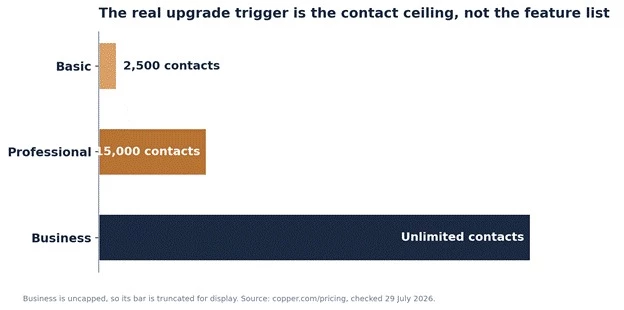
The figure above shows how sharply the contact ceilings step up. The jump from Basic to Professional is a six fold increase in capacity and a 157 percent increase in price. For a growing team this is the cliff to model before signing, because contact databases only ever get bigger and nobody enjoys deleting five years of relationship history to stay under a cap.
The feature gating is cumulative, meaning each plan contains everything below it. The table format on most vendor sites hides how much sits behind the Professional wall in particular, so the map below is worth studying before choosing a plan.
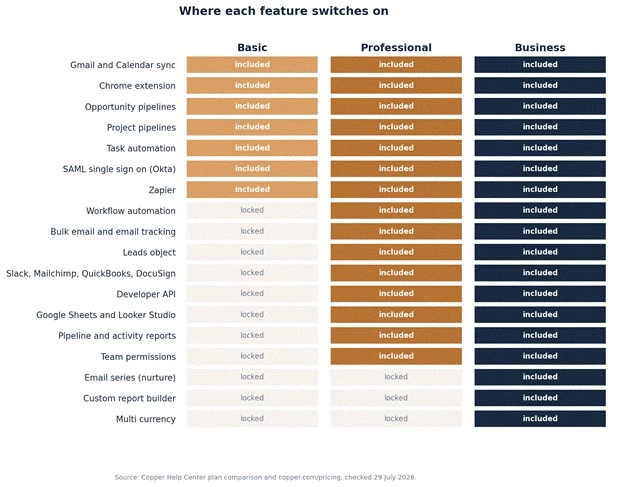
The figure above maps eighteen commonly needed capabilities against the three plans. Two things stand out. First, Professional is doing an enormous amount of work: every native integration, the API, reporting, bulk email and the Looker Studio connector all appear at that line. Second, the genuinely advanced items, meaning custom report building, nurture email series and multi currency, sit only on Business. Teams that need one of those three things have no cheaper path.
A small inconsistency worth knowing about. The public pricing comparison table lists custom field allowances of 25, 50 and unlimited across the three plans. Copper’s help centre article describes Professional as having unlimited custom fields. These cannot both be current. Anyone whose configuration depends on a large number of custom fields should confirm the current allowance in writing rather than relying on either page.
Copper advertises up to 26 percent off for annual commitment. The phrase up to is doing real work there, because the discount varies substantially by plan.
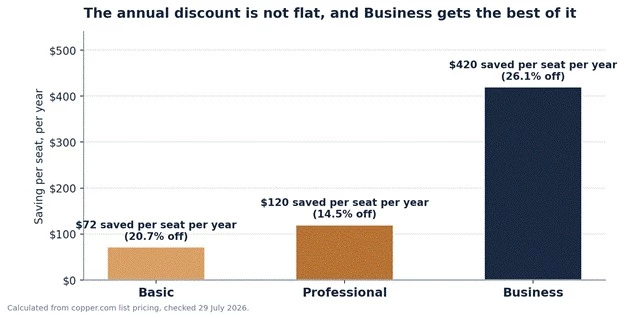
The figure above breaks the annual discount down by plan. Business takes 26.1 percent off, Basic takes 20.7 percent, and Professional takes only 14.5 percent. The plan most teams actually buy is the one with the weakest annual discount, which is unlikely to be a coincidence. The absolute saving on Business is 420 dollars per seat per year, which on a fifteen seat account is 6,300 dollars.
Per seat pricing looks harmless on a pricing page and considerably less harmless on an annual invoice. The chart below runs the arithmetic across realistic team sizes at annual billing rates.
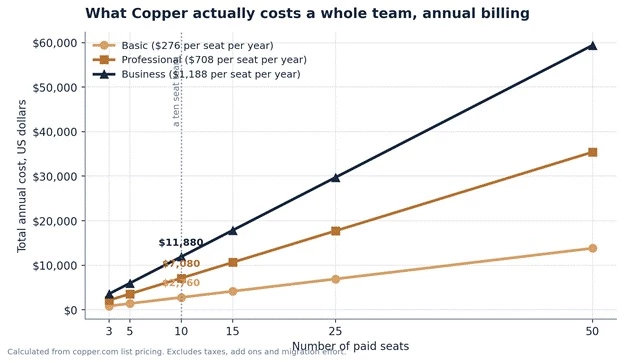
The figure above converts the per seat price into total annual spend. A ten person team on Professional commits to 7,080 dollars a year. The same team on Business commits to 11,880 dollars. Those are not outrageous numbers for a working revenue system, but they are real money for a small agency, and they are the numbers that belong in the budget conversation rather than the 59 dollar headline.
| Team size | Basic per year | Professional per year | Business per year |
| 3 seats | $828 | $2,124 | $3,564 |
| 5 seats | $1,380 | $3,540 | $5,940 |
| 10 seats | $2,760 | $7,080 | $11,880 |
| 15 seats | $4,140 | $10,620 | $17,820 |
| 25 seats | $6,900 | $17,700 | $29,700 |
| 50 seats | $13,800 | $35,400 | $59,400 |
Calculated from Copper list pricing at annual rates. Excludes taxes, third party add ons and internal implementation time.
Buried at the bottom of Copper’s plan comparison help article is a line noting that plan options may be able to be mixed and matched, with an invitation to contact sales about it. Almost no third party review mentions this.
For a team where two people need custom report building and eight people only need pipeline access, that single sentence is potentially worth thousands of dollars a year. It is worth raising in any sales conversation before accepting a uniform Business quote across every seat.
No review is useful without this section, and Copper has a clear and consistent set of weaknesses that show up across hundreds of independent reviews.
This is the big one. Native reporting is shallow relative to the rest of the product. Pipeline and activity reports arrive at Professional, and a custom report builder only exists on Business. Reviewers describe exporting opportunities to a spreadsheet to do analysis that other CRMs handle natively, and larger organisations frequently report supplementing Copper with separate business intelligence tooling.
There is a real workaround, and it is a good one for Google native teams. Copper ships a Looker Studio connector and a Google Sheets add on from the Professional tier upward. Looker Studio is free and genuinely capable, so pipeline analytics can be rebuilt there properly. The catch is that somebody on the team has to be comfortable building reports, or the budget has to stretch to a consultant. Teams that expect polished dashboards out of the box will be disappointed.
Copper on Microsoft 365 is a bad idea. Technically the web application and API exist and will function, but the sidebar capture, the automatic logging and the calendar sync are the entire reason to pay Copper prices. Without Gmail, a team is paying a premium for a mid tier CRM. Anyone running Outlook should be looking at HubSpot, Pipedrive or Zoho instead, and no amount of enthusiasm for the interface changes that.
Multiple independent review sources, including Capterra summaries and long standing CRM review sites, report that the Basic plan carries a cap of around three users. Copper’s own comparison table refers to seat minimums rather than maximums, so the public documentation is ambiguous. This is a material question for a five person team looking at Basic, and it should be confirmed in writing with Copper before any purchase decision, because the difference between Basic and Professional across five seats is 2,160 dollars a year.
Reviews describe occasional technical glitches, connection errors requiring a second sign in, and support experiences that range from responsive and genuinely helpful to slow. This is unremarkable for SaaS at this price point, but it is worth setting expectations honestly: this is a good product, not a flawless one.
There is no built in dialler. Calling requires the JustCall or RingCentral integrations, which sit on Professional and above. Sequencing and cadence tooling is limited compared with platforms designed for outbound. A team running structured multichannel prospecting at volume will outgrow Copper quickly, and should be looking at a sales engagement platform rather than a relationship CRM.
The honest summary of the weaknesses Copper is very good at keeping a relationship record accurate with minimal human effort. It is average at telling anyone what that record means. Teams that mainly need the first thing will be happy. Teams that mainly need the second thing will spend their first quarter building Looker Studio dashboards and wondering whether they picked the right tool. |
The comparison that matters is not feature counts. It is which constraint a team is actually solving for. Vendor list pricing changes frequently and every figure below should be confirmed on the vendor site before any purchase.
| Platform | Core strength | Where it beats Copper | Where Copper wins |
| HubSpot | All in one growth suite with a strong free tier | A genuinely usable free plan, far deeper marketing automation, much stronger native reporting | Far lower cost at the tier where real automation appears, dramatically faster setup, no jump to a four figure monthly bill |
| Pipedrive | Visual pipeline management for sales teams | Cheaper entry pricing, sharper visual cues on overdue and at risk deals, better pure sales ergonomics | Automatic Gmail capture, project pipelines for post sale delivery, native Google Workspace depth |
| Zoho CRM | Enormous feature breadth at low cost inside a 45 app suite | Substantially cheaper per seat, free tier available, deeper customisation and its own ecosystem | Much lower learning curve, cleaner interface, far better Google integration |
| Salesforce | Enterprise scale, unlimited configurability | Territory management, advanced forecasting, scale to thousands of seats, ecosystem depth | Setup measured in days rather than months, no dedicated administrator required, no implementation fee |
| Streak | A lightweight CRM built inside Gmail itself | Lower cost, lives literally inside the Gmail interface, simpler for solo operators | Real pipelines, workflow automation, project management, proper reporting path, a company scale product |
The pattern is consistent. Copper is rarely the cheapest option and it is never the most powerful one. It wins when the deciding factor is whether the team will actually use the thing, and it loses whenever the deciding factor is depth of analysis or breadth of function.
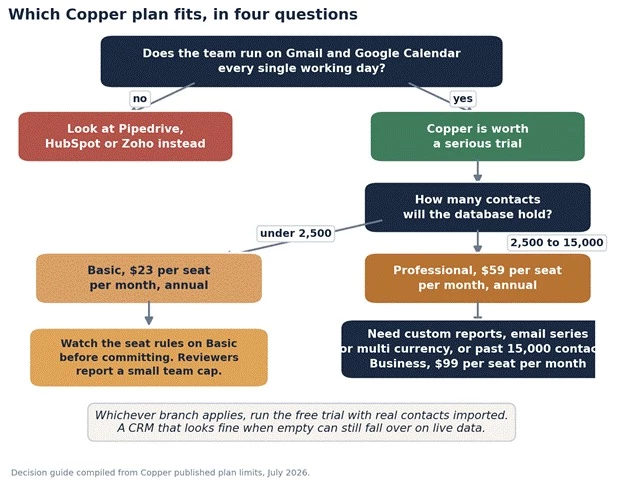
The figure above condenses the decision into four questions. The first question is the only one that really matters. Everything after it is a matter of sizing rather than suitability. If the answer to the Gmail question is anything other than an emphatic yes, the rest of the chart is irrelevant and the search should continue elsewhere.
| Team type | Verdict | Reasoning |
| Creative or marketing agency, 5 to 40 people, on Google Workspace | Strong fit | Account managers live in Gmail, relationships run for years, and project pipelines cover delivery as well as sales. |
| Consultancy or professional services firm | Strong fit | Long relationship cycles, low deal volume, high value per relationship. Exactly the shape Copper was designed around. |
| Solo operator or two person business | Consider carefully | Capable but expensive at this size, and free alternatives exist. The seat rules on Basic need confirming first. |
| High volume outbound sales team | Poor fit | No native dialler, limited sequencing, and reporting that will not support a metrics driven floor. |
| Any team on Microsoft 365 or Outlook | Poor fit | The core value proposition simply does not apply. Paying Copper prices without Gmail makes no economic sense. |
| Company above roughly 50 seats with complex process | Poor fit | Per seat costs compound and customisation ceilings arrive. Most teams at this stage migrate outward. |
Setup speed is one of Copper’s more credible advantages, and it is worth being specific about what that means in practice.
1. Initial connection takes well under an hour. Signing in with a Google account, authorising Workspace access, installing the Chrome extension and configuring pipeline stages is a single sitting of work rather than a project.
2. The contact database partially fills itself. Because Copper reads existing Gmail history, many teams find a meaningful portion of their contacts already present before importing anything.
3. Data import runs from CSV, and Copper supports migration from the usual suspects including Salesforce, HubSpot, Pipedrive and Zoho.
4. Pipeline design is where the real time goes. Deciding stage definitions and which custom fields matter is a business exercise rather than a software one, and rushing it is the most common cause of a CRM nobody trusts six months later.
5. Full team adoption typically settles over two to four weeks. Independent reviews consistently put Copper ahead of the category on this measure, and one frequently cited customer account describes three days to get running against three months on a heavier platform.
One planning note that catches people out: adding seats mid term is prorated, but reducing seat count generally is not. Committing annually to headcount that has not been hired yet is an expensive form of optimism.
Copper maintains a public trust centre and reports SOC 2 Type II certification and GDPR compliance, running on Google infrastructure. Single sign on through Okta using SAML is available from the Basic plan upward, which is unusually generous, since many competitors reserve single sign on for their highest tier.
Team permissions and record visibility controls sit at Professional and above, and Copper shipped additional record visibility controls in its June 2026 release. One caution appears in independent review summaries: at least one reviewer flagged that they would not consider the platform appropriate for storing highly sensitive personal identifiers such as social security numbers. Any organisation with specific regulatory obligations should validate Copper against its own compliance requirements directly rather than relying on a general certification claim.
| Platform | Rating | What the review body consistently says |
| G2 | 4.5 out of 5 | More than 1,150 reviews, with small business accounting for roughly 79 percent of them. Praise clusters on Google Workspace integration and ease of use. Criticism clusters on reporting depth, advanced features locked to premium tiers, and occasional glitches. |
| Capterra | 4.4 out of 5 | Contact management, sales pipeline management and lead management are all supported, and Capterra data identifies those three as the top rated priorities among CRM buyers generally. Cost escalation with seats and tiers is the recurring criticism. |
| Gartner Peer Insights | Listed | Reviewed as a CRM designed around email and calendar integration for automating data entry and communication tracking. |
Anyone researching CRM software in 2026 will encounter a wall of confident statistics. A few of them deserve scepticism, and understanding why is useful when reading any vendor comparison.
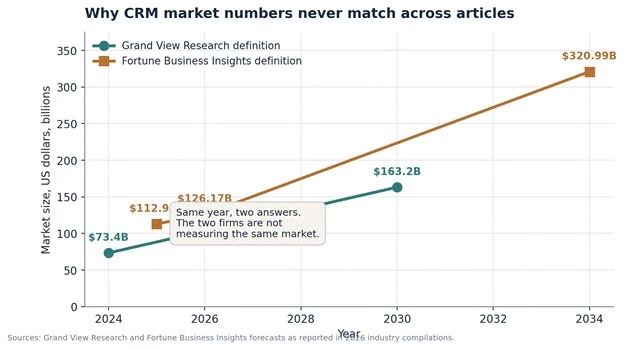
The figure above shows why market size figures never agree between articles. Grand View Research and Fortune Business Insights are not measuring the same thing. One works from a narrower software definition and one includes services. Quoting either as the CRM market size without naming the firm is how a reasonable estimate turns into a meaningless number.
Two more figures worth handling carefully. The widely repeated claim that CRM returns 8.71 dollars for every dollar spent traces back to a Nucleus Research study published in 2014. It may still be directionally true, but a twelve year old figure quoted as current data should raise an eyebrow. Separately, the frequently cited statistic that 91 percent of companies with ten or more employees use a CRM is genuinely well sourced and does hold up across multiple compilations.
The relevance to a Copper decision is simple. Vendor pages and affiliate comparisons lean heavily on ROI statistics to justify price. The realistic view is that CRM returns depend far more on whether the team adopts the tool than on which tool was selected, which is precisely the argument in Copper’s favour for the narrow set of teams it fits.
Copper is a specialist product pretending to be a general one, and it is at its best when buyers treat it as the specialist it is.
For a Google Workspace team of roughly three to forty people whose business runs on long relationships rather than transaction volume, Copper solves the hardest problem in CRM, which is getting the data in without anyone having to care. That is worth real money, and the setup speed alone will recover a meaningful part of the first year cost compared with a heavier platform.
For everyone else, the case falls apart quickly. Without Gmail, the premium is unjustifiable. Without patience for Looker Studio, the reporting will frustrate. Without a budget that tolerates 59 to 99 dollars per seat, cheaper tools cover the same ground adequately.
The most sensible approach for a serious evaluation is to run the 14 day trial with a genuine contact import rather than a handful of test records, put two real deals through a real pipeline, and then attempt to build the one report that the business actually reviews every month. Whether that last step feels satisfying or exhausting is the answer to the whole question.
Editorial score: 8.1 out of 10 Ease of use and adoption: 9.4. Google Workspace integration: 9.6. Value for money: 7.2. Reporting and analytics: 6.1. Feature breadth: 7.0. Suitability outside Google environments: 3.5. |
Share your thoughts about this article.
Be the first to post a comment!
Choosing growth software in 2026 means finding five winners inside a catalog of...
Sakshi Dhingra3 weeks ago
If you've spent any time around tax professionals in the United States, you've h...
Harpreet Singh1 month ago

The short versionQuicken sells two entirely separate things. Quicken Classic is...
Harpreet Singh1 month ago

Here is a small confession most security writers avoid making: you probably do n...
Deepak Mehra1 month ago
The photo editing software market has been shaken harder in the past eighteen mo...
Sakshi Dhingra1 month ago

A code kata is a small exercise you repeat until the technique becomes instinct....
Harpreet Singh2 months ago