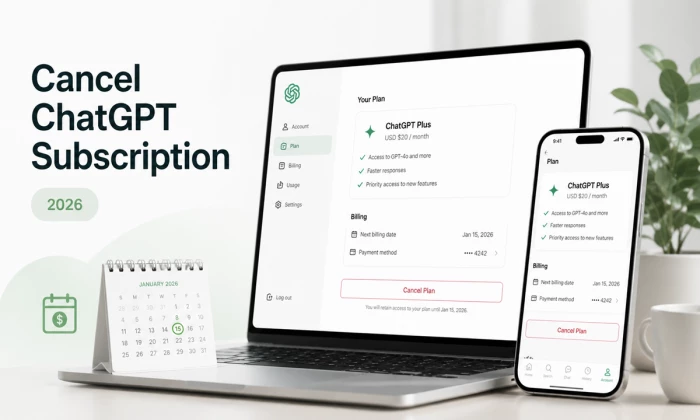
Cancelling a ChatGPT subscription takes less than two minutes, once you know where to click. The catch is that the correct cancellation path depends entirely on where you originally subscribed. If you signed up on the ChatGPT website, you cancel on the website. If you subscribed through the Apple App Store or Google Play, you must cancel through those stores, OpenAI cannot cancel an app-store subscription for you, and trying to cancel in the wrong place is the single most common reason people get charged for an extra month.
This guide walks through every cancellation method in detail: the web flow, the iPhone/iPad flow, the Android flow, and the process for Team and Business workspaces. It also covers OpenAI's refund policy (including the 14-day rights for EU, UK, and Turkey residents), what happens to your chats, custom GPTs, and data after you cancel, and the timing rules that decide whether you get billed one more time.
Before the detailed walkthroughs, here is the entire process in one table. Find the row that matches how you pay, and you already know 90% of what you need.
| Where you subscribed | Where to cancel | The path | Time needed |
| ChatGPT website (credit/debit card) | chatgpt.com (browser) | Profile icon → Settings → Subscription → Manage → Cancel Plan | ~2 minutes |
| iPhone / iPad (App Store) | iPhone Settings app | Settings → your name → Subscriptions → ChatGPT → Cancel Subscription | ~1 minute |
| Android (Google Play) | Google Play Store app | Profile → Payments & subscriptions → Subscriptions → ChatGPT → Cancel | ~1 minute |
One rule applies to all three paths: cancellation stops future billing but does not end your access immediately. You keep every paid feature until the end of the billing period you have already paid for, and then your account automatically drops to the free tier. There is no cancellation fee and no long-term contract on any consumer plan.
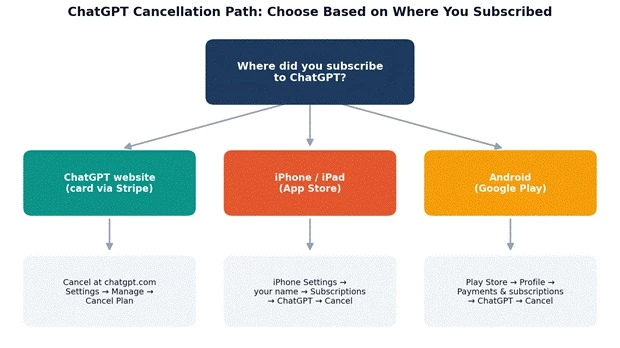
Figure 1: Your cancellation path depends on where the subscription was originally purchased.
OpenAI's plan lineup has grown considerably. In 2026 there are six tiers, and the cancellation mechanics are identical for all consumer plans (Go, Plus, and both Pro tiers). Business and Enterprise plans follow workspace billing and annual commitment terms, which we cover in a separate section below.
| Plan | Price (2026) | Built for | Cancel anytime? |
| Free | $0 | Casual use with limited quotas | N/A, nothing to cancel |
| Go | $8/month | Budget users; higher limits than Free, ad-supported | Yes, self-serve |
| Plus | $20/month | Individual power users; the standard paid plan | Yes, self-serve |
| Pro (base tier) | $100/month | Heavy users; roughly 5x Plus limits | Yes, self-serve |
| Pro (top tier) | $200/month | Maximum limits, top research quotas | Yes, self-serve |
| Business | $20/user/mo (annual) or $25 monthly | Teams with admin controls and SSO | Admin cancels; annual terms apply |
| Enterprise | Custom | Large organisations | Contract terms apply |
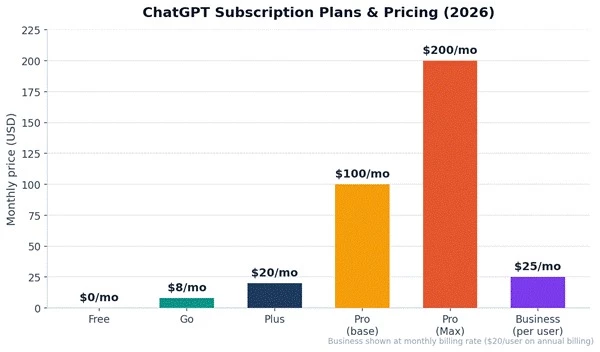
Figure 2: The 2026 ChatGPT pricing ladder. All consumer plans can be cancelled at any time with no penalty.
The financial case for reviewing your subscription is straightforward. A Plus plan left running unused costs $240 a year; the top Pro tier costs $2,400. If you only needed ChatGPT for a one-off project, cancelling, or downgrading to the $8 Go plan, adds up quickly.
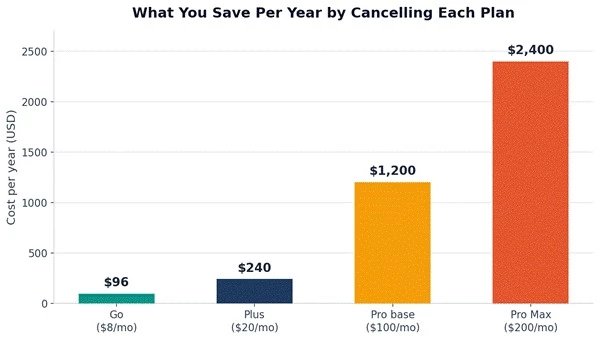
Figure 3: Annualised cost of each consumer plan — what cancelling actually saves you over 12 months.
Cancelling does not delete your account or your conversation history, but some things do change when you drop to the free tier. Custom GPTs you created stop being accessible until you upgrade again, and free-tier limits apply to models, file uploads, and image generation. Five minutes of housekeeping before you cancel prevents any regret later:
1. Export your chat history. In ChatGPT, go to Settings → Data Controls → Export Data. OpenAI emails you a download link to a ZIP file containing all your conversations. The link expires after 24 hours, so download it promptly.
2. Save critical outputs separately. Copy any prompts, documents, code, or research you rely on into your own notes or files. Exports are in HTML/JSON format, which is not always convenient to search later.
3. Note your custom GPT configurations. If you built custom GPTs, copy their instructions and knowledge-file lists somewhere safe. The GPTs are not deleted, but you cannot open or edit them on the free tier.
4. Check your next billing date. In Settings → Subscription you can see exactly when the next charge lands, this tells you how much paid time you have left after cancelling.
Use this method if you subscribed directly at chatgpt.com with a credit or debit card. This covers the majority of subscribers. You can do it from any browser, including a mobile browser, but not from inside the mobile app itself.
1. Log in at chatgpt.com. Use the exact account that holds the subscription. This matters more than it sounds: many people maintain two OpenAI accounts (for example, a Google login and an email login) and cancel the wrong one. Verify by checking that this account actually shows Plus or Pro features.
2. Open Settings. Click your profile icon or name (bottom-left corner in the sidebar on desktop, top-right in some layouts) and choose Settings from the menu.
3. Go to the Subscription section. Look for 'Subscription' or 'My plan' in the settings menu. You will see your current plan, price, and the next billing date.
4. Click 'Manage'. This opens OpenAI's billing portal, which is hosted by Stripe, the payment processor. Don't be alarmed that the page looks different from ChatGPT; this is the legitimate billing page.
5. Select 'Cancel Plan'. The button sits below your plan details. Stripe will show you the date your access will end (the last day of your current billing cycle).
6. Confirm the cancellation. You may be asked to give a reason, you can pick one or skip it. Click the final confirmation button.
7. Verify it worked. The billing page should now say your plan is set to cancel on your cycle-end date, and OpenAI sends a confirmation email within a few minutes. If you see no confirmation, the cancellation did not complete, repeat the process.
Pro tip: an alternative route to the same place is the 'View plans' or 'My plan' link at the bottom of the left sidebar, then 'Manage my subscription'. Both routes end at the same Stripe billing portal.
If you subscribed inside the ChatGPT iOS app, Apple handles your billing, not OpenAI. There is no cancel button inside the ChatGPT app, and OpenAI support cannot cancel it for you. You must use your device settings:
1.Open the Settings app on your iPhone or iPad (the grey gear icon, not the ChatGPT app).
2. Tap your name at the very top of the Settings screen to open your Apple ID page.
3.Tap 'Subscriptions'. This lists every active and expired subscription tied to your Apple ID.
4. Find and tap 'ChatGPT' in the active subscriptions list. If it is not there, your subscription is billed elsewhere, check the web method, or a different Apple ID.
5. Tap 'Cancel Subscription' at the bottom of the screen and confirm in the pop-up.
6. Check the expiry date. After cancelling, Apple displays the exact date your access ends, that is your proof the cancellation registered.
Apple-billed subscriptions renew automatically unless cancelled at least 24 hours before the renewal date, so don't leave it to the last minute.
If you subscribed through the ChatGPT Android app, Google Play manages the billing. Note Google's quirk: Play Store charges your payment method up to 24 hours before the renewal date, so the effective deadline to cancel is earlier than you might think.
1. Open the Google Play Store app and make sure you are signed in with the Google account you used to subscribe.
2. Tap your profile picture in the top-right corner.
3. Tap 'Payments & subscriptions', then 'Subscriptions'.
4. Select 'ChatGPT' from your list of active subscriptions.
5. Tap 'Cancel subscription' and follow the confirmation prompts (Google usually asks why you're cancelling, you can pick any reason).
6. Look for the confirmation email from Google Play. Your Plus features remain active until the end of the paid period.
Workspace plans work differently from consumer plans. Only a workspace owner or admin can cancel, and the commitment terms you chose at signup apply:
1. Log in as a workspace admin and open the admin/workspace settings from your profile menu.
2. Go to the Billing section of the workspace settings, where you can see seats, billing cadence, and renewal date.
3. Choose 'Cancel subscription' or 'Manage plan'. On monthly billing, the workspace downgrades at the end of the current month. On annual billing, you typically remain committed until the end of the annual term, cancelling stops the renewal rather than ending the contract early.
4. For Enterprise, contact your account manager. Enterprise contracts are negotiated and cancellation follows the contract's notice terms, not a self-serve button.
Nothing dramatic happens at the moment you click cancel. The changes arrive when your paid billing perViod runs out:
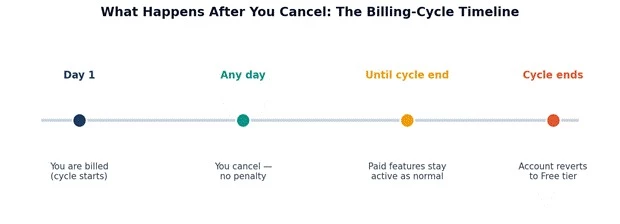
Figure 4: Cancellation stops the next charge — access continues until the current cycle ends.
| Item | After cancelling (free tier) |
| Your account & login | Unchanged, cancelling is not account deletion |
| Chat history | Kept and fully accessible |
| Memory & saved preferences | Kept, subject to free-tier feature availability |
| Custom GPTs you built | Not deleted, but inaccessible until you upgrade again |
| Model access | Free-tier models and quotas only |
| File uploads, image generation, advanced tools | Reduced to free-tier limits |
| Billing | No further charges after the current cycle |
Resubscribing later is painless: your history, memory, and custom GPTs are all waiting, and you can upgrade again from the same Settings page at any time. There is no penalty or waiting period for rejoining.
OpenAI's default position is that subscription payments are non-refundable, with no prorated refunds for unused days in a billing cycle. If you cancel on day 3 of a 30-day cycle, you keep access for the remaining 27 days but you do not get money back. That said, there are real exceptions worth knowing:
• EU, UK, and Turkey residents: consumer protection law gives you the right to a refund if you cancel within 14 days of purchase. This is the strongest and most reliable exception. (Note: Switzerland is not covered.)
• Accidental purchases: OpenAI states that accidental purchases are generally refund-eligible if you contact support within 14 days of the charge.
• Billing errors and duplicate charges: clear errors, double billing, charges after cancellation, are refunded once verified.
• Unauthorized charges: if someone else subscribed on your card, report it; these trigger an investigation-based refund.
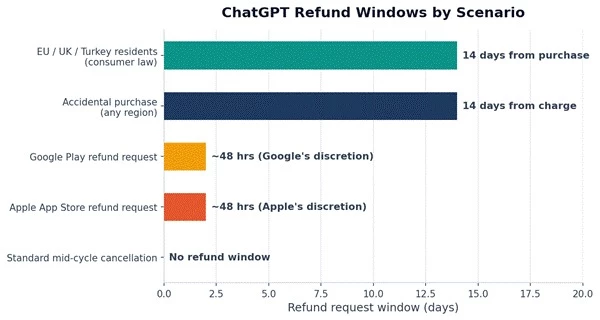
Figure 5: Refund windows vary sharply by scenario and billing platform.
1. Web subscriptions: log in to ChatGPT with the charged account, then open help.openai.com and click the chat widget in the bottom-right corner. Request a refund in the chat, the system shows an automatic eligibility summary before connecting you to an agent. Approved refunds are processed within roughly 5–7 business days. Make sure you are logged into the Help Center with the same account that was charged, or the widget cannot locate your subscription.
2. Apple (iOS) subscriptions: Apple owns the charge, so OpenAI cannot refund it. Go to reportaproblem.apple.com, sign in with your Apple ID, find the ChatGPT charge, and select 'Request a refund'. Apple decides at its discretion; requests soon after an unwanted renewal have the best odds.
3. Google Play subscriptions: recent charges (within about 48 hours) can be refunded via Play Store → Profile → Payments & subscriptions → Budget & history → select the charge → 'Request a refund'. Older charges go through the same OpenAI Help Center chat route; approved Google Play refunds take up to about 10 business days.
| Scenario | Refund likelihood | Where to request |
| EU/UK/Turkey, within 14 days of purchase | Very high, legal right | OpenAI Help Center chat |
| Accidental purchase, within 14 days | Good | OpenAI Help Center chat |
| Duplicate / erroneous charge | High once verified | OpenAI Help Center chat |
| iOS charge | Apple's discretion | reportaproblem.apple.com |
| Google Play charge (recent) | Google's discretion | Play Store refund flow |
| Changed your mind mid-cycle (elsewhere) | Very low | N/A, no prorated refunds |
• Cancel at least 24 hours before your renewal date on every platform. Google Play in particular may charge up to 24 hours before the renewal date.
• Cancelling early costs you nothing. Since access runs to the end of the cycle regardless, the smartest habit is to cancel right after a billing date if you know you won't need next month, you lose nothing and can't forget later.
• Set a reminder if you're mid-cycle. If you want to squeeze the full paid period first, set a calendar reminder 2–3 days before renewal.
• Watch for the confirmation email. No confirmation email means no cancellation. This is the most common failure mode, people close the tab one click too early.
| Problem | Likely cause & fix |
| No 'Cancel' button in ChatGPT settings | You subscribed via an app store. Cancel in iPhone Settings → Subscriptions or Play Store → Subscriptions instead. |
| ChatGPT missing from Apple/Google subscription list | Wrong Apple ID / Google account, or the subscription is web-billed. Check other accounts and the web method. |
| Charged after cancelling | Either the confirmation never completed, or a second account holds a subscription. Check emails and both stores; contact support with the charge details. |
| Cancelled the wrong account | Subscriptions can't be transferred between accounts, resubscribe on the correct one. |
| Billing page won't load / errors out | Try another browser, disable ad-blockers or VPN (the Stripe portal is sometimes blocked), or use incognito mode. |
| Need proof of cancellation | Keep the confirmation email; on iOS, screenshot the expiry date Apple shows after cancelling. |
If cost is the issue but you still use ChatGPT regularly, cancelling to zero is not the only move:
• Downgrade to ChatGPT Go ($8/month): Go keeps meaningfully higher limits than Free at 40% of the Plus price. It is ad-supported and does not include the flagship-model access and full toolset of Plus, but for everyday chat use it covers a lot.
• Drop from Pro to Plus: if you subscribed to a Pro tier ($100 or $200) for a specific crunch period, stepping down to Plus keeps the core experience at a fraction of the cost.
• Use the Free tier strategically: the free plan still includes modern models with usage caps, fine for occasional questions, and your history stays intact.
• Resubscribe seasonally: because there's no penalty or lock-in, some users simply subscribe for months when they need heavy usage and cancel in between. OpenAI keeps your data either way.
Cancelling ChatGPT is genuinely one of the easier subscription exits, no retention phone calls, no hidden fees, no dark patterns beyond having to find the right platform. Match the cancellation path to your billing platform, get your confirmation email, and you're done.
Share your thoughts about this article.
Be the first to post a comment!
Software rarely gets removed. It accumulates. A team hits a snag, someone finds...
Deepak Mehra2 months ago

⚑ The short versionAn AI detector returns a probability, not a verdict. Th...
Sakshi Dhingra2 months ago
Picture the last time you called a business after hours. You already know the so...
Pritam Singh2 months ago
Here is the uncomfortable truth about buying an AI chatbot for customer support...
Harpreet Singh2 months ago

AI assistants stopped being optional somewhere in the last two years. Four in fi...
Harpreet Singh3 months ago
Buying an AI tool after reading one polished review can be risky. Some reviews r...
Michael Hicklen4 months ago