Here is the uncomfortable truth about buying an AI chatbot for customer support in 2026: the technology finally works, and a lot of your customers still might hate it.
Two numbers tell the whole story. Roughly two-thirds of customer service organisations now run AI agents, up from 39 percent just a year earlier. And yet about 64 percent of customers say they wish companies would stop using AI in support. Both facts are true at the same time. The gap between them is not about whether AI works. It is about whether the specific bot a company picked was the right one, set up the right way, and pointed at the right problems.
A support chatbot is not a product you switch on. It is a decision with about a dozen moving parts, and most of the regret comes from getting three or four of them wrong before the contract is even signed. This guide walks through how to make that call like someone who has to live with the results, not someone reading a vendor deck.
Response time is trivial to fake. Any chatbot can reply in under two seconds. Resolution rate, whether the problem actually got solved, is the only number that matters. A rule seasoned support leaders keep repeating.
The pressure to buy is intense. About 91 percent of customer service leaders are under executive pressure to deploy AI in 2026 (Gartner), 74 percent of consumers now expect 24/7 availability, and the AI customer service market is projected near $15 billion this year, growing at roughly a 23 percent annual clip. So far, so exciting.
The catch is maturity. While 64 percent of teams ran an AI pilot in 2026, only 27 percent had even one channel in full production. In other words, you are being asked to choose fast, under pressure, in a market where most buyers are still figuring it out. That is precisely the environment where expensive mistakes get made.
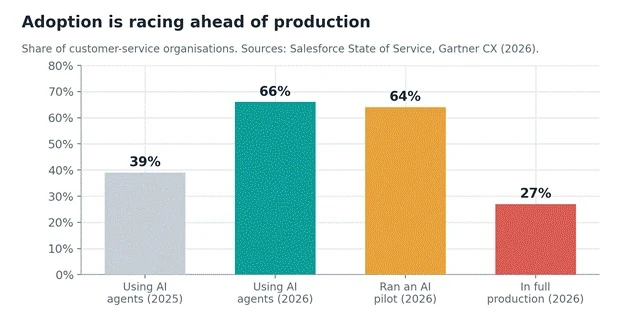
Figure 1. Adoption of AI support agents nearly doubled in a year, but production deployment lags far behind the hype. Choose like the 27 percent, not the 64 percent.
Work through these eight steps in order. The early ones do more to prevent regret than any feature on a comparison chart.
Before you look at a single vendor, pull 30 to 90 days of your own tickets and sort them by volume and by type. You are hunting for the boring, repetitive, high-volume work: order status, password resets, "where is my refund," shipping and returns questions. That is where AI earns its keep. The exotic edge cases are not the point.
Why this matters so much: one bot delivers wildly different accuracy depending on the task. AI nails structured requests like password resets (98.2 percent accuracy) but falls off a cliff on emotionally complex ones (61.2 percent). If you cannot name your top ten ticket types from memory, you are not ready to shop yet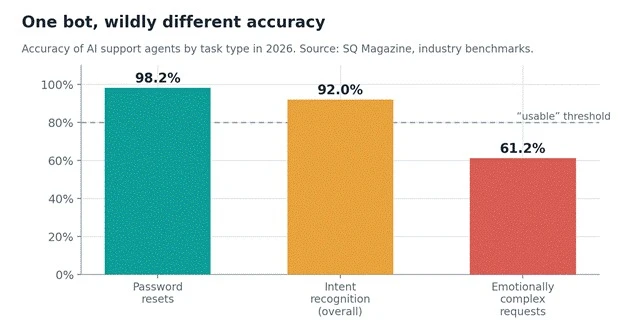 .
.
Figure 2. Accuracy of AI support agents by task type. Scope the bot to the tasks on the left, keep humans on the tasks on the right.
Write your success metrics down now, so a slick demo cannot move the goalposts later. Four numbers matter more than the rest:
• Containment: share of conversations the bot handles end to end without a human.
• True resolution: did the customer's problem actually get solved, not just deflected.
• CSAT on AI-handled tickets specifically, not your blended score.
• Cost per resolved conversation, measured at your real resolution rate.
Watch the containment-versus-resolution trap. Bots deflect 45 percent or more of queries, but only about 14 percent of issues are genuinely resolved by self-service. A bot that sends someone back to the same help article they already read marks that as "handled." Your customer experiences a wall. Sensible anchors: a well-configured retrieval-based chatbot lands 40 to 65 percent containment, the median program deflects around 41 percent of tier-one contacts, and the top quartile reaches 59 percent.
The biggest technical risk is hallucination: the bot answering confidently and wrongly. Left to answer from its own memory, a support bot invents an answer 15 to 27 percent of the time. Ground that same model strictly in your knowledge base using retrieval (RAG) and the rate drops below 2 percent. That is not a tuning detail. That is the difference between a tool you can trust and a liability.
So the question for every vendor is blunt: does every answer trace back to a source document you control, or can the model free-style? If it can free-style, walk away. Ask to see source citations on answers, retrieval debugging, and what happens when the knowledge base has no answer. A good bot says "I do not know" and escalates. A bad one makes something up.
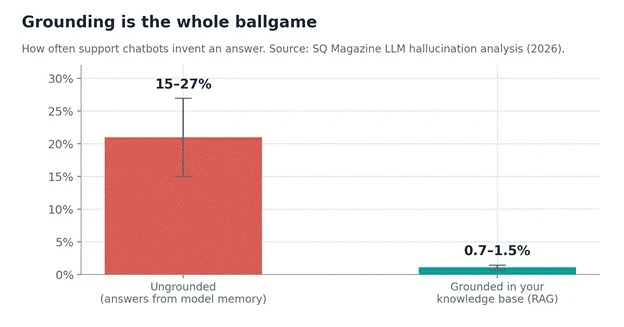
Figure 3. Grounding a chatbot in your own verified content cuts fabricated answers from roughly one in five to under one in fifty.
The fastest way to sink an AI rollout is a platform migration you did not need. If you already live in Zendesk, the path of least resistance is Zendesk's AI. If you run Intercom, start with Fin. That is not because those are objectively the best tools, it is because tool-stack migrations tank most deployments.
Check native integrations with your CRM, knowledge base, ticketing, and every channel you support (chat, email, WhatsApp, voice). A bot that cannot see order data or account context is just a search box with a personality.
Four pricing structures dominate, and each creates very different incentives:
• Per resolution. You pay only when the bot fully resolves a ticket. Intercom Fin is about $0.99 per resolution, Zendesk is $1.50 committed or $2.00 pay-as-you-go. The twist: as the bot improves, your bill grows. Going from 25 to 75 percent resolution roughly triples the cost on the same volume.
• Per seat. A flat monthly fee per human agent (Zendesk seats run about $19 to $115, Freshdesk about $15 to $79), with AI often layered on as an add-on (Zendesk Advanced AI is roughly $50 per agent per month).
• Flat or bundled. AI included at a fixed price no matter the volume (LiveAgent bundles its chatbot this way). Predictable, which finance loves.
• Enterprise contracts. Autonomous platforms like Decagon or Sierra run $95,000 to $150,000 or more per year.
Model it on your actual volume. At 2,000 monthly resolutions, per-resolution pricing alone can approach $2,000 a month before seat fees. Then look at the payoff side. AI resolves a contact for about $0.62 on average (chat as low as $0.41, voice around $1.18) versus roughly $7.40 for a human agent.
First-year ROI across programs averages around 340 percent, with cost savings near 30 percent typical and 53 percent in the top quartile. The spread between average and great is execution, not the logo on the invoice.
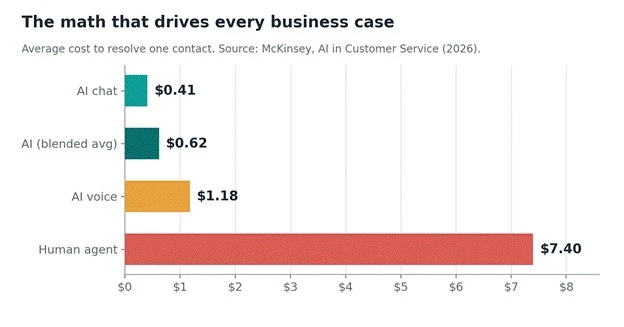
Figure 4. Cost to resolve one contact. The 10x-plus gap versus a human agent is the entire business case, which is exactly why vendors want to meter it.
Almost all of AI's satisfaction gap lives in the handoff. Pure-AI handling scores about 4.1 out of 5 versus 4.3 for humans, but clean hybrid escalation narrows that gap to 0.05 points. So the escalation path is not a nice-to-have, it is where satisfaction is won or lost. Test it live: does the bot recognise frustration and hand off quickly?
Does the human receive the full conversation summary, or does the customer have to repeat everything? Re-contact rates are already higher on AI-resolved tickets (11.3 percent versus 8.7 percent for humans), so sloppy handoffs compound fast.
If you operate in finance, healthcare, or anywhere with regulated data, this is a gating item, not a footnote. Ask for SOC 2 and GDPR compliance, PII redaction, clear data-retention controls, and a straight answer on whether your conversations are used to train the vendor's models.
The EU AI Act adds obligations for how automated systems interact with people, so make sure the vendor can speak to it specifically. "We are working on it" is a no.
Vendor demos are theatre. Your tickets are truth. Install two shortlisted tools in parallel on different channels or customer segments, feed them the same real knowledge base, and compare after 30 days on the metrics you set in Step 2: resolution rate, CSAT, escalation rate, and cost per resolution.
Budget a week or two upfront just to clean up your knowledge base, because a bot is only ever as good as the content behind it. The difference between a 3.5x and an 8x return usually comes down to that unglamorous cleanup, not the model.
These are not endorsements, and the right pick depends entirely on your stack and volume. Think of this as a shortlist of where each option tends to fit, with the trade-offs stated plainly.
| Tool | Pricing model | Typical cost (2026) | Best fit / trade-off |
| Intercom Fin | Per resolution | ~$0.99 / resolution + seats | Product-led teams where support lives in-app. Strong autonomous resolution; bill gets unpredictable at scale. |
| Zendesk AI | Per seat + AI add-on | $19-$115 / seat; AI ~$50 / agent or $1.50-$2 / resolution | Default if you already run Zendesk. Huge integrations; leans toward assisting agents over resolving. |
| Gorgias | Per AI interaction | ~$0.90-$1.00 / interaction | Ecommerce support (Shopify-centric). Watch the interaction-based billing. |
| Freshdesk | Per seat | ~$15-$79 / agent / month | Budget-friendly for smaller, support-only teams. Lighter autonomous resolution. |
| Tidio / Chatbase | Flat / low-cost tiers | Free tier; Chatbase ~$40 / month | Cheapest way for SMBs to launch a bot trained on their docs. Fewer enterprise controls. |
| Decagon / Sierra | Enterprise contract | ~$95k-$150k+ / year | High-volume autonomous resolution. Six-figure commitment and heavier setup. |
Prices are indicative public list figures as of mid-2026 and change often. Always confirm current pricing and model your own volume before committing.
A data-driven guide owes you the failure modes as clearly as the wins. Keep humans firmly in the loop on these:
• Emotionally complex or high-stakes tickets. Accuracy drops to around 61 percent, and complaint handling is the lowest-performing tier of all (AI CSAT about 3.34 out of 5). Route these to people.
• The trust gap. About 84 percent of users still believe humans are more accurate, and 64 percent wish companies would drop AI in support. Label the bot clearly and keep a human one click away.
• Containment obsession. Optimising only for deflection tanks satisfaction. If the system marks a problem "handled" while the customer is stuck in a loop, you are training people to distrust the channel for anything that matters.
Before you sign anything, confirm you can answer yes to each: ✓ You know your top 10 ticket types and their monthly volume. ✓ You have written success metrics: containment, true resolution, AI CSAT, cost per resolution. ✓ Every AI answer is grounded in a knowledge base you control, with visible sources. ✓ The tool integrates natively with your current helpdesk, CRM, and channels. ✓ You have modeled the real bill at your actual volume and resolution rate. ✓ Escalation is fast, and the human agent inherits full context automatically. ✓ Security is documented: SOC 2, GDPR, PII redaction, no silent model training on your data. ✓ You have a 30-day, two-tool bake-off planned on your own tickets. |
The teams winning with AI support in 2026 are not the ones with the flashiest model. They are the ones who scoped tightly to the right tickets, grounded the bot ruthlessly in their own content, priced it honestly against real volume, and made the human handoff feel invisible. Do those four things and the reported 3.5x-to-8x return starts tilting your way. Skip them, and you become one more line in the statistic about customers who wish you had not bothered.
Bottom line: choose for resolution, not for demo dazzle. Run the bake-off. Let your own tickets, not a sales engineer, make the final call.
Share your thoughts about this article.
Be the first to post a comment!
Software rarely gets removed. It accumulates. A team hits a snag, someone finds...
Deepak Mehra1 month ago
⚑ The short versionAn AI detector returns a probability, not a verdict. Th...
Sakshi Dhingra1 month ago
Picture the last time you called a business after hours. You already know the so...
Pritam Singh1 month ago
Cancelling a ChatGPT subscription takes less than two minutes, once you know whe...
Harpreet Singh1 month ago

AI assistants stopped being optional somewhere in the last two years. Four in fi...
Harpreet Singh2 months ago
Buying an AI tool after reading one polished review can be risky. Some reviews r...
Michael Hicklen3 months ago