Quick answer Blackbox AI is an AI coding assistant used for generating code, debugging errors, writing unit tests, explaining unfamiliar code, converting designs and screenshots into working front-end code, and running autonomous coding agents that handle multi-step tasks like refactors and documentation. It works inside 35+ IDEs (VS Code, JetBrains, its own IDE), a CLI, mobile apps, and the browser. There's a genuinely usable free tier, and paid plans start at $10/month. |
If you've seen Blackbox AI popping up in your VS Code extension recommendations or all over developer Twitter and wondered whether it's worth your time, this guide is for you. I'll walk through exactly what people use it for day to day, what it costs, where it shines, where it falls flat, and how it stacks up against GitHub Copilot and Cursor. No fluff, just what you'd want to know before installing it.
Blackbox AI is an AI-powered coding platform built for software developers. It started life in 2019 as a code search tool from a San Francisco company founded by the Rizk brothers, and it has since grown into a full development assistant that writes, edits, explains, and debugs code.
Two numbers tell you how far it's come. The company reported roughly $31.7 million in revenue for 2025 without raising outside venture funding, and it claims a user base of over 30 million developers, including teams at Fortune 500 companies. The more conservative, verifiable signal is its VS Code extension, which shows install counts in the millions (reported figures range from about 2.5 to 4.8 million depending on the listing and date you check). Either way: this isn't a niche tool anymore.
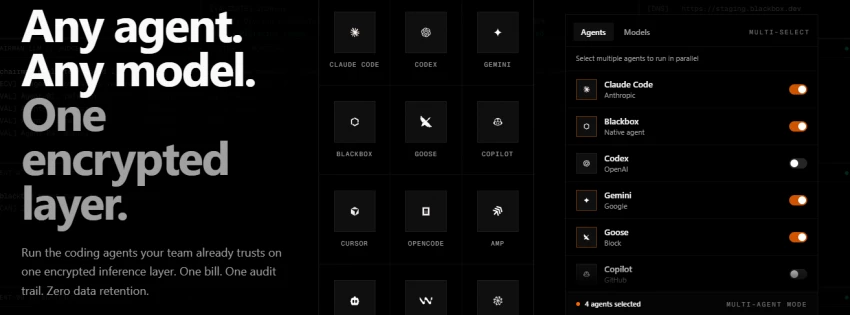
One thing that sets it apart in 2026 is its multi-agent "Chairman LLM" architecture. Instead of relying on a single AI model, Blackbox can dispatch the same coding task to several frontier models at once, including Claude, OpenAI's Codex, Gemini, and its own in-house models, then have a supervising model pick the strongest output. You also get access to 300+ AI models under one subscription, which is unusual at its price point.
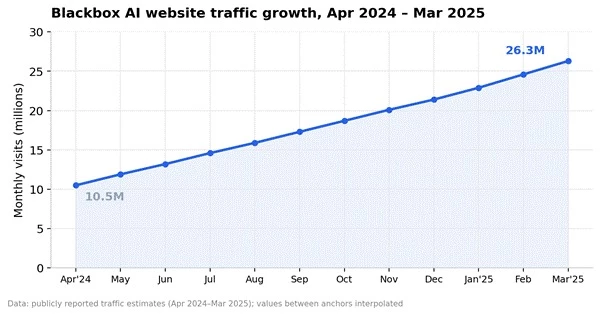
Figure 1: Blackbox AI's website traffic grew from 10.5M to 26.3M monthly visits in a single year, a reported 461% year-over-year jump.
Don't confuse the two "black box AI" meanings "Black box AI" is also a research term for any machine-learning system whose internal reasoning can't be directly inspected. That's completely unrelated to the product. This article is about Blackbox AI the coding assistant (blackbox.ai). |
Let's get into the actual jobs developers hire this tool for. I've ordered these roughly by how often they show up in hands-on reviews and user feedback.
This is the bread and butter. You describe what you need in plain English ("build a React dashboard with authentication") or just start typing, and Blackbox suggests completions inline. It supports 20+ programming languages, and because it can index your whole repository rather than just the open file, its suggestions tend to fit your existing patterns instead of generic boilerplate. Users report the biggest wins on repetitive code: vendor and user-reported figures cite around a 55% average efficiency boost on routine tasks.
Debugging is one of the strongest practical reasons to use Blackbox AI.
You can give it:
| Debugging input | What Blackbox can do |
| Error message | Explain what the message means |
| Stack trace | Trace the likely source of the failure |
| Broken function | Identify logical or syntax errors |
| Screenshot | Read visible errors and suggest a fix |
| Repository context | Find related files that may be causing the issue |
| Failed test | Explain why the expected and actual results differ |
The platform’s VS Code and CLI documentation specifically includes compilation errors, runtime errors, code review, security analysis, and automated debugging among its supported workflows.
The important limitation is that an AI-generated fix still needs review. Blackbox’s own terms state that generated results are not guaranteed to be accurate, complete, or suitable for a particular purpose.
Inherited a messy codebase? Highlight a function and ask what it does. This is huge for junior developers, for anyone onboarding onto a new project, and honestly for anyone reading their own code from six months ago. The chat remembers past interactions in a session, so you can dig progressively deeper instead of re-explaining context every time.
Test coverage is the classic "important but nobody wants to do it" job, which makes it perfect AI territory. Blackbox generates unit tests for existing functions, and its agents can run test-writing as a background task across multiple files while you keep working.
Blackbox can draft:
| Documentation type | Typical use |
| Docstrings | Explain functions and parameters |
| README files | Describe installation and project usage |
| API documentation | Document endpoints, inputs, and responses |
| Code comments | Explain difficult logic |
| Setup instructions | Help new developers run the project |
| Change summaries | Explain what was modified during a refactor |
This can save time when maintaining older applications with incomplete documentation. However, documentation should be generated after confirming the code’s actual behaviour, not merely from what the function name suggests.
This one genuinely surprises people. Feed it a Figma design, a wireframe, or a plain screenshot of a UI, and it generates the corresponding front-end components (Tailwind, React, and so on). Front-end developers who regularly convert mockups to code cite image-to-code as a headline reason to pick Blackbox over competitors. It also works in reverse for debugging: teammates can share a screenshot of an error and it will read it.
Because it handles code conversion between languages and can refactor across an entire repository, teams use it to migrate and clean up legacy systems. Its proprietary model is trained on a claimed 2+ trillion lines of code covering 80+ languages, including older ones like COBOL, which is exactly what you want when the codebase predates half your team.
This is where things get properly 2026. Blackbox's agents (the CLI calls this agentic mode; the company has also shipped multi-agent "k-agents" support since February 2026) can take a multi-step task, like "refactor this module, update the tests, and regenerate the docs," and execute it end to end, even running steps in parallel.
The CLI supports a non-interactive mode for CI/CD automation and, yes, voice commands via an ElevenLabs integration. A structured project-management layer called Conductor keeps longer agent runs organized.
Finally, a lot of developers use Blackbox simply as the cheapest way to access many frontier models in one place. Instead of paying separately for multiple AI subscriptions, you get Claude-class, GPT-class, Gemini, DeepSeek, and hundreds of other models behind a single $10/month interface, with the Chairman system routing tasks to whichever model performs best.
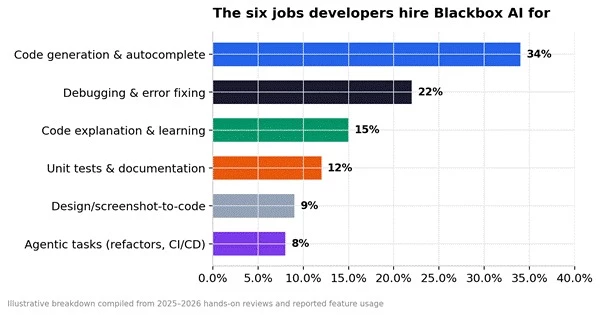
Figure 2: How Blackbox AI usage typically breaks down across workflows, compiled from 2025–2026 hands-on reviews.
The easiest starting point for most developers is the VS Code extension.
Open VS Code and press Ctrl + Shift + X to open Extensions. Search for BLACKBOX AI, confirm that you are installing the official extension, and select Install.
After installation, open the Blackbox AI agent icon in the editor and connect your account. The official setup guide says the agent becomes available for both creating new projects and improving existing ones once the account is connected.
Next, open the project you want to work on. Give the agent enough context by selecting the relevant code or attaching the required files, folders, Git commit, project, screenshot, or web documentation.
A weak request would be:
Fix my code.
A more useful request would be:
The login form returns a blank page after incorrect credentials. Review LoginController.php, the authentication middleware, and the Blade form. Identify the root cause, explain it, and propose the smallest safe fix. Do not change unrelated files.
Blackbox recommends selecting relevant code, adding sufficient context, writing specific instructions, and treating the first response as a starting point that can be refined.
Before allowing the agent to edit files or execute commands, choose between Manual and Auto mode carefully. Manual mode requires approval for tool operations, while Auto mode can be configured to approve actions such as reading files, editing files, creating files, or executing commands.
Finally, inspect the generated diff and run the project’s formatter, linter, tests, type checker, and security checks before merging or deploying anything.
A reliable Blackbox prompt contains five parts:
| Prompt element | Example |
| Context | “This is a Laravel 12 application using MySQL.” |
| Problem | “Duplicate client records are being created.” |
| Relevant files | “Review the controller, request class, and client model.” |
| Constraints | “Do not change the database schema.” |
| Expected result | “Explain the cause, patch it, and add a regression test.” |
This format gives the agent a measurable task rather than asking it to guess what “better” means.
Blackbox also provides a terminal-based coding agent.
On Linux or macOS, the official installation command is:
curl -fsSL https://blackbox.ai/install.sh | bash
On Windows PowerShell, it is:
iex (irm https://blackbox.ai/install.ps1)
After installation, configure the CLI:
blackbox configure
Then start a session:
blackbox
You can ask it to analyse the current project, generate files, fix a bug, run tests, or create a new application. The CLI can read the project files it needs, so each file does not have to be attached manually.
Windows users should note that native PowerShell currently supports a more limited selection of CLI agents. Blackbox’s documentation says WSL is required to unlock agents such as Codex, Gemini, Goose, OpenCode, and Qwen, while Blackbox and Claude are available natively.
| Platform | Practical use |
| Web app | Chat, code generation, model access, and general assistance |
| VS Code | Inline assistance, project context, editing, agents, and debugging |
| Blackbox IDE | Standalone AI-focused development environment |
| CLI | Terminal-based coding, automation, and multi-agent work |
| Other IDEs | Coding-agent access across supported development environments |
| Mobile apps | Chat, monitor agents, review work, and manage tasks remotely |
| API | Add supported models and agent workflows to other applications |
The mobile application supports iOS and Android access, including AI chat, agent monitoring, pull-request review, and deployment management.
One of Blackbox AI's biggest differentiators is surface area. As of 2026, no other mainstream AI coding assistant covers this many environments with one account:
| Surface | What you get |
| VS Code extension | The most common entry point. Inline autocomplete, chat, multi-file edits, @mention agents. Millions of installs. |
| JetBrains IDEs | Full plugins for IntelliJ, PyCharm, WebStorm, GoLand, PhpStorm, and the rest of the family. |
| Blackbox IDE | A standalone, AI-native development environment. |
| CLI | Terminal agent with Conductor project management, voice commands, and CI/CD-friendly non-interactive mode. |
| Mobile apps | Dedicated iOS and Android apps — rare in this category. |
| Browser & web app | Chrome extension for grabbing code from GitHub, Stack Overflow, and YouTube, plus the main web workspace. |
| API | Unified inference API with managed keys for building on top of the platform. |
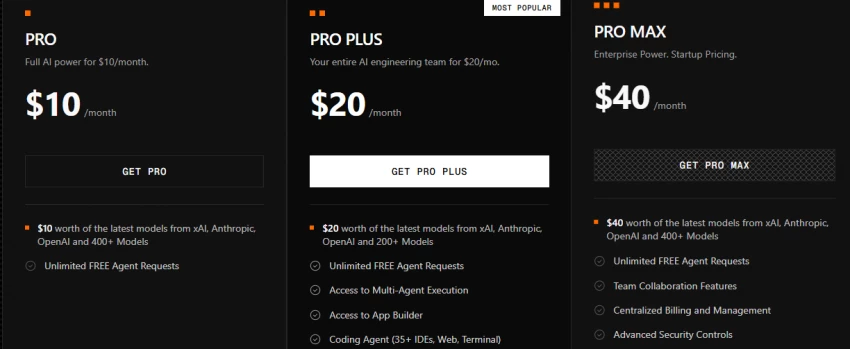
Pricing was overhauled in 2026 into a flat, credit-based structure, which killed off the confusing intro-then-regular pricing that drove most of its historical billing complaints. Here's the current lineup:
| Plan | Price / month | Included credits | Best for |
| Free | $0 | Daily usage caps | Students, casual coding, evaluating the tool |
| Pro | $10 | $20 in credits | Most working developers, unlocks premium models and agents |
| Pro Plus | $20 | $40 in credits | Heavy daily users |
| Pro Max | $40 | $80 in credits | Power users running long agent sessions |
| Enterprise | Custom | Custom | Teams needing volume pricing and contracts |
Annual billing knocks roughly 20% off every paid tier. Note that each paid tier includes credits worth double the sticker price, and premium model usage draws down those credits, so heavy Chairman multi-agent runs can burn through them faster than you'd expect. That's the most common complaint from paying users.
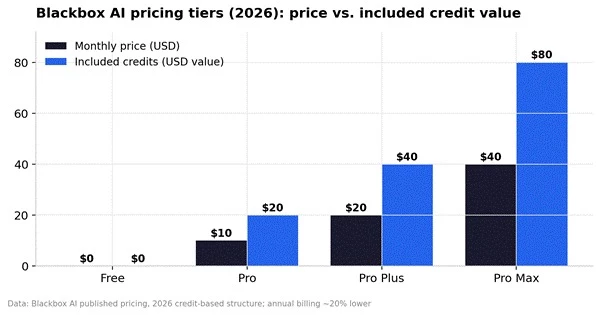
Figure 3: Every paid tier includes credit value worth 2x its monthly price, though premium model calls consume credits at different rates.
Yes, there's a permanently free tier: basic chat and standard code completion in the VS Code extension, no credit card required. Where you hit the wall is premium features. Image-to-code, the newest frontier models, the Chairman multi-agent workflow, and autonomous agents all sit behind the Pro plan. One more thing worth knowing: on the free tier, your data may be used (anonymized) to improve the model, while paid tiers advertise stricter data retention policies. If you're writing commercial code, that difference matters.
The three-way comparison everyone actually wants. The honest summary from across 2026 reviews:
| Blackbox AI | GitHub Copilot | Cursor | |
| Starting paid price | $10/mo | $10/mo | $20/mo |
| Model access | 300+ models, multi-agent Chairman | OpenAI + Anthropic models | Frontier models, single-task focus |
| Works in your IDE | 35+ IDEs + own IDE, CLI, mobile | VS Code, JetBrains, more | Requires switching to Cursor IDE |
| Standout strength | Multi-model value, image-to-code, platform breadth | Safest default in the GitHub ecosystem | Most polished IDE-native experience |
| Pick it if | You want maximum flexibility per dollar | You live in Microsoft/GitHub tooling | You'll switch editors for the best UX |
If I only told you the good parts, this wouldn't be much of a guide. Here's what reviewers and users consistently flag:
• No offline mode. It's fully cloud-dependent. Connection drops mean you're coding solo again.
• Credit burn. Premium model calls and long agent sessions can eat your monthly credits faster than expected.
• Opaque model routing. The Chairman system doesn't always tell you which model produced your answer or why, which frustrates developers who want predictable behavior.
• Support and billing complaints. Historical reviews cite slow customer support and billing friction. The 2026 pricing overhaul addressed the worst of it, but support response times remain inconsistent.
• It still needs a competent human. It writes skeletons and logic well, but complex applications need architectural oversight, and generated code should be reviewed before production. Every serious reviewer says the same thing.
Blackbox AI may stop working because of an expired login session, insufficient credits, a model-provider failure, a rate limit, an outdated extension, an invalid API key, a network restriction, or an overly large request.
The correct solution depends on what you see.
| Problem or message | Likely cause | Solution |
| Blackbox keeps asking you to log in | Expired account or OAuth session | Sign out completely, restart the editor or browser, and sign in again |
| Extension icon does not appear | Extension is disabled, outdated, or failed to load | Enable the extension, update VS Code, run Developer: Reload Window, or reinstall the extension |
| Chat opens but produces no response | Network, browser extension, proxy, or provider issue | Test another network, disable conflicting privacy extensions temporarily, and try a different model |
| “Insufficient credits” or error 402 | Account allowance has been used | Check usage, add credits, change plan, or wait for the allowance to reset |
| Error 401 | Invalid API key, disabled key, or expired authentication | Create or copy a valid key, update the configuration, and sign in again |
| Error 403 | The selected model’s moderation system blocked the input | Remove unnecessary sensitive content and rewrite the request more clearly |
| Error 408 | The request timed out | Divide the job into smaller steps and attach only the files needed for the current task |
| Error 429 | Too many requests were sent | Pause repeated requests, reduce parallel agents, or retry later |
| Error 502 | The chosen model is down or returned an invalid response | Switch to another model and retry the same task |
| Error 503 | No suitable provider is currently available | Relax model-routing requirements, choose another model, or retry later |
| CLI command is not found | Installation path was not loaded or setup failed | Open a new terminal, verify installation, reinstall the CLI, and confirm that the command is in PATH |
| Some CLI agents are missing on Windows | Native Windows support is limited for those agents | Use WSL for Codex, Gemini, Goose, OpenCode, or Qwen |
| Screenshot or image request fails | Unsupported, corrupted, or inaccessible image data | Re-export the image as a valid PNG or JPEG and upload it again |
| Agent keeps changing the wrong files | The task lacks context or boundaries | Name the exact files, desired behaviour, and files that must not be changed |
Blackbox’s official API documentation confirms error codes for bad requests, expired credentials, insufficient credits, moderation blocks, timeouts, rate limits, unavailable models, and unavailable providers.
Start by testing Blackbox in a fresh browser session. If the web version works but the editor does not, the problem is probably related to the extension, editor session, or local network configuration.
Next, sign out and sign back in. Reload the editor and update both VS Code and the Blackbox extension.
Try a different model. A 502 or 503 error can be limited to the selected model or provider rather than the entire Blackbox platform.
Reduce the size of the task. Instead of asking the agent to review an entire repository, provide the error, expected behaviour, and two or three relevant files.
Check account usage and API credentials. For API requests, Blackbox requires a valid key in the authorisation header, and requests without a valid key will fail.
For CLI problems, run:
Then restart the session. The CLI supports configuration and manual update commands specifically for diagnosing setup and version problems.
Based on everything above, here's the honest fit assessment:
| Great fit | Look elsewhere |
| Developers who want access to many frontier models for $10/month | Anyone needing offline or local-first AI coding |
| Front-end devs converting Figma designs and screenshots to code | Teams that need transparent, predictable single-model behavior |
| Teams modernizing legacy codebases (old languages included) | Developers fully invested in GitHub ecosystem perks |
| Students and learners using the free tier for coursework | Anyone unwilling to review AI-generated code before shipping |
| JetBrains users who want agentic AI without changing IDEs | Non-technical users expecting a full app with zero coding oversight |
For everyday coding, yes, with the usual caveats. It's a legitimate San Francisco company with millions of users and Fortune 500 customers. The two things to check: review generated code before production (true of every AI assistant), and read the data policy for your tier, since free-tier usage may contribute anonymized data to model training while paid tiers advertise stricter retention.
No. It relies on cloud models and there's no offline mode as of 2026. It caches recent snippets to survive brief connection drops, but that's it.
It can scaffold modules, write the logic, generate the tests, and draft the docs. Complex, production-grade applications still need a human making the architectural calls.
Different jobs. ChatGPT is a general-purpose assistant; Blackbox lives inside your IDE, reads your whole repository, and runs coding agents. For actual day-to-day development work inside an editor, a code-specialized tool wins on workflow alone.
Blackbox AI is used for pretty much every stage of writing software: generating and completing code, debugging, testing, documenting, converting designs to code, modernizing legacy systems, and running autonomous agents that do multi-step work while you focus elsewhere. Its pitch in 2026 is breadth and value: more models, more IDEs, and more surfaces than any competitor, starting free and topping out cheaper than most rivals' entry plans.
The smart way to try it: install the free VS Code extension, use it for a week on real work, and only upgrade to Pro ($10/month) if the workflow sticks. At that price, it's one of the lowest-risk experiments in your dev stack.
Share your thoughts about this article.
Be the first to post a comment!

The same tool can be a 4.7 on one site and a 3.9 on another. Here is what is rea...
Nitin1 month ago

Here is the number worth pinning above your budget: in Gartner Digital Markets r...
Deepak Mehra1 month ago

What Artlist AI is in 2026Artlist began as a royalty-free music library. By 2026...
Deepak Mehra2 months ago

Most AI tool failures do not announce themselves. There is no crash, no angry em...
Nitin2 months ago

The best AI image generator in 2026 is Nano Banana 2 for speed, FLUX.2 for photo...
Parveen Verma2 months ago

“Useful” is a slippery word for a coding assistant. A tool can be brilliant at o...
Sakshi Dhingra2 months ago