Creating presentations used to be a tedious and time-consuming task for me. Whether I was designing slides from scratch, tweaking templates, or trying to make my presentations stand out, the process often felt more exhausting than rewarding. That’s when I came across SlidesGo and Gamma AI, two tools promising to speed up and simplify the process using AI.
After using both tools extensively for weeks, I’ve compiled a detailed, hands-on comparison based on my own experiences. These tools serve the same purpose, to create impressive presentations faster, but they cater to different needs. In this article, I'll break down each tool’s strengths and weaknesses in terms of design, speed, customization, support, and much more.
Quick Verdict: Which One Should You Choose?
After hours of creating presentations using both tools, I’ve arrived at this conclusion:
Category
Winner
Reason
Best for fast AI deck creation
Gamma AI
Creates full presentation drafts quickly from prompts
Best for templates
Slidesgo
Larger library of PowerPoint and Google Slides templates
Best for students
Slidesgo
Easier for classroom-style and academic presentations
Best for business decks
Gamma AI
Better for pitch decks, proposals, reports, and web-style decks
Best for design control
Slidesgo
More traditional editing control
Best for non-designers
Gamma AI
AI handles structure, layout, and visual flow
Best for PowerPoint users
Slidesgo
More natural PPT/Google Slides workflow
Overall winner
Gamma AI
Better if the user wants AI to build the presentation faster
If you want ready-made templates that you can edit in PowerPoint or Google Slides, Slidesgo is the safer choice. If you want AI to generate the structure, content, and design of a presentation from a prompt, Gamma AI feels more useful for modern workflows.
How I Compared Slidesgo and Gamma AI
To make this comparison practical, I did not judge Slidesgo and Gamma AI only by their feature lists. I compared both tools from the point of view of someone who actually needs to create a presentation quickly, edit it without confusion, and use the final deck for real work.
I looked at how each tool handles the complete presentation workflow, from the first idea to the final output. That includes how easy it is to start, how much help the AI provides, how polished the slides look, how much manual editing is needed, and whether the final presentation is better suited for students, teachers, marketers, founders, or business teams.
Testing Area
What I Checked
AI deck creation
Whether the tool can create a complete presentation from a simple prompt
Ease of use
How quickly a beginner can start and understand the workflow
Design quality
Whether the final slides look clean, modern, and presentation-ready
Template strength
How useful the ready-made templates are for different use cases
Editing control
How easily users can change text, layout, colors, images, and slide structure
Content quality
Whether the generated content feels useful or needs heavy rewriting
Export options
Whether the presentation can be downloaded or moved into PowerPoint, PDF, or Google Slides
Best use cases
Which tool works better for education, business, marketing, pitch decks, and reports
Pricing value
Whether the free and paid plans offer enough value for the target user
For a fair comparison, I also looked at both tools as different types of products. Slidesgo is mainly a template-first presentation platform with AI features, while Gamma AI is an AI-first presentation builder. That difference matters because Slidesgo is stronger when you already have content and want a good-looking template, while Gamma AI is more useful when you want the tool to help create the structure, content, and design from scratch.
Feature Comparison
Feature
SlidesGo
Gamma AI
AI‑Generated Slides
Basic generation (needs editing)
Full deck generation (polished)
Templates
Thousands of pre‑designed templates
No templates — AI generates everything
Design Quality
Customizable with manual tweaks
Highly polished AI‑generated designs
Collaboration
No real‑time collaboration
Real‑time collaboration
Export Options
Google Slides, PPTX
PPTX, PDF, Google Slides, Live link
Free Plan
Limited slides per month
Limited free access, but more generous
Paid Plan
Premium subscription unlocks all features
Various tiers with advanced features and branding
Design and Aesthetics: Which Tool Provides the Best Visual Appeal?
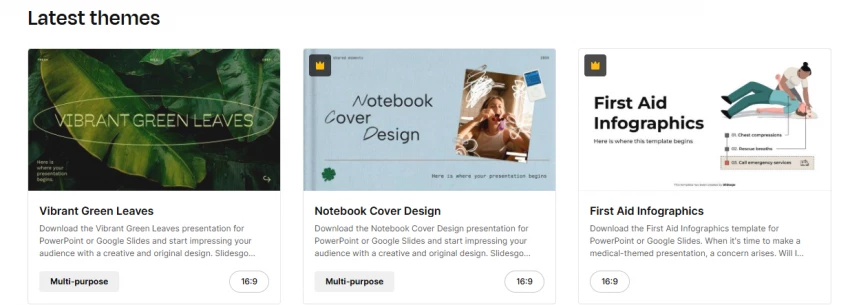
If you're someone who loves beautifully crafted templates to kickstart your presentations, SlidesGo is a great choice. This platform offers a massive library of pre-designed templates tailored for a variety of needs, from minimalist business decks to bright, colorful education templates. The templates look polished right out of the box, but what I love most is the flexibility in how you can customize them.
My Takeaway: I found the design variety offered by SlidesGo to be one of its standout features. You’re never stuck with a generic template. Whether I was working on a professional presentation or a more creative one, there was always something that fit my style perfectly.
On the other hand, Gamma AI approaches presentation design with a modern, clean aesthetic that’s generated automatically based on the content you input. The slides are AI-designed, ensuring that every deck is both visually appealing and cohesive. The best part? The AI suggests layouts, fonts, and visuals that match the tone of your presentation. It's like having a designer behind the scenes, creating polished slides for you within minutes.
My Takeaway: Gamma AI is ideal if you’re looking for a sleek, polished design without spending time tweaking each slide. It provides a futuristic look that makes your presentations stand out with little effort on your part.
Design Factor
Slidesgo
Gamma AI
Template variety
Strong
Moderate
Modern AI layouts
Limited
Strong
Manual control
Strong
Moderate
Business polish
Good
Strong
Classroom designs
Strong
Good
Visual consistency
Depends on template
Usually consistent
AI Generation Test: Which Tool Builds a Deck Faster?
Test Prompt
Slidesgo Result
Gamma AI Result
Winner
“Create a 10-slide startup pitch deck for an AI productivity app”
Gave template-based support, required manual content work
Created a full structured deck draft
Gamma AI
“Create a classroom presentation on climate change”
Strong education-style templates
Good AI structure but less classroom-focused
Slidesgo
“Create a marketing proposal for a SaaS company”
Needed more manual editing
Created a more useful first draft
Gamma AI
Customization Options: Can You Truly Make It Your Own?
Both platforms offer customization options, but the degree of customization differs.
SlidesGo offers a wide range of editable templates that allow for deep customization. You can adjust fonts, colors, images, and even slide animations, giving you a lot of flexibility. However, the process is more manual, so if you want to make a presentation truly unique, you need to invest time.
Gamma AI, on the other hand, generates full slides automatically based on the content you provide. While it’s incredibly fast and efficient, the level of customization is a bit more restricted compared to SlidesGo. However, Gamma’s AI-driven design suggestions do allow for minor adjustments to the slides.
My Takeaway: If you prefer full control over every design aspect, SlidesGo is your tool. But if you need quickly generated, polished slides with minimal effort, Gamma AI is the better choice — just don’t expect as much customization.
Export and Compatibility
Export Options: PowerPoint, Google Slides, PDF, and Web Sharing
Add this because many users search for practical compatibility.
Export/Workflow
Slidesgo
Gamma AI
PowerPoint workflow
Strong
Available, but may need cleanup
Google Slides workflow
Strong
Available/export-supported
PDF export
Yes, depending on workflow
Yes
Web sharing
Limited compared with Gamma
Strong
Traditional slide editing
Strong
Moderate
Interactive/web-style presentation
Limited
Strong
Gamma supports exports such as PDF, PPTX, PNG, and Google Slides, but comparison sources note that its card-based format may not always translate perfectly into traditional PowerPoint layouts.
Industry Applications: Which Platform Is Better for Different Sectors?
Each platform serves different industry needs effectively:
SlidesGo: Best suited for educational content, marketing presentations, and creative portfolios. The wide range of aesthetic templates makes it ideal for people in the education sector who want to make learning materials or presentations look professional yet approachable. It’s also great for freelancers, small businesses, and marketers who need eye-catching templates.
Gamma AI: Best for corporate professionals, consultants, sales teams, and anyone who needs business‑ready, polished pitch decks or client presentations. The speed of Gamma AI’s full deck creation makes it perfect for busy professionals who need to impress clients quickly. It also excels at interactive presentations, making it a great choice for product demos and startup pitches.
My Takeaway: SlidesGo works best for creatives and educators, while Gamma AI is better for corporate users and business professionals who want polished, quick presentations for meetings, pitches, or proposals.
Customer Support and Resources: How Easy Is It to Get Help?
When it comes to customer support, both platforms have their strengths:
SlidesGo: Offers a help center with FAQs and some guides, but it’s not as extensive as other platforms. Email support is available if you run into issues, though response times can vary.
Gamma AI: Provides live chat support and an extensive knowledge base with tutorials and tips to help users navigate the platform. Their customer service is generally quick and responsive, especially if you need help with AI-generated slides or customization features.
My Takeaway: For quick support and guides, Gamma AI stands out with its 24/7 live chat support and more in-depth resources. SlidesGo has some support, but it’s more basic.
Best Use Cases
Which Tool Should You Choose?
User Type
Better Choice
Why
Student
Slidesgo
Better academic templates and Google Slides workflow
Teacher
Slidesgo
More classroom-friendly templates
Startup founder
Gamma AI
Faster pitch deck generation
Marketing team
Gamma AI
Better for proposals and campaign decks
Designer
Slidesgo
More manual control
Non-designer
Gamma AI
AI handles structure and visual flow
Corporate team
Gamma AI
Better for fast internal reports and strategy decks
PowerPoint-heavy user
Slidesgo
More traditional presentation workflow
Slidesgo vs Gamma AI Pricing Comparison
Plan/Factor
Slidesgo
Gamma AI
Free plan
Yes. Free templates and limited AI-generated presentations
Yes. Free plan for basic projects and trying Gamma
Starting paid price
$5.99/month or $35.99/year, shown as $3/month billed annually
Founders, marketers, consultants, teams, and users who want AI-generated decks
Main pricing limitation
Free users may face download or AI-generation limits
Free/Plus users may need higher plans for more credits, branding removal, and advanced features
Overall value winner
Slidesgo for low-cost template access
Gamma AI for AI-first presentation creation
Slidesgo’s official pricing page shows a free plan with 3 AI-generated presentations per month, while Premium unlocks unlimited AI-generated presentations and is listed at $5.99 monthly or $35.99 annually, shown as $3/month when billed annually. Gamma’s official pricing page lists a Free plan, Plus at $9/seat/month, and Pro for premium AI models and advanced features.
User Reviews in Comparison: What Users Are Saying
Quick Comparison
Platform
Trustpilot / Public Ratings
G2 / Professional Review Highlights
SlidesGo
~2.4/5 (mixed)
Variety of templates praised; customization limits and premium barriers criticized
Gamma AI
Mixed at Trustpilot (some negative time‑use feedback)
Polished AI generation and time savings praised; generic content and customization limits noted
SlidesGo: Mixed User Sentiment
Positive feedback:
Users love the wide variety of templates, especially for students and marketers.
It's easy to use, with templates that can be quickly customized.
The free plan is appreciated for quick, low‑effort presentations.
Negative feedback:
Billing issues and slow customer support are common complaints.
The AI features are basic and often need manual tweaking after generation.
Some reviewers complain about limited customization compared to competitors.
Overall: SlidesGo excels at template variety and customization but faces challenges with support and AI limitations.
Gamma AI: Generally Positive with Some Critiques
Positive feedback:
Gamma AI is praised for generating entire presentations in minutes with a clean, modern design.
Speed and AI-driven design save time, especially for business professionals and consultants.
Real‑time collaboration is highly valued by teams working together.
Negative feedback:
Customization options are limited compared to manual design tools.
Some users find the learning curve steep and the AI results a bit too generic.
Overall: Gamma AI is great for business professionals needing quick, polished presentations, but some customization limitations remain.
Pros and Cons
Slidesgo Pros and Cons
Pros
Cons
Large template library
Less AI-native than Gamma
Works well with PowerPoint and Google Slides
Manual editing still required
Good for students and teachers
Not ideal for full AI-generated business decks
Many ready-made visual styles
Can feel template-based
Gamma AI Pros and Cons
Pros
Cons
Creates full decks quickly from prompts
Less traditional slide control
Good for business and startup decks
Export cleanup may be needed
Strong web-sharing experience
AI content can feel generic without editing
Useful for non-designers
Not as template-heavy as Slidesgo
Final Thoughts
After weeks of using both platforms, here's my conclusion:
SlidesGo is ideal for users who want stunning templates and full customization. It’s perfect if you have the time to edit your slides and want total control over your presentation’s design.
Gamma AI is perfect for those who need to generate a polished deck quickly without sacrificing quality. It’s especially suited for corporate professionals, startups, and sales teams who need fast, engaging presentations.
My Final Rating
SlidesGo: 8/10 — Excellent for creative projects and educators but requires more manual input.
Gamma AI: 9.5/10 — Great for business professionals who need polished decks quickly.
Ultimately, Gamma AI wins in terms of speed and design quality, while SlidesGo is perfect if you need more manual customization. My pick? If I’m working on a quick corporate pitch, I’ll go with Gamma AI. If I’m designing a creative project or educational deck, SlidesGo will be my tool of choice.